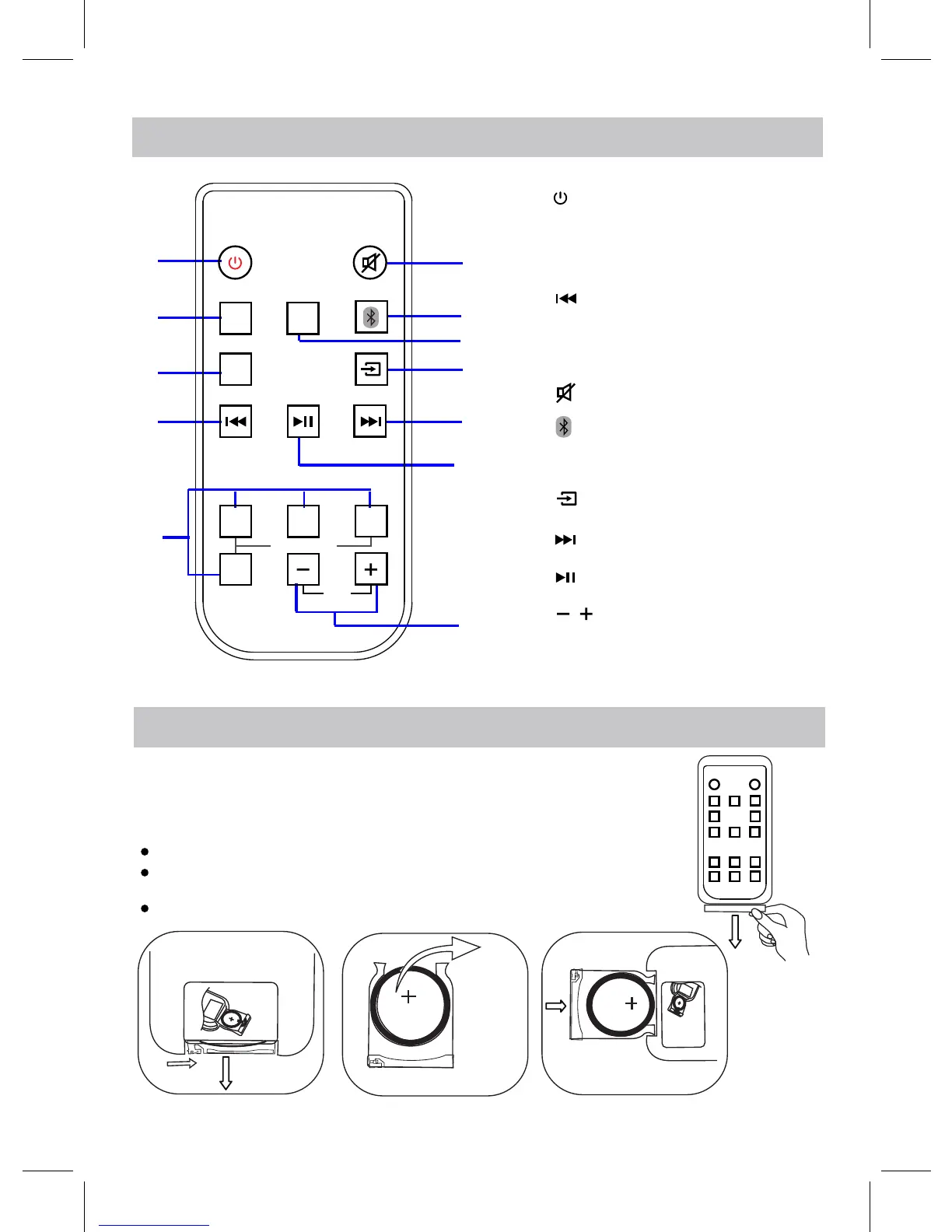
Fig.1
Fig.2
Fig.3
Remove and discard the insulation film as Fig.1.
1
2
3
4
5
6
7
8
9
10
11
1. (Power On/Off) Button
2. AUX Button
3. LINE IN Button
4. (Previous) Button
6. (Mute) Button
10. (Next) Button
11. Play/Pause Button
12. (Volume Up/Down)Button
9. (Mode Switch) Button
O
P
E
N
O
PE
N
3V CR2025
3V CR2025
with the polarity markings facing upward as Fig.3.
Fig.4
AUX
OPTICAL
LINE
IN
TALK MOVIE
MUSIC
Sound Mode
VOL
STANDARD
12
7. (Bluetooth)Button
8. OPTICAL Button
5. Sound Mode (MUSIC,
TALK, MOVIE, STANDARD)
REMOTE CONTROL
BATTERY INSTALLATION OF REMOTE CONTROL
BATTERY REPLACING:
USING AT FIRST TIME:
Pull out the battery holder as Fig.2.
Replace the old button cell with a new CR2025 button cell
Push back the battery holder as Fig.4.
9


 To Next Page