4
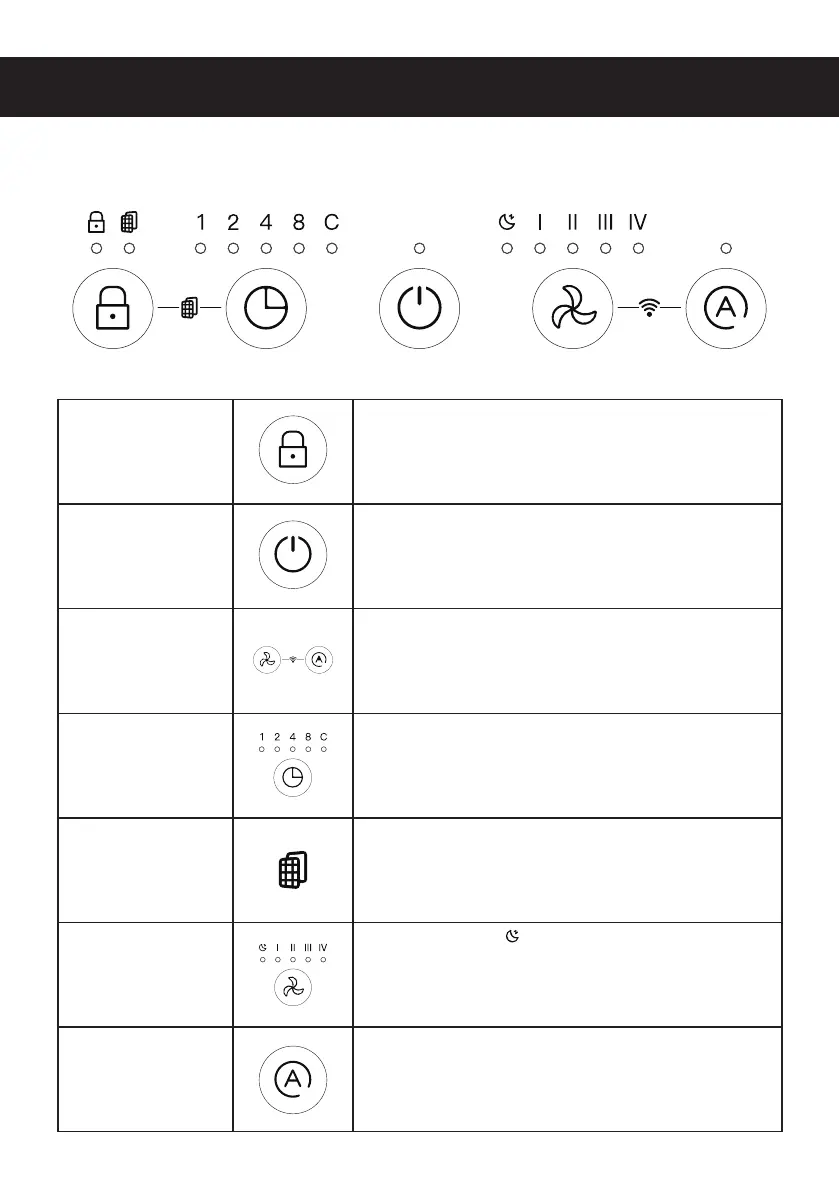
Child Lock
Press and hold the child lock button for 5 seconds to
lock/unlock the machine.
Other buttons will be dysfunctional in "Child Lock" mode.
Power ON/OFF Press to turn unit on/off .
WiFi Control
Long press the "fan speed" & "Auto" buttons at the same
time for 5 seconds to turn on WiFi Indicator.
WiFi indicator will fl ashes slowly while searching.
Timer Mode
Press to set timer at 1, 2, 4,8 hours.
The C light will only appear when the time is set
longer than 8 hours. And this operation can only be done
on App.
Filter Indicator
When fi lter lifetime has run out, the indicator will light up.
(The fi lter life cycle is 3000 hours or 4 months)
Fan Speed
: Hibernate Mode
1 : Speed 1
2 : Speed 2
3 : Speed 3
4 : Speed 4
Auto mode Auto and SMART mode
Description of Control Panel Functions


 To Next Page