Indicator light Common error Solution
Flashing red
Fan error / overheating / the dust
collector’s cover is not closed
properly
1. Collecting dust frequently leads to malfunction of the fan and its overheating
protection. It is recommended to try to collect dust after 30 minutes.
2.Make sure that the dust collector cover is completely closed, securely sealed, and
the robot has been placed on the dust collector to charge, and try to collect dust
once.
Flashing red
The dust bag is not installed / not
installed in place
1. Check whether the dust bag is installed, if not, please install the dust bag.
2. Check if the dust bag is installed correctly and in place.
fl ash
simultaneously
Failed to pair / Haven’t paired yet
1. Press and hold the both buttons
and on the dust collector simultaneously
for 5 seconds: The dust collector goes into pairing mode, the three indicators of
the dust collector fl ash green.
2. Press and hold the button for 5 seconds on the robot: The robot enter the
pairing mode, the indicators of the robot fl ash green.
3. Place the robot on the dust collector to charge, and the voice prompt indicates
the pairing is successful.
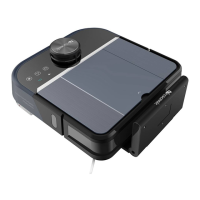
Dust collector unit
This product will prompt you the current product status through the indicator light on the top of the body:


 To Next Page