Need help?
Do you have a question about the ProsKit MT-7615 and is the answer not in the manual?
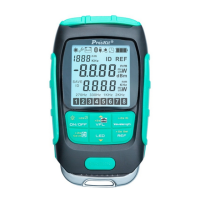
The Pro'sKit MT-7615/MT-7616 is a versatile 4-in-1 fiber optical power multimeter designed for comprehensive testing and maintenance in fiber optic networks. This device integrates an optical power meter (OPM), a visual fault locator (VFL), an LED lighting function, and a cable test module, making it a robust tool for technicians.
The core function of the device is its optical power meter, which accurately measures optical power across a wide wavelength range. It supports multiple wavelengths, allowing for precise measurements in various fiber optic systems. The OPM can display measurements in dB, dBm, mW, uW, and nW, providing flexibility for different applications. A key feature of the OPM is its ability to set a reference value (REF), which is crucial for relative power measurements and loss calculations in fiber links. The device also incorporates a WAVE ID function, which, when used with compatible Pro'sKit light sources, can automatically identify the wavelength being transmitted, simplifying testing procedures.
The integrated visual fault locator (VFL) is essential for identifying breaks, bends, and poor connections in fiber optic cables. It emits a visible laser light into the fiber, allowing technicians to visually pinpoint faults over short distances. The VFL offers different output modes, providing flexibility for various fault detection scenarios.
For network cable testing, the device includes a cable test module. This module, which can be pulled out from the main unit, is designed to test UTP network cables (RJ45, 8P8C) for continuity and sequence. It supports various cable types, including shielded and unshielded Cat-3, Cat-4, Cat-5, and Cat-5E, making it suitable for common Ethernet installations.
An LED lighting function is also built into the device, providing illumination in dark working environments, enhancing usability and safety during field operations.
The device is designed for user-friendly operation with a clear LCD display that shows measurement results, selected wavelengths, and other operational parameters. The backlight feature ensures readability in various lighting conditions.
Power management is intuitive. The device turns on with a short press of the ON/OFF button and features an auto-off function to conserve battery life. The auto-off can be canceled by a long press of the ON/OFF button. The backlight can be toggled on/off with a short press when the device is already on. A long press of the ON/OFF button will power down the device.
For optical power measurement, users can easily switch between different units (dB, dBm, mW, uW, nW) and check the current REF value with a short press of the REF button. A long press of the REF button sets the current measured value as the new reference. Wavelength selection is done via the Wavelength/ID button, and a long press of this button activates the WAVE ID function. The device also supports an offset (self-calibration) setting, allowing users to fine-tune the OPM's accuracy within a range of [-5, +5]. This is accessed by simultaneously long-pressing the ON/OFF and Wavelength/ID buttons, and confirmed with the ON/OFF button.
Data storage is a significant feature, allowing users to save up to 500 sets of OPM values. A long press of the Save button stores the current OPM reading. Saved data can be reviewed by short-pressing the Save button, and pages can be navigated using the VFL and LED buttons. Exiting data storage mode is done by pressing the Save button again.
The VFL output mode can be switched with a short press of the VFL button. The cable test mode is activated by a long press of the VFL button. Once the cable test module is connected and locked, the network test automatically begins when a network cable is connected. The LED lighting function can be toggled on/off with a short press of the LED button.
The device incorporates a charging function and a four-level power indicator to show the remaining battery life (80%-100%, 40%-80%, 20%-40%, less than 20%). It charges via a Micro USB cable (5V/1A adapter) and is recommended to be charged within 24 hours when the power drops below 20%.
Proper maintenance is crucial for the longevity and accuracy of the device. The optical fiber connector adapter should be kept clean and protected from hard objects to prevent damage. The device should be stored in a dry, well-ventilated area to avoid moisture exposure.
For long-term storage, it is recommended to charge the battery every three months to maintain a charge level of 50% to 80%. This helps preserve battery health and prevents deep discharge.
The device is equipped with a rechargeable lithium-ion battery. Users are cautioned against disassembling, opening, or destroying the battery, or exposing it to fire, as this could lead to explosion or release of toxic substances. The device should also be protected from strong shocks or vibrations. Discarded products, including batteries, should be disposed of according to local laws and regulations.
To prevent condensation, which can form within the device due to sudden temperature changes, it is advised to avoid using the device immediately after moving it from a cold to a warm environment or rapidly increasing room temperature.
Troubleshooting guidelines are provided for common issues:
These maintenance practices ensure the device remains reliable and accurate over its lifespan.
 General
| Type | Digital Multimeter |
|---|---|
| Diode Test | Yes |
| Continuity Test | Yes |
| Auto Range | Yes |
| Data Hold | Yes |
| Backlight | Yes |
| Auto Power Off | Yes |
| Continuity Threshold | <50Ω |
| Display | 6000 counts |
| DC Current Range | 600μA to 10A |
| Resistance Range | 600Ω to 60MΩ |
| Display Count | 6000 |
| Duty Cycle | Yes |

 To Next Page