N 93-310-00 Issue 0 Page 3 of 4 © Protec Fire Detection PLC 2012
2.0 VIEWING FIRE / ALARM EVENTS
FIRE SIGNAL
On hearing the ‘FIRE ALARM’ signal :-
a) Evacuate the premises IMMEDIATELY.
b) Send for the fire brigade.
c) DO NOT re-enter the premises until authorised by the fire brigade.
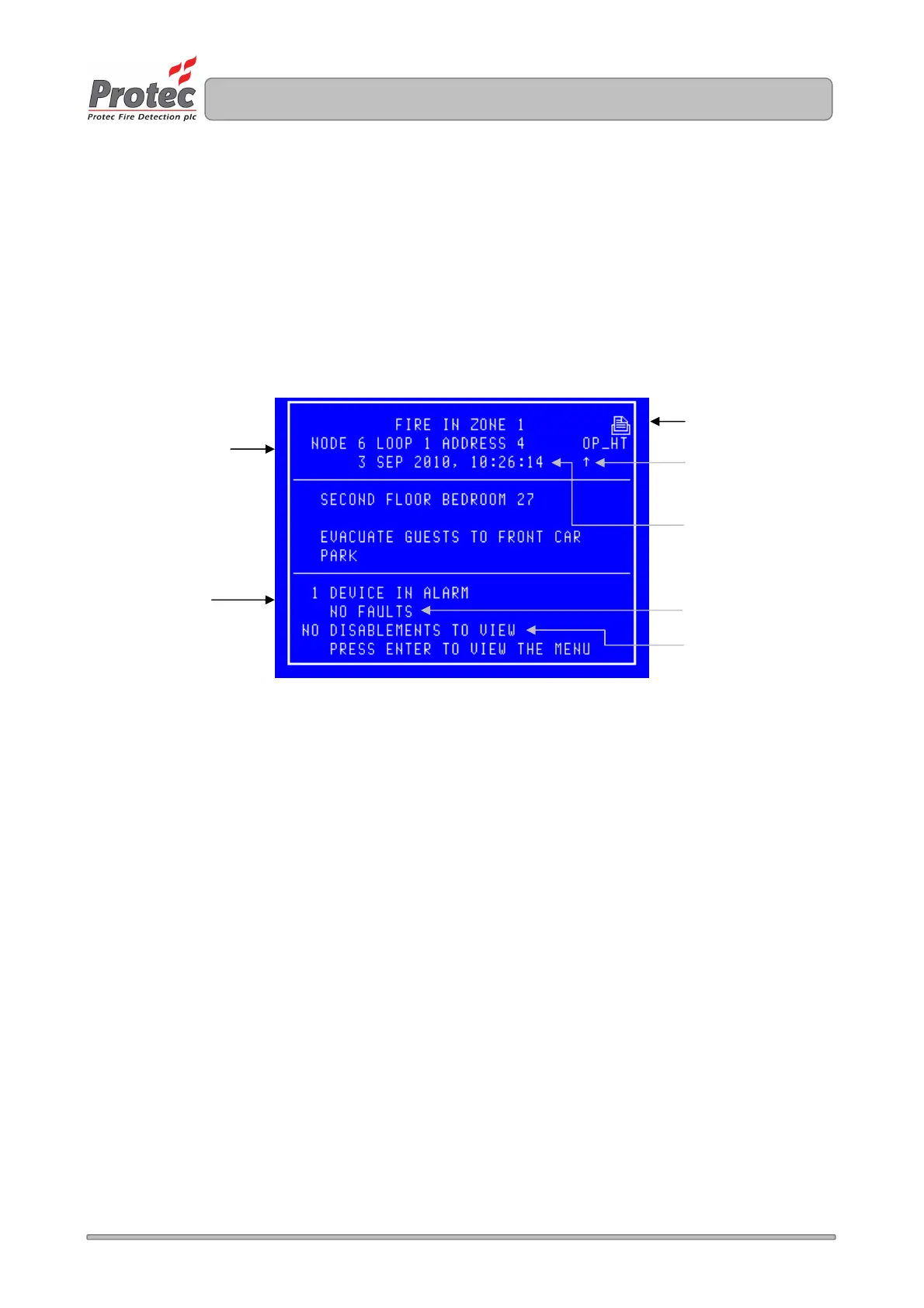
In the event of a fire activation occurring, the panel’s audible buzzer will fast pip. The ‘FIRE‘ lamp will
illuminate constantly and the ‘ZONE’ location lamp will illuminate intermittently. The panel will also display
the location details on the LCD display as follows :-
3.0 PRINTING FIRE EVENTS
The 6400 control panel will NOT print ‘Fire’ events automatically, they are printed on demand. If the panel
has any events pending, the ‘Print Pending Icon’ will be shown on the top right corner of the LCD Display.
To print these events press and hold the ‘ Fn’ key and then press the ‘p’ key on the QWERTY keypad.
4.0 SILENCING FIRE EVENTS
Pressing the ‘SILENCE’ key after any FIRE event will cause the ‘ALARMS SILENCED’ led to illuminate or
the Silence logo to appear at the top left of the LCD and the alarms to silence. The fast pip is an indication
that the external alarm outputs are activated. DO NOT at this stage attempt to ‘RESET’ the system until the
cause of the fire has been established.
5.0 SOUND ALARMS
Pre-programmed Alarm Outputs may be sounded by pressing the ‘Sound alarms’ button (red).
This will illuminate the ‘Alarms On’ LED, the buzzer will fast pip and the screen will display “SYSTEM
STATUS : SOUND ALARMS”.
Displays the Node /
Loop / address and type
of the device in alarm
Note - If text has been
assigned to the node, then
the text will be displayed
rather than the node & loop
No
Displays the ‘Zone’
number in which the fire
has occurred
Displays the date &
time of the activation
Displays the number of
fault events currently on
the system
Displays the number of
disablements currently on
the system
Displays the number
of
Devices which are
currently in an alarm
condition
The arrow indicates the
sensor that has
generated the fire



 To Next Page