9
QM7430 - User Manual
11.Measurement Operation
11-1.Hold the meter by its Handle Grip and point it toward the surface to be measured.
11-2.Pull and hold the Trigger to turn the meter on and begin testing. The display
will light if the battery is good. Replace the battery if the display does not light.
11-3.Release the Trigger and the HOLD display icon will appear on the LCD indicating
that the reading is being held. In HOLD status, press the “Up” button to turn
on or off the laser. And press the “Down” button to turn on or off t
he backlight.
11-4.The meter will automatically power down after approximately 7 seconds after
the trigger is released.(Unless the unit is locked on)
Note: Measurement considerations
•Holding the meter by its handle, point the IR Sensor toward the object whose
temperature is to be measured. The meter automatically compensates for
temperature deviations from ambient temperature. Keep in mind that it will take
up to 30 minutes to adjust to wide ambient temperatures are to be measured
followed by high temperature measurements, some time (several minutes) is
required after the low (and before the high) temperature measurements are made.
•This is a result of the cooling process, which must take place for the IR sensor.
12.Battery Replacement
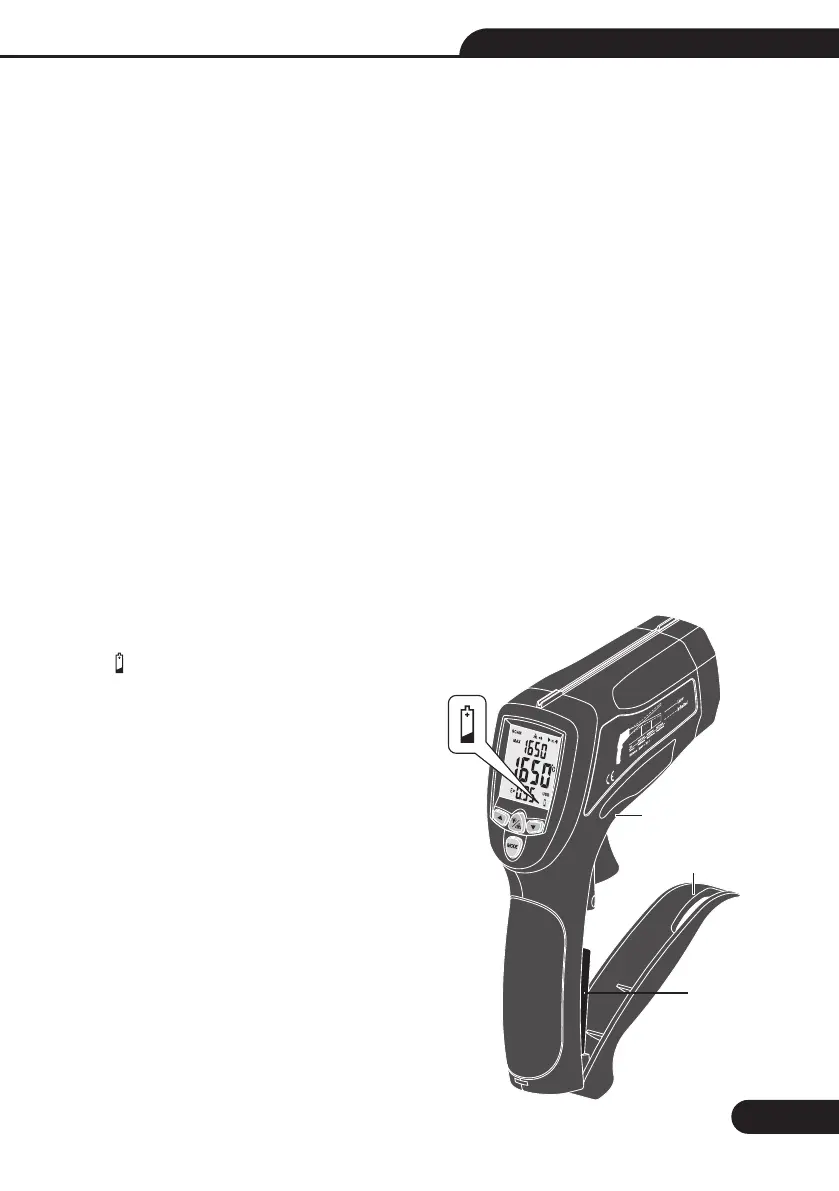
12-1.As battery power is not
sufficient, LCD will display
“ ” replacement with one
new battery type 9V is
required.
12-2.Open battery cover, then
take out the battery from
instrument and replace with
a new 9-Volt battery and
place the battery cover back.
Low battery
indicator
9V Battery
Open the
battery cover
Push this button


 To Next Page