EasyManua.ls Logo

Protek 608 - Frequency Measurement Procedure

Protek 608
52 pages
Print Icon
To Next Page IconTo Next Page
To Previous Page IconTo Previous Page
Loading...
14
Ea
TIrt
seamdmy
disp/JJy
muIs
1M
Itst
oolbJge
tJIIll
1M
CJJpOCiIDr
/IllS
drargetI
to
in flUs
~
1M
tIG!ue
is
2.5Y.
TIrt
azpaciIor
is
tJrm
discJrJuged
through
altSistor
cin:uit with
TIfllvts
from
1.5k
ohm
to
1Megohm
dep<nding
on
1M
1IIlJJS1lmrrmt
rtmge.
3-
JO.
Hz
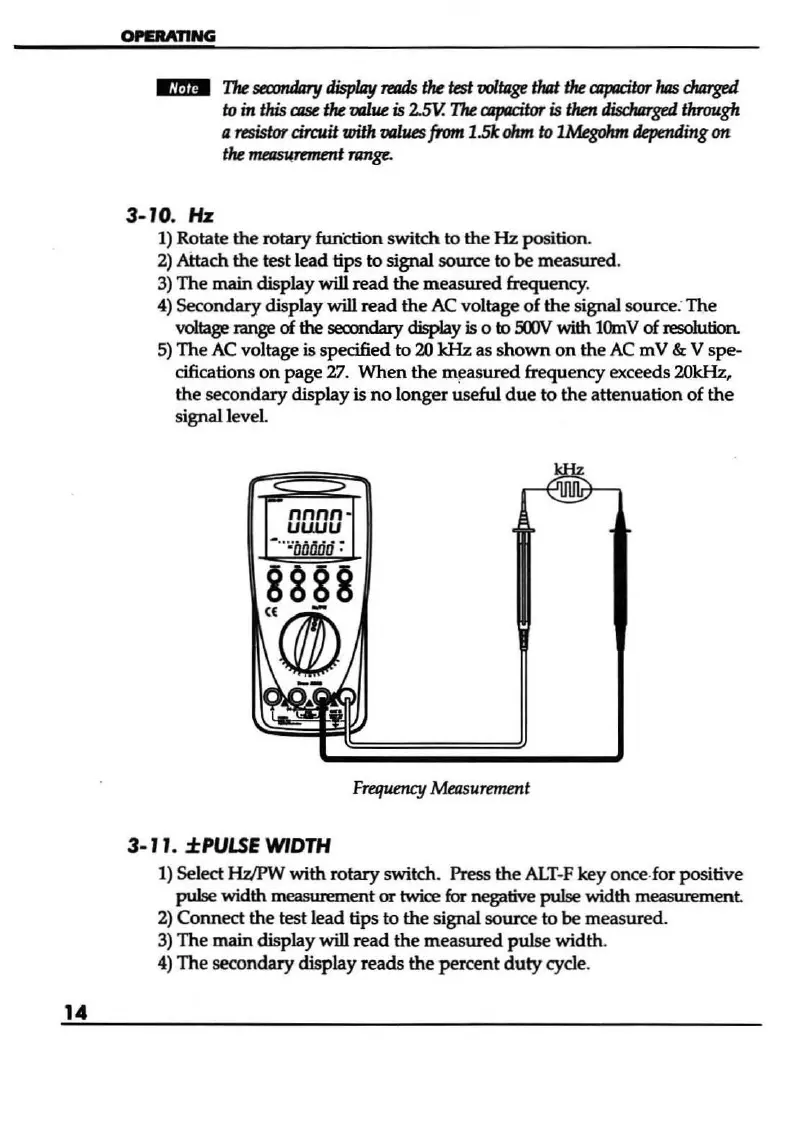
1) Rotate
the
rotary
function
switch
to
the
Hz
position.
2) Aitach
the
test
lead
tips
to
signal source
to
be
measured.
3)
The
main
display will
read
the
measured
frequency.
4)
Secondary
display will
read
the
AC
voltage
of
the
signal source:
The
voltage range of the
secondary
display
is 0 to
500V
with
10m
V of resolution.
5)
The
AC
voltage is specified
to
20
kHz
as s
hown
on
the
AC
m V & V
spe
-
cifications
on
page
27.
When
the
measured
frequency exceeds 20kHz,
the
secondary
display is
no
longer
useful
due
to
the
attenuation
of
the
signal level.
nnnn
uuuu
3-
ll
.
±PULSE
WIDTH
Frequency
Measuremmt
1) Select
HzIPW
with
rotary
switch. Press
the
ALT-F
key
once
-for positive
pulse
width measurement
or
twioe for negative
pulse
width
measurement
2)
Connect
the
test
lead
tips
to
the
signal
source
to
be
measured.
3)
The
main
display will
read
the
measured
pulse
width
.
4)
The
secondary
display
reads
the
percent
duty
cycle.

Other manuals for Protek 608

Related product manuals