EasyManua.ls Logo

Protek 608 - Page 23

Protek 608
52 pages
Print Icon
To Next Page IconTo Next Page
To Previous Page IconTo Previous Page
Loading...
MAINTENANCE
6-4.
CALIBRATION
1)
Turn
the
power
off
by
turning
the
rotary
switch
completely
counter
clockwise.
2)
Remove
the
bottom
case
by
performing
.teps
1 to 3
of
the
above
for
fuse replacement procedure.
3) Turn
on
the
switch for
auto
calibration located
at
the
top
of
the
main
PCB
4)
Replace
the
bottom
case
and
reinstall
aU
the
screw
.
5) Rotate
the
rotary
function
switch
to
the
"V"(volts)position.
6)
Proceed
with
the
calibration
in
the
order
listed
on
the
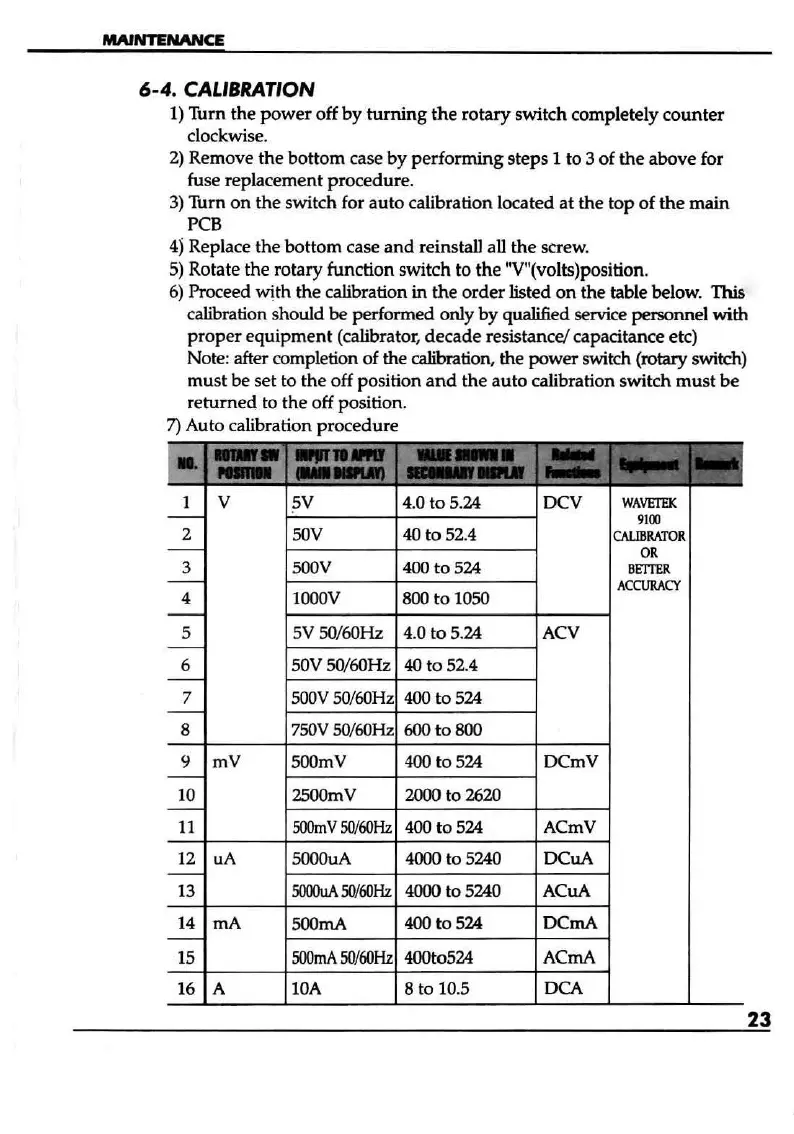
table below. This
calibration
should
be
performed
only
by
qualified service personnel
with
proper
equipment
(calibrator,
decade
resistance! capacitance etc)
Note: after completion
of
the
calibration,
the
power
switch (rotary switch)
must
be
set to the off position
and
the auto calibration switch
must
be
returned to the off position.
7) Auto calibration procedure
__
~.
_A~
r
E3E±53~
-r'
-. .."
.,_
._.L....J
...
1 V 5V 4.0
to
5.24
DeV
WAVETEK
-
9100
2
SOV
40
to
52.4
CALIBRATOR
-
OR
3
SOOV
400
to
524
BE'ITER
-
ACCURACY
4
lOOOV
800
to
10SO
-
5 5V SO/60Hz 4.0
to
5.24
ACV
-
6 50V SO/60Hz
40
to
52.4
-
7
SOOV
SO/60Hz
400
to
524
-
8
7SOV
5O!6OHz
600
to
800
9
mV
SOOrnV
400
to
524
DCrnV
-
10 2500mV 2000 to 2620
-
11
SOOmV5Ol60Hz
400
to
524
ACmV
12 uA
SOOOuA
4000 to 5240
DeuA
-
13
5000uA
5OI60Hz
4000
to
5240 ACuA
14 rnA
SOOmA
400
to
524
DCmA
-
15
SOOmA
5OI60Hz
4OOt0524
ACmA
16
A
lOA
8 to 10.5
DCA
23

Other manuals for Protek 608

Related product manuals