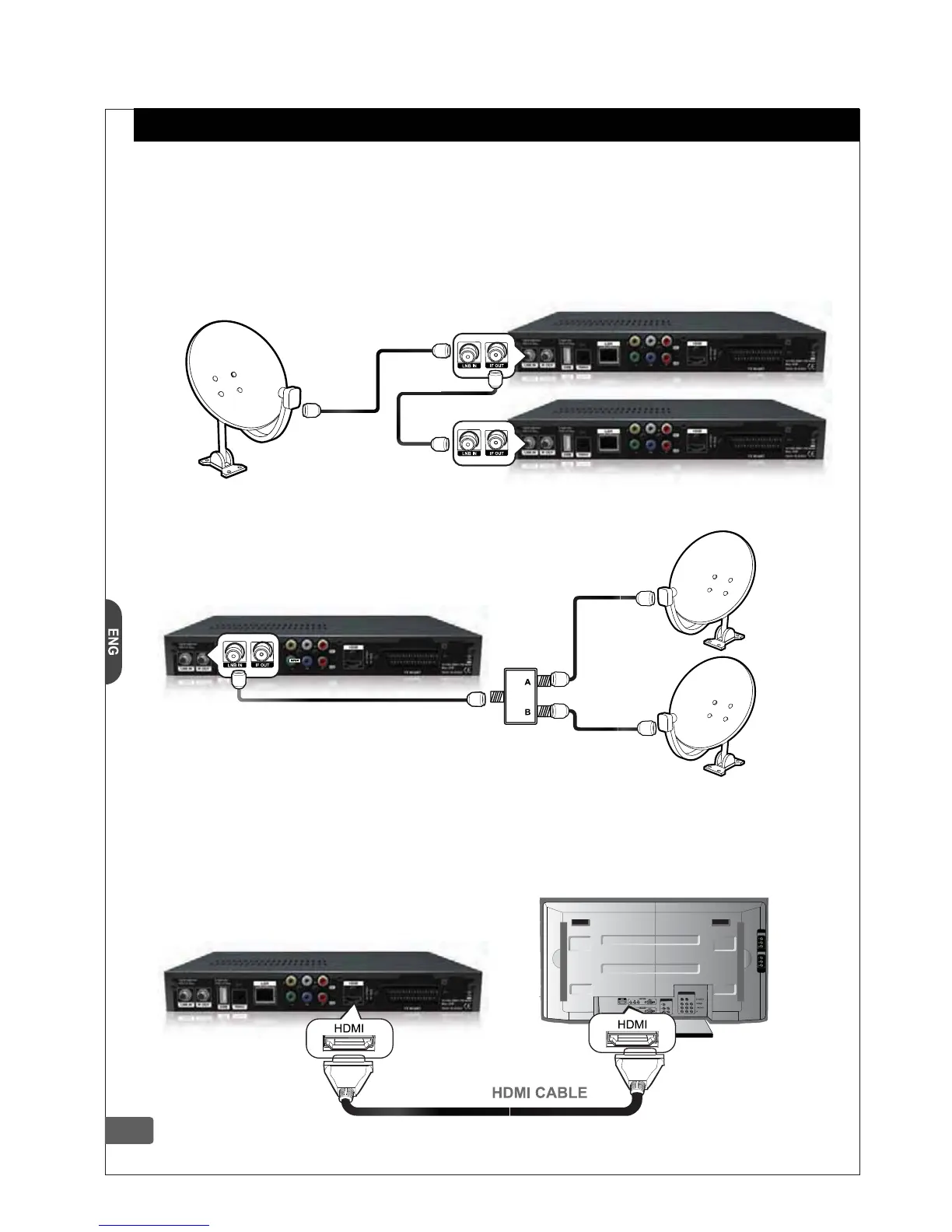
Connect satellite antenna cable to the LNB IN socket of the HD-Receiver.
If you have another Satellite Receiver, you may link it from the LOOP OUT connector.
This chapter describes how to connect your HD-Receiver to the TV and other equipments.
The HD-Receiver provides various connection methods for your TV, VCR and other equipments.
2-1. Antenna Connection
2-2. Video Connection
If
you have two or more antenna dish,
you can use DiSEqC switch. Connect DiSEqC
switch OUT to LNB IN connector of HD-Receiver. You can use Tone-burst switch
or DiSEqC 1.0 switch. If you have motor system with
DiSEqC
1.2 or USALS, please refer to article 4-3-3-1 & 4-3-3-2 for more
detailed installation information.
2-2-1. HDMI (High Definition Multimedia Interface) connection
Connect HDMI Video cable to the HDMI output terminal on the rear of HD-Receiver. Connect the other
end of HDMI Video cable to the HDMI Input terminal on the HDTV. The HDMI connection carries whole
digital video & audio signal and there is no required additional audio connection. Set up the video
format to desired resolution. This HDMI output supports
1080i/ 720p/ 576p Video Format. Please make sure, the
HDMI output does not support SD (576i) Video resolution.
3
2. Connecting your HD-Receiver
DiSEqC SW


 To Next Page