Need help?
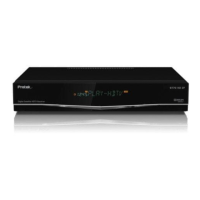
Do you have a question about the Protek 9700HD IP and is the answer not in the manual?
Ensuring the receiver is operated with the correct power source.
Instruction to avoid opening the receiver due to dangerous voltages inside.
Instructions for connecting the satellite antenna cable to the HD-Receiver.
Details the HDMI connection for high-definition video and audio.
Connecting to a HDTV using YPbPr component video cables.
Connecting stereo audio output to TV or amplifier.
Connecting optical digital audio to home theater systems.
Instructions for connecting the satellite antenna cable to the receiver.
Steps for connecting video and audio outputs to your display and sound system.
Procedure for connecting the HD-Receiver to the AC power outlet.
Procedure for selecting a satellite and performing an automatic channel scan.
Settings for language, audio, timers, and other user preferences.
Configuration of display, network, and factory default settings.
Guides on setting up LNB types, dish motors, and channel scanning.
Calibrating the antenna with DiSEqC 1.2 or USALS systems.
Step-by-step guide to update firmware using a USB drive.
 General
| HDTV Compatible | Yes |
|---|---|
| IPTV Support | Yes |
| Ethernet | Yes |
| HDMI Output | Yes |
| Component Video Output | Yes |
| Composite Video Output | Yes |
| Connectivity | Ethernet |
| Tuner Type | DVB-S2 |
| Video Decoding | MPEG-2, MPEG-4, H.264 |
| Audio Decoding | AAC |

 To Next Page