EasyManua.ls Logo

Protek B-810 - Page 16

Default Icon
23 pages
Print Icon
To Next Page IconTo Next Page
To Previous Page IconTo Previous Page
Loading...
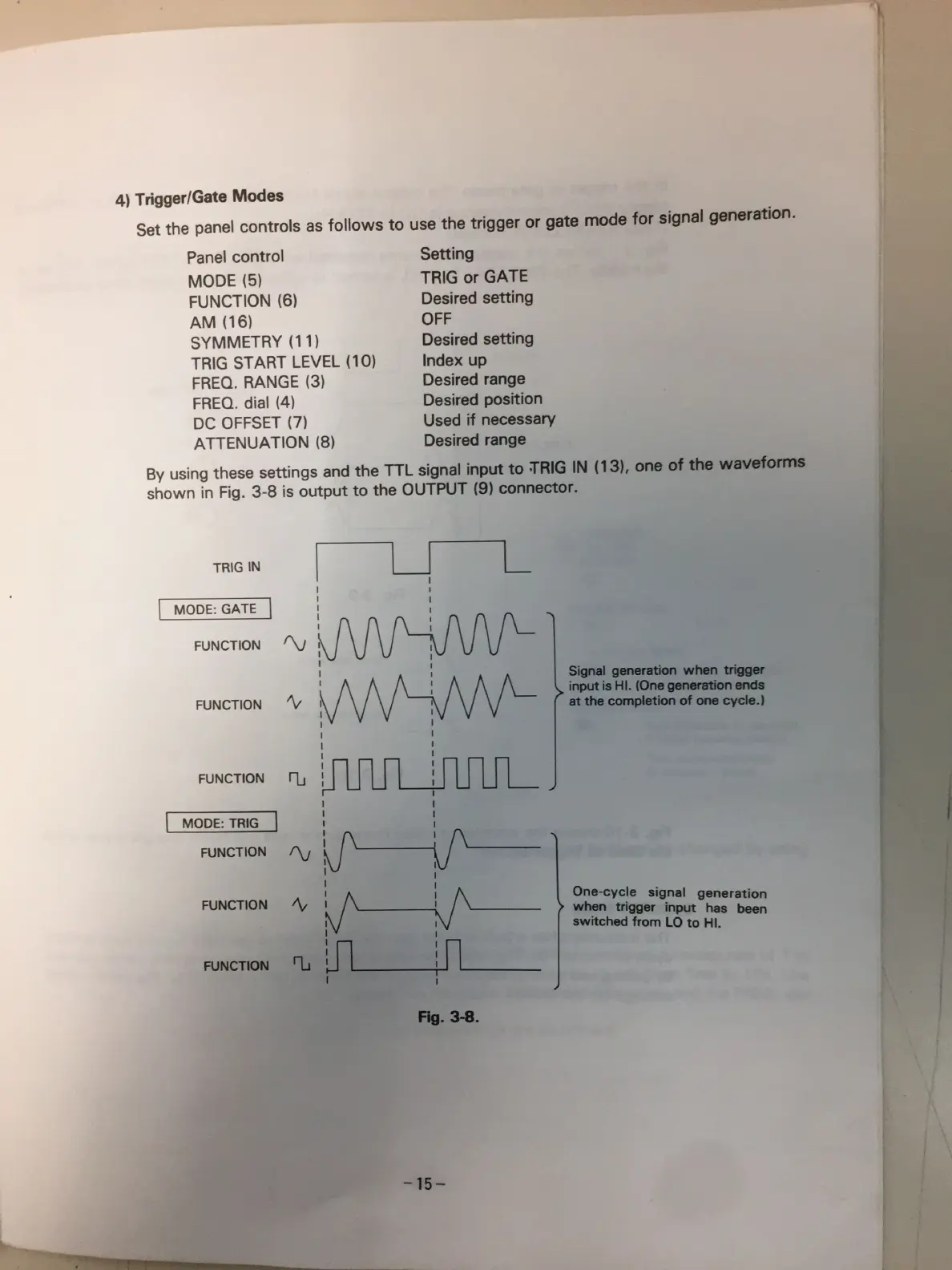
4)
Trigger/Gate
Modos
Set
the
panel
controls
as
fo||ows
to
use
the
trigger
or
gate
mode
for
signal
generation.
Panel
control
MODE
(S)
FUNCTION
(6)
AM
(16)
SYMMETRY
(1
1)
TRlG
START
LEVEL
(10)
FREQ.
RANGE
(3)
FRED.
dial
(4)
DC
OFFSET
(7)
ATTENUATION
(8)
Setting
TRlG
or
GATE
Desired
setting
OFF
Desired
setting
Index
up
Desired
range
Desired
position
Used
if
necessary
Desired
range
By
using
these
settings
and
the
TTL
signal
input
to
ING
IN
one
of
the
wavaforms
shown
in
Fig.
3-8
is
output
to
the
OUTPUT
(9)
connector.
TR|G
W
I
MODE:
GATE
E
’\/
FUNCTION
FUNCTION
’\/
FUNCTION
¡"LJ
MODE:
TRIG
FUNCTION
IV
l
g
l
FUNCT|0N
/\,
u
A
i
A
l
l
¡
|
I
l
I
l
Signal
geneiation
when
winner
inputisHl.
más
atüiecompletimafonocyde.)
One-cycle
signal
generation
when
trigger
input
has
been
swnched
from
LO
to
Hi.
""WÏWW‘W
.,

Related product manuals