EasyManua.ls Logo

Protocol FLIX - User Manual

Protocol FLIX
29 pages
Print Icon
To Next Page IconTo Next Page
Loading...
INSTRUCTION MANUAL
FLIX
3.5 CHANNEL R/C VIDEO-COPTER
Question and Answer IconNeed help?

Do you have a question about the Protocol FLIX and is the answer not in the manual?

Summary

Safety Warnings

Parts Identification

Helicopter Components

Identifies and lists the main components of the helicopter, including canopy, blades, balance bar, tail blade, camera, power switch, and charging cord.

Remote Control Components

Identifies and lists the components of the remote control, including buttons, sticks, and phone mount.

Battery and Phone Installation

Installing Batteries in Remote

Instructions for correctly inserting the required AA batteries into the remote control, emphasizing correct polarity.

Mounting Smartphone on Remote

Steps for mounting a smartphone onto the remote control, including opening the clamp.

Charging the Helicopter Battery

Charging Safety Precautions

Provides essential safety guidelines and precautions to follow during the helicopter battery charging process.

Start-Up Procedure

Synchronization and Engine Idle

Details on synchronizing the helicopter and remote, and initiating engine idle mode for flight preparation.

Operation: Flying the Helicopter

Take-Off

Instructions on how to initiate flight by taking off from the ground to a desired height.

Landing

Procedures for safely landing the helicopter, either automatically or manually.

Forward;Backward Movement Control

Explains how to use the direction lever to control the helicopter's forward and backward flight.

Left;Right Turn Control

Explains how to use the direction lever to control the helicopter's turns to the left or right.

Performance Modes

Speed Button Operation

Instructions on how to use the speed button to change between multiple performance or speed modes.

Trim Adjustment

Left Trim

Guidance on using the right trim button to correct unintended left spins of the helicopter.

Right Trim

Guidance on using the left trim button to correct unintended right spins of the helicopter.

Troubleshooting

Re-calibrating the Helicopter

Steps to re-calibrate the helicopter if it remains unstable after starting and trimming.

Common Troubleshooting Issues

A table listing common symptoms, their possible causes, and potential solutions for troubleshooting.

How to Change the Blades

Detailed instructions and diagrams for correctly replacing the helicopter blades.

App Instructions & Photo;Video

Installing and Connecting to the App

Steps for downloading and connecting the Protocol Flix app to the helicopter via Wi-Fi.

App Flying and Camera Instructions

Overview of instructions for shooting photo/video and flying through the app interface.

Flying Outdoors

How to Prevent Fly Aways

Advice on preventing 'fly-away' situations by testing range and maintaining visual control.

Replacement Parts & Limited Warranty

Limited Warranty Details

Details of the product warranty, including coverage, duration, and exclusions.

Overview

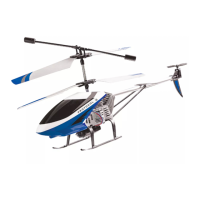
The Protocol Flix is a 3.5 Channel R/C Video-Copter, designed to offer an engaging remote control flight experience with integrated photo and video capabilities. This precision flying machine is suitable for both novice and experienced pilots, offering multiple performance modes to match varying skill levels.

Function Description:

The Flix helicopter is a remote-controlled aircraft capable of forward/backward movement, left/right turns, and altitude control. It features a built-in camera for capturing photos and videos during flight, which can be viewed and managed through a dedicated smartphone application. The helicopter can be flown using the included remote control or via the app interface on a smartphone. Key functions include automatic take-off and landing, an engine idle mode, and an emergency stop feature for immediate engine shutdown. The remote control also includes trim adjustments to correct unintentional drifts during flight.
Important Technical Specifications:

  • Channels: 3.5 Channel R/C
  • Battery Type: Li-Po, 3.7V, 1200mAh
  • Charging Time: Approximately 150 minutes
  • Flying Time: Approximately 7 minutes
  • Remote Control Batteries: 3 x 'AA' LR6 1.5V (not included)
  • Connectivity: Wi-Fi signal ("Flix") for smartphone app connection
  • App Compatibility: Apple and Android App stores (search "Protocol Flix")

Usage Features:

  • Synchronization: Before each flight, the helicopter and transmitter must be turned on in sequence and synchronized. The helicopter's front light will flash, and the remote's power indicator will turn steady once synced.
  • Engine Idle: After synchronization, pressing the engine on button or pushing the throttle up and releasing it will put the helicopter into idle mode, where the blades rotate without lifting.
  • Take-Off: From idle mode, pressing the take-off button or gently advancing the throttle will lift the helicopter to a desired height, where it will hover.
  • Landing: The helicopter can be landed automatically by pressing the land button or manually by pushing the throttle all the way down.
  • Flight Controls:
    • Throttle: Controls altitude (up/down).
    • Direction Lever: Controls forward/backward movement and left/right turns.
  • Performance Modes: The Flix offers multiple speed modes. The remote control indicator beeps once for low speed and twice for high speed. Higher speeds result in more pitch and require greater piloting skills.
  • Trim Adjustment: Dedicated trim buttons on the remote allow for correction of unintentional left or right spins. The remote emits a long beep when trim is centered.
  • Re-calibration: If the helicopter becomes unstable after a crash or re-starting, it can be re-calibrated by pushing the throttle and direction sticks to the lower outer corners simultaneously.
  • Smartphone App Integration:
    • Connection: Connect your smartphone to the helicopter's Wi-Fi signal ("Flix"), then open the app and press "START" to view the live camera stream.
    • Photo/Video Capture: The app interface includes icons for shooting photos and videos.
    • VR Mode: Tap the VR icon to view the live stream in VR mode, compatible with VR viewers. It is recommended to have a second pilot for helicopter operation when using VR.
    • Filters: The app offers various filters for photos and videos, which can be applied to the live stream and recorded media.
    • Media Management: Photos and videos are automatically downloaded to the phone's photo gallery and can be viewed within the app's folder.
  • Outdoor Flying: It is crucial to test the helicopter's range in close proximity before flying too far to prevent "fly-away" situations, which are typically caused by pilot error and not covered by warranty. The helicopter's engines are designed to turn off if the radio signal is lost.

Maintenance Features:

  • Battery Care:
    • Allow the battery a cool-down period before recharging to prevent overheating.
    • Do not charge overnight or beyond the stated charging time (150 minutes).
    • Always use the supplied charger and/or charging cable.
    • Charge on a dry, well-ventilated surface away from heat sources.
    • Avoid repeated charging and excessive discharging to increase battery longevity.
    • Charge after cooling down from flight for higher efficiency.
    • Do not strike, cut, pierce, or subject the battery to hard impacts.
    • Never leave the battery unattended during charging.
    • Do not disassemble or submerge the battery in water.
  • Engine Life: Allow a cool-down period between flights to prolong engine life.
  • Blade Replacement: The manual provides instructions for changing blades, emphasizing the importance of placing "A" and "B" marked blades on the correct axes for proper function.
  • Troubleshooting: The manual includes a troubleshooting guide for common issues such as non-responsive controls, intermittent inputs, incorrect hovering/strafe, and motors stopping. Solutions include re-synchronization, battery replacement, trim adjustment, and checking for propeller debris.
  • Spare Parts: Protocol offers spare parts kits on their website, www.ProtocolNY.com, acknowledging that accidents can happen.
  • Limited Warranty: A 30-day limited warranty covers defects in workmanship and materials from the date of purchase. It does not cover transportation damage, misuse, accident, or similar events. For service claims or questions, refer to www.ProtocolNY.com.

Protocol FLIX Specifications

General IconGeneral
BrandProtocol
ModelFLIX
CategoryToy
LanguageEnglish

Related product manuals