17
②
2. Alarm
a. Activate/Deactivate Alarm
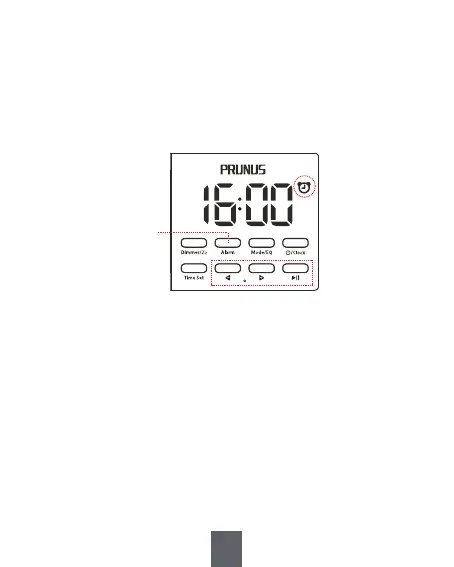
In clock mode, press and hold <②Alarm> to activate and
deactivate the alarm. When the alarm is activated, the icon
will appear, and it will disappear when the alarm is
deactivated.
b. Alarm Setting
1) In clock mode, briefly press <②Alarm> to enter alarm setting and the
“hour” digit will flash.
2) Briefly press <⑥ -> and <⑦ +> to set hour.
3) Briefly press <⑧ >II> to confirm and then “minute” digit will flash.
4) Briefly press <⑥ -> and <⑦ +> to set minute.
5) Briefly press <⑧ >II> to confirm.
6) Briefly press <⑥-> and <⑦+>select alarm sound (8 alarm sounds).
7) Briefly press <⑧ >II> to confirm.
8) Briefly press <⑥ -> and <⑦ +> adjust alarm volume.
9) Briefly press <⑧ >II> to confirm.
⑥ ⑦ ⑧


 To Next Page