8
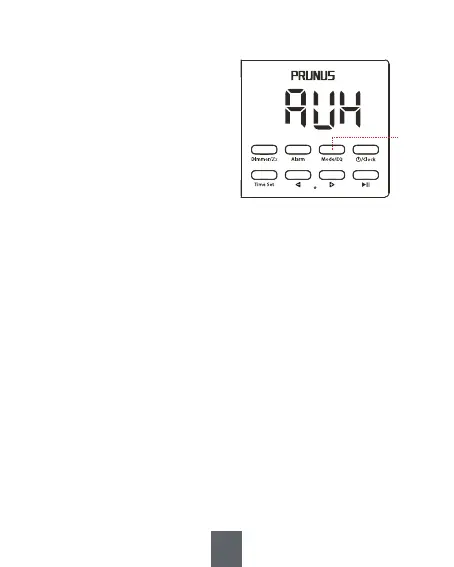
③
In working mode, press <③
Mode/EQ> repeatedly to
cycle through and switch
between modes, including
Bluetooth mode, TF card
mode, FM mode, USB drive
mode, and AUX IN mode.
2. Mode Switch
Note:
1. When there is no TF card or USB drive inserted, TF card mode and
USB drive mode will be automatically skipped.
2. When a USB drive/TF card is inserted, the radio will directly enter
USB drive or TF card mode.
3. To switch to FM mode, TF card/USB drive mode or AUX mode, you
need to briefly press <④/Clock> to enter Bluetooth mode first, then
briefly press <③ Mode/EQ> to switch the mode.
4. Volume Adjustment
Press and hold <⑥ -> to decrease the volume.
Press and hold <⑦ +> to increase the volume.


 To Next Page