The PryMAX Portable Power Station, model J1200, is a versatile solar generator designed to provide portable power for various applications. This user manual outlines its functions, usage, and maintenance to ensure correct operation and longevity.
Function Description
The PryMAX J1200 serves as a portable power station, capable of delivering both AC and DC output to power a wide range of electronic devices and appliances. It features multiple input options for charging, including a dedicated solar charge input, DC input (via adapter), and Anderson ports, making it suitable for off-grid use or as a backup power source.
The device is equipped with a clear LCD display that provides real-time information about its operational status. This includes the current input power (in watts) and remaining charging time (in hours) when charging, as well as the current output power (in watts) and remaining usage time (in hours) when discharging. The display also shows the battery level as a percentage, indicating when recharging is recommended (below 20%).
For output, the J1200 offers several interfaces:
- AC Output: Multiple AC outlets are available, providing power for devices such as laptops, fans, TVs, and CPAP machines. The AC output voltage and frequency may vary depending on the region, so users should refer to the actual product.
- DC Output: Dedicated DC output ports are provided for 12V devices, including vacuum cleaners, inflation pumps, electric wrenches, and car fridges.
- USB Output: Multiple USB ports, including standard USB and Type-C outputs (with PD 100W and PD 18W capabilities), allow for charging smartphones, digital cameras, tablets, and other USB-powered devices.
- LED Light: An integrated LED flashlight offers different modes (High light, Low light, SOS, and Strobe) for illumination in various situations.
The power station incorporates a robust protection circuit that safeguards against common electrical issues such as short circuits, over current, over power, over discharge, over charge, and over temperature. These features ensure the safety of both the device and connected equipment.
Usage Features
Operating the PryMAX J1200 involves straightforward controls, primarily through dedicated buttons for each output type and the LED light.
- Turning On/Off AC Output: To activate the AC output, users press and hold the AC power button for 2 seconds. The corresponding indicator light illuminates, and the display shows the frequency. The AC output will automatically shut off after 3 hours if no loads (less than 5W) are detected, conserving power. To turn off AC output, the AC power button is pressed and held again for 2 seconds, which will extinguish the indicator light and clear the frequency display.
- Turning On/Off DC Output: Similarly, the DC output is activated by pressing the DC power button. An indicator light confirms activation, and the display shows the DC-OUT icon. The DC output will automatically turn off after 1 hour if no loads (less than 2W) are detected. Pressing the DC power button again for 2 seconds will deactivate it.
- Turning On/Off USB Output: The USB/Type-C outputs are controlled by pressing the USB power button. The corresponding indicator light turns on, and the display shows the USB OUT icon. Like other outputs, the USB output will automatically shut off after 1 hour if no loads (less than 1W) are detected. Pressing the USB power button again for 2 seconds will turn it off.
- Operating the LED Light: The LED light is turned on by pressing and holding its dedicated button for 2 seconds. The display will show the LED icon. Subsequent short presses of the LED button cycle through different light modes: High light, Low light, SOS, and Strobe. To turn off the LED light, the button is pressed and held for 2 seconds.
Charging the Power Station:
The J1200 offers multiple charging methods:
- DC Input (Adapter): The device can be charged using a standard AC adapter connected to the DC input port (7.95.50.9mm). When charging via this method, the "Adapter" icon lights up on the display, showing the current input power in watts and the remaining charging time.
- Anderson Port 1 (Solar/Car): This port supports charging via solar panels or a car charger. The "PV/CAR" icon illuminates, indicating the current input power and remaining charging time.
- Anderson Port 2 (Fast Charging): This is a fast-charging port, primarily for solar input. It supports higher power input for quicker charging. The "Adapter" icon (with a different visual representation) lights up, displaying the input power and remaining charging time. It's important to use the original charger or one with matching parameters (voltage range 25±0.2V, current range 5A~20A) and ensure correct polarity. Charging via this port will stop automatically when the device reaches 90% charge to protect the battery. If charger parameters do not match, the display will light up, but charging will not commence.
Safety and Error Handling:
The device provides warnings for functional failures. In cases of short-circuit, exceeding maximum current/power limits, or low voltage, a "Function Failure" sign will appear on the display, and the corresponding outlet indicator will flash for 60 seconds. The output will automatically shut down. Users should remove overloaded devices and restart the power station to resume operation. The AC output will also shut down if short-circuited or overloaded.
Maintenance Features
Proper maintenance is crucial for extending the lifespan and ensuring the safe operation of the PryMAX J1200.
- Battery Care: The power station uses high-quality lithium-ion batteries with no memory effect. To optimize charging capacity and battery lifespan, it is recommended to operate and charge the device within a temperature range of 10°C to 30°C (50°F to 86°F). The battery level indicator prompts users to recharge when the power drops below 20%. To preserve battery lifespan, it is advised to recharge the device every 3 months, especially if stored for extended periods.
- Cooling System: The device features a built-in cooling fan system. The fan intelligently activates when the battery temperature rises, helping to dissipate heat and maintain a high conversion rate. A slight noise during operation due to the fan is normal.
- Charging Practices: When charging, it is recommended to keep the device away from TVs, radios, and other equipment to avoid interference. Always use original or certified cables for charging. The charger (adapter) may heat up during charging, which is normal and conforms to national safety standards.
- Storage and Handling: If the device is not used for a long time, disconnect all cables before storing. Avoid exposing the device to liquids, dropping it, or disassembling it, as these actions can damage the internal components or battery. The built-in battery is non-removable and rechargeable; attempts to remove it may cause damage.
- Environmental Responsibility: Scrap products should be disposed of in accordance with local regulations. The built-in battery should not be treated as household garbage to prevent explosion and pollution.
- Purpose of Use: The PryMAX J1200 is designed as an emergency power station and is not intended to replace standard DC or AC power for household appliances or digital products on a permanent basis.
- Energy Saving: If no outputs are activated after starting the device, the LCD display will automatically shut down within 60 seconds to conserve energy.
For additional information and support, users can check the manufacturer's website.

 Need help?
 General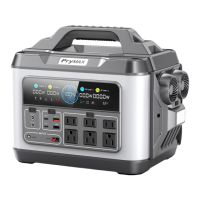

 To Next Page