We are coasting to the finish now.
12. Replace the Oscillator Board
a. Read this entire section before you attempt to replace the oscillator board!!
b. Now take the NEW Oscillator Board from the pink anti-static bag. Be careful to only touch the
edges of the new Board. Notice the sticker on the rear of the Board. One more time: the sticker
is on the REAR of the Board.
c. The new Board must only be inserted in one direction.
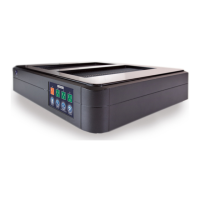
d. The electronic components on the new Oscillator Board MUST FACE FORWARD, toward the
faceplate of the Power Plant. NEVER, NEVER insert the Oscillator Board so that the electronic
components face to the rear of the Power Plant. Remember the little sticker on the REAR of the
Board.
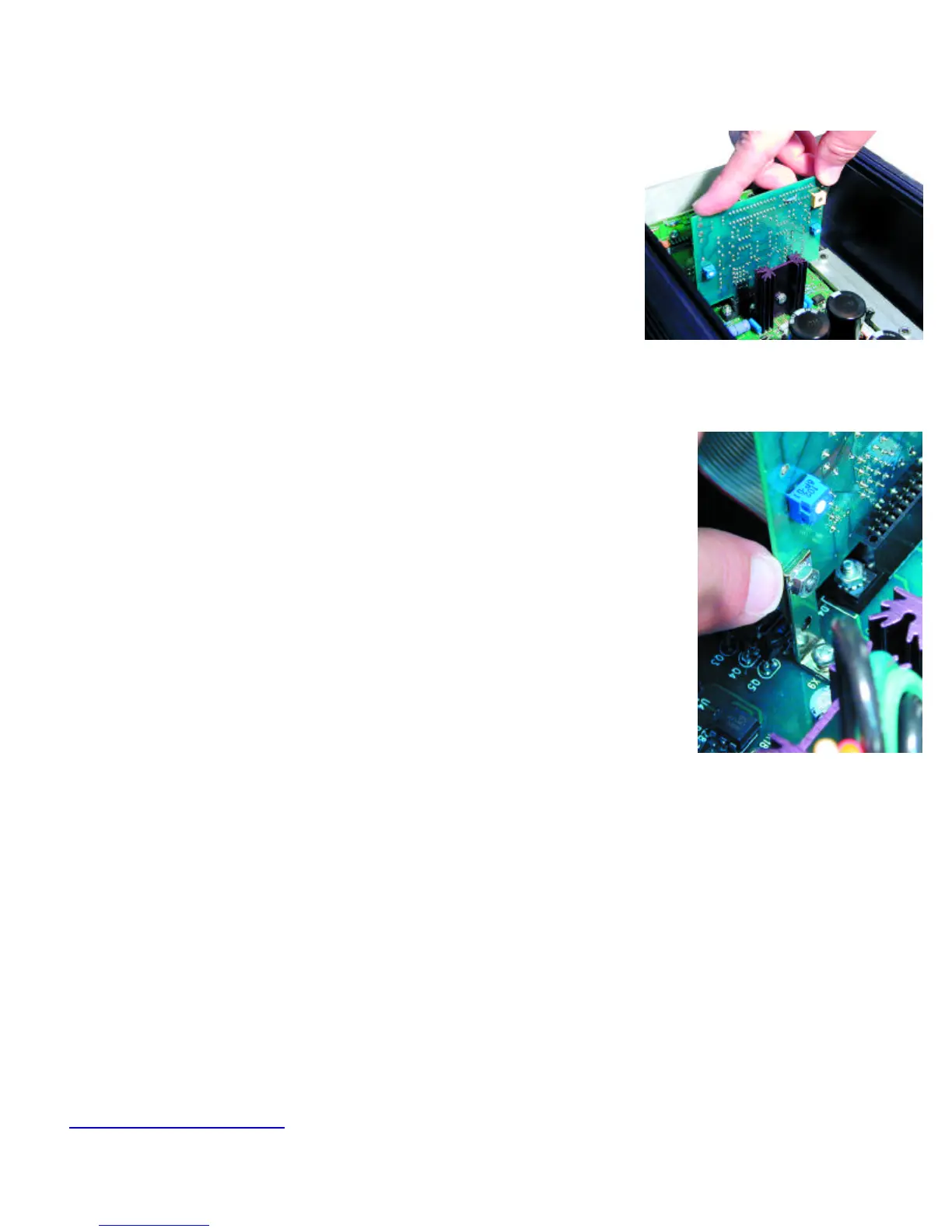
e. Insert the New Oscillator Board into its socket on the Power Plant's Main Board by pushing
straight down.
DO NOT ROCK THE CARD back and forth. Insert it straight. The Board must not be inserted at an
angle.
f. If you are working on a P600 or a P1200, replace the two small screws and nuts that hold the oscillator board in place.
13. Inspect your work
You are almost finished. Carefully inspect you work one more time before you button up!
a. Make sure that the NEW microprocessor on the Front Panel Board is inserted correctly. Use that mirror if you need to!
b. Is the half moon of the front panel chip you inserted going in the same direction as the half moon of the
other chips on this same board? If not, you’ve done this step incorrectly.
c. Make certain the Front Panel Cable Connector is inserted correctly with no exposed pins.
d. Be sure the New Oscillator Board is fully inserted with the electronic components facing the FRONT of
the Power Plant and the sticker facing the REAR.
14. Replace the bottom cover or the top cover (depending on your model)
a. Before reinstalling the bottom cover of the P300, notice the gray support strip on the inside of the bot-
tom cover. The groove in this support strip aligns with the edge of the Oscillator Board. Looking at the unit
from the side, place the bottom cover on top of the P300. Align the top of the Oscillator Board with the
groove in the support strip. When they are aligned, press down on the bottom cover. It will snap into place
when properly aligned. Sorry, the trusty dentist's mirror will not help you here.
b. Replace the screws in the bottom cover of the P300.
c. Place the MultiWave sticker on the back of your Power Plant.
d. YOU'RE DONE! Really. But keep that dentist's mirror close by. Who knows what computer chips or
teeth might need inspecting.
15. Testing The Power Plant
To make sure everything is ship-shape, perform the following tests:
a. Plug the Power Plant into your source of power. Do not plug anything into the back of the unit at this time.
b. If you have a P300, turn on the unit with the switch on the back panel. Up is ON. If you have a P600
or P1200, the unit is on the moment you plug it in to the wall socket.
c. Next, press the front panel power button. The Power Plant front panel display should read "Sin." If it does, the Power Plant is fully opera-
tional and you are now a certified PS Audio MultiWave Upgrade Installer. We are proud of you.
16. Sending the Old Oscillator Board Back to PS Audio.
a. Please return the old oscillator board to PS Audio within 45 days of receiving the MultiWave update kit. This applies only in the United States.
Should you fail to return the Oscillator board with 45 days, PS Audio will charge your credit card for $50, the value of the old oscilla-
tor board. If you live outside of the United States, you or your dealer are responsible for returning the old board to us for credit.
b. Sending the old board back could not be easier. Simply place the old oscillator board in the pink static protection bag. Place the pink bag in
the 6 inch square box and seal with a piece of strong tape. The return label to PS Audio is already attached.
c. Just drop the box in any US Post Office mailbox. No need to add postage. PS Audio pays the postage. The box is marked with your order
number so we can check in your old board when it arrives.
Now, hold on to your favorite listening chair and experience MultiWave.
Peter and I are quite sure you will be as amazed as we were the first time we listened.
If you have any questions about the installation process, stop and contact us. We are here to help.
E-mail customerservice@psaudio.com anytime. We will get back to you within 24 hours. Or call us at 720-406-8946 from 9 to 5, Mountain
Daylight Time. Our fax number is 720-406-8967 if you prefer.



 To Next Page