Controlling PWD & Bridge with tagNplay
®
4826 Sterling Drive, Boulder, CO 80301
PH: 720.406.8946 | service@psaudio.com | www.psaudio.com
15-042-21-1 Rev A
Instruction i
©2010 PS Audio International Inc. All rights reserved.
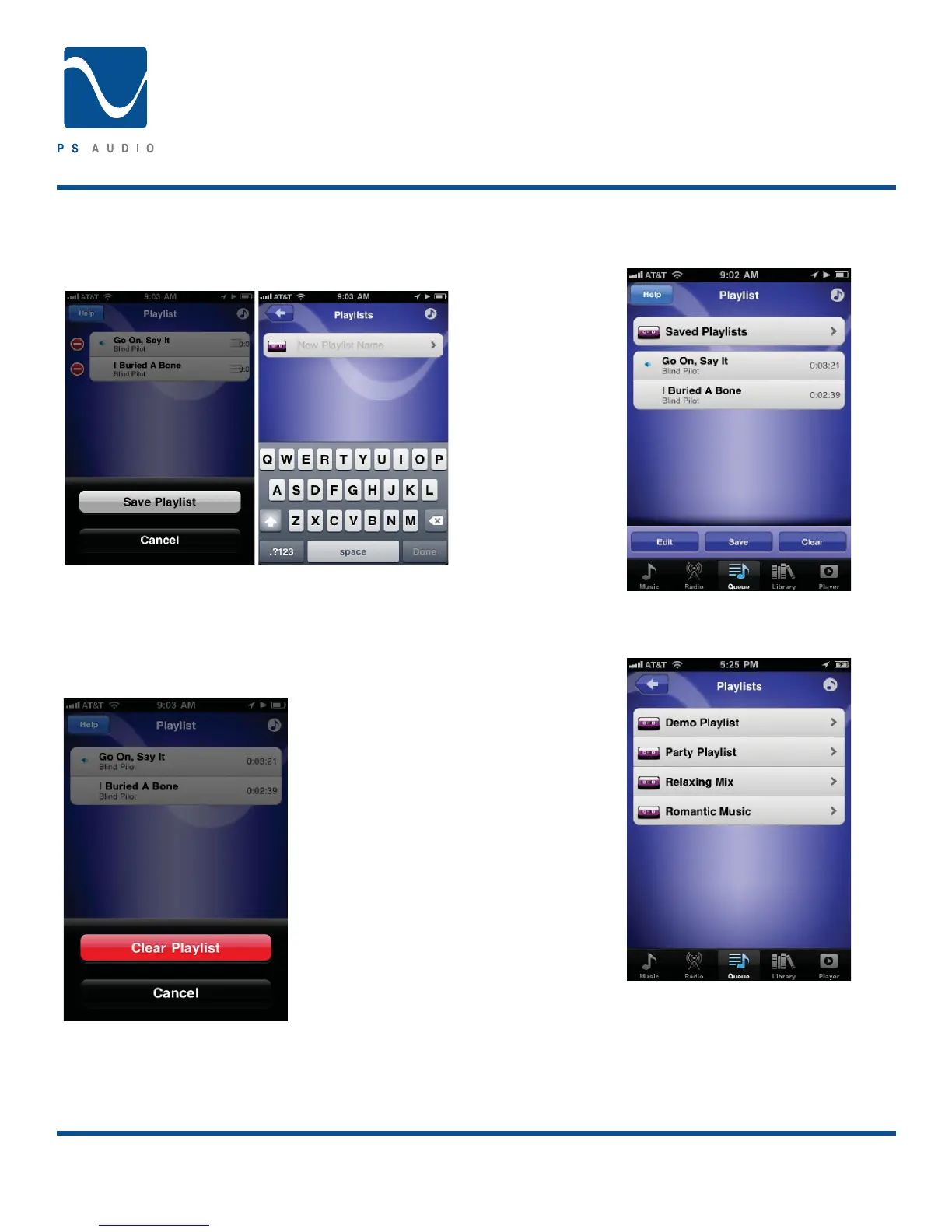
Saving the Queue
Building a great Queue fun. If you would like to save the Queue
you have built simple touch the ‘Save’ button.
*VUÄYT[OH[`V\^V\SKSPRL[VZH]L[OLWSH`SPZ[HUK[OLUUHTL
the playlist.
Clear the Queue
If you would like to clear the Queue
touch the ‘Clear’ button.
Accessing Saved Playlists
Saved Playlists can be accessed through the Queue Screen.
Playlists are listed in Alphabetical order. From here touch the
desired Playlist.
Once selected you can choose to add the Playlist to the Queue
by selecting ‘Play All’. Like any other navigation screen you may
HSZVZLSLJ[HZWLJPÄJ[YHJR[VWSH`I`[V\JOPUN[OLKLZPYLK[YHJR
Editing can be performed by touching the ‘Edit’ button and
making the desired changes as outlined in Queue Management
above.
Owner’s Reference
Perfect Wave DAC


 To Next Page