Controlling PWD & Bridge with tagNplay
®
4826 Sterling Drive, Boulder, CO 80301
PH: 720.406.8946 | service@psaudio.com | www.psaudio.com
15-042-21-1 Rev A
Instruction i
©2010 PS Audio International Inc. All rights reserved.
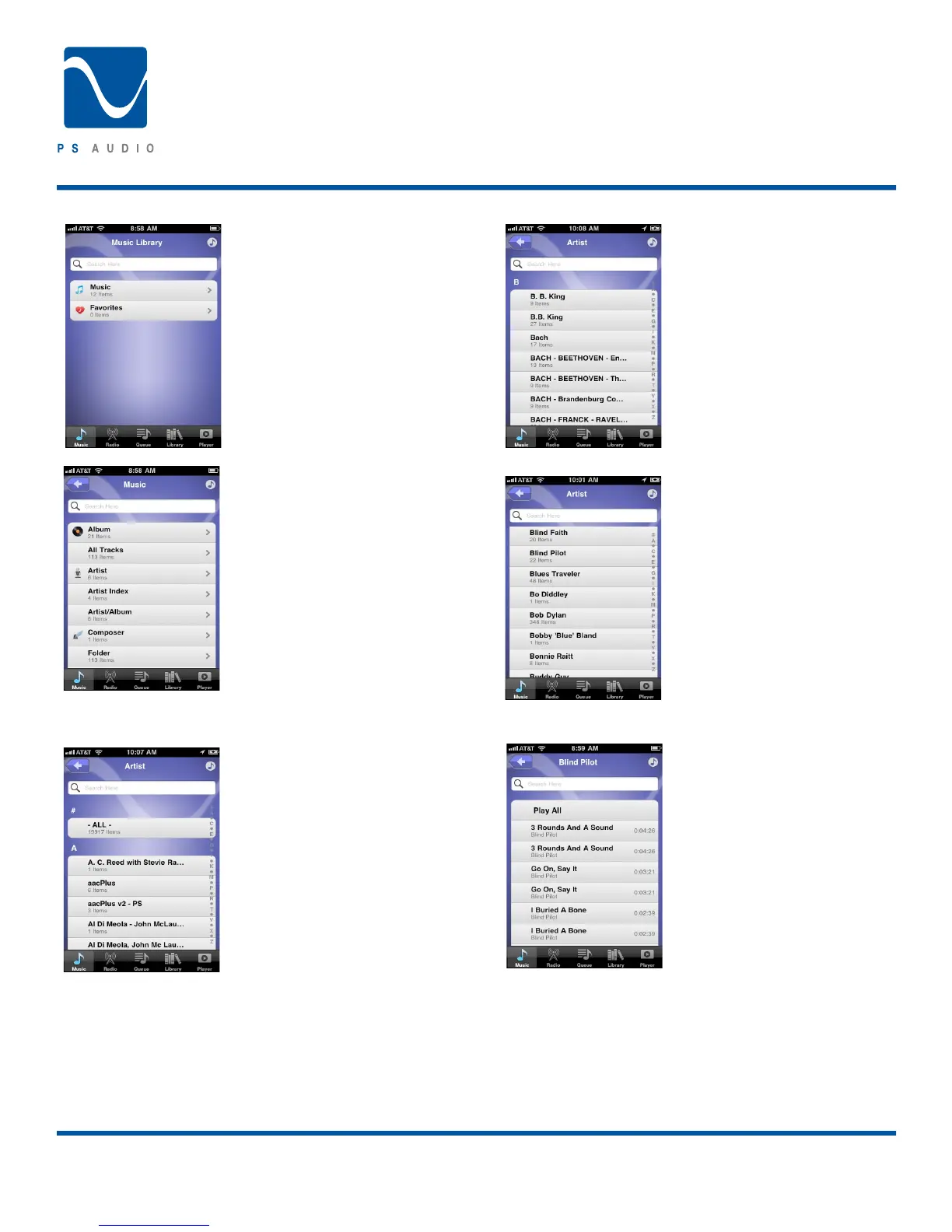
In the case of this server we now
select Music. Once in the Music
folder we can see multiple options
for deeper navigation:
At this point we select Artist since
we know the name of the art-
ist. After selecting Artist we are
presented with a list of Artists from
the Server.
We can now use the quick naviga-
tion letters at the far right of the
screen to quickly scroll to the rst
letter of the Artist name.
Then slide up and down to nd the
Artist ‘Blind Pilot.’
After drilling down to the Artist we
are presented with a list of tracks
by the Artist.
From this point you may select
Play All or any track individually.
Owner’s Reference
Perfect Wave DAC




 To Next Page