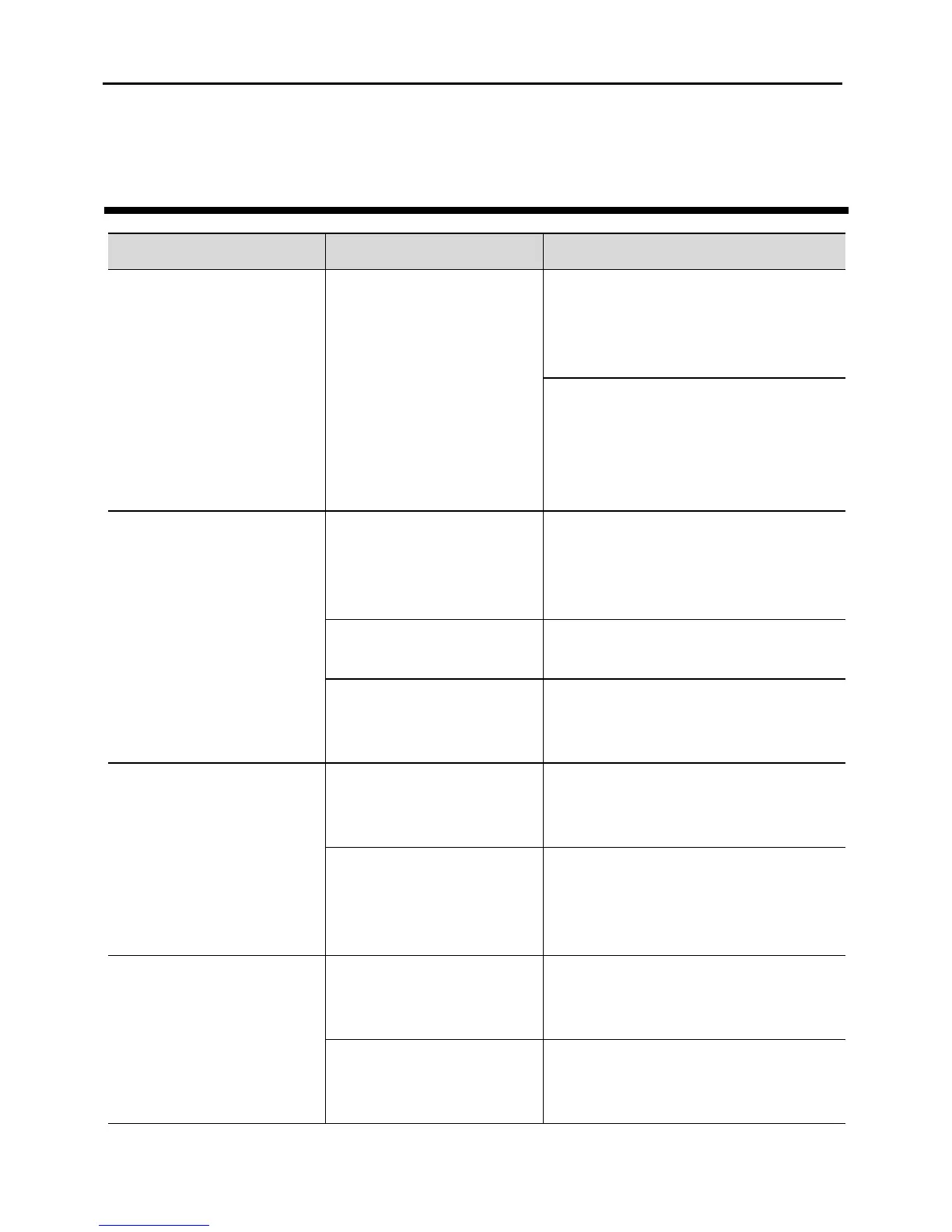
The STB indicators
are off and the STB
cannot be powered on
after you press the
power switch on the
rear panel.
Verify that the power cable is
properly connected and the
power switch on the rear panel is
turned on.
Verify that the power socket on
a wall or the extension cord
functions properly and that the
socket is not blocked by
something.
No video is displayed
on the TV screen.
The video cable or
network cable is not
properly connected.
Verify that the video cable and
network cable are properly
connected. For details, see
Connecting Cables.
Verify that the STB is powered
on.
The TV is in an
incorrect mode.
Verify that the TV is in the
correct mode. For details, see
Starting the STB.
The audio cable is not
properly connected.
Verify that the audio cable is
properly connected. For details,
see Connecting Cables.
The TV or the STB is
in mute mode or the
volume is extremely
low.
Switch the TV and STB to the
audible mode, and increase the
volume.
The remote control is
working abnormally.
The remote control is
far away from the
STB.
Move the remote control to a
workable distance.
The batteries in the
remote control are
low.


 To Next Page