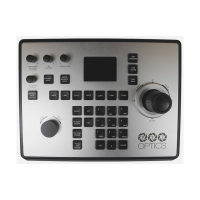
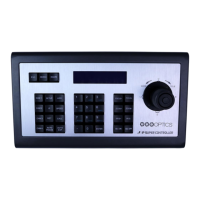
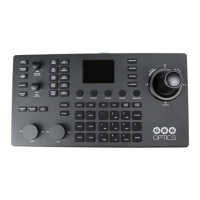
The PT-SUPERJOY-G1 is a 1st-generation network and serial camera controller designed to provide in-depth control for PTZOptics and HuddleCamHD cameras in production environments. It supports both IP and serial communication, making it a flexible control solution.
Function Description:
The controller allows users to pan, tilt, and zoom cameras, adjust white balance, exposure, and focus settings, and manage camera presets. It features a comprehensive layout with dedicated buttons and dials for various controls, an LCD screen for OSD menu navigation, and an alpha-numeric keypad for input.
Important Technical Specifications:
- Control Interfaces:
- Network: NIC (TCP and UDP)
- Serial: RS-232 Full Duplex, RS-485 Semi Duplex, RS-422 Full Duplex
- Protocols:
- PTZOptics VISCA and VISCA over IP
- PELCO-D and PELCO-P via Serial Ports
- Limited Sony VISCA and VISCA over IP support
- Limited ONVIF support
- Limited NDI support
- Variable Baud Rate: 1200 to 19200 bps
- Maximum Cable Distance:
- Ethernet: 328 feet | 100 Meters
- RS-232: 50 feet | 15 Meters
- RS-485: 3,937 feet | 1200 Meters
- RS-422: 50 feet | 15 Meters
- Maximum Cameras: 28 channels / cameras
- Power Voltage: 12V DC
- Power Consumption: 6W
- Power over Ethernet: 802.3af
- Working Temperature: 14° F ~ 122° F (-10° C ~ +50° C)
- Working Humidity: 10% ~ 90% (non-condensing)
- Weight: 3.75 lbs | 1.70 kg
- Dimensions: 13.94in W x 7.09in D x 1.97in H (3.98in H including joystick) / 354mm W x 180mm D x 50mm H (101mm H including joystick)
- Shipping Weight: 5.80 lbs | 2.63 kg
- Box Dimensions: 14.57in W x 8.46in D x 4.61in H / 370mm W x 215mm D x 117mm H
- Warranty: 2 Year Manufacturer Warranty
- Certifications: FCC Class B, CE (EMC Directive 2014/30/EU), RoHS (Directive 2011/65/EU).
Usage Features:
- White Balance Control: Adjusts red and blue gain, and cycles through modes like Auto, Indoor, Outdoor, OnePush, and Manual. The [RESET R/B GAIN] button resets to default, and the [ONEPUSH TRIGGER] button calibrates white balance in One Push mode.
- Exposure Control: Toggles backlight compensation and cycles through exposure modes including Auto, Manual, Shutter Priority, Iris Priority, and Brightness Priority. The [IRIS / SHUTTER] knob adjusts Iris and Shutter values.
- Speed Control: Dedicated buttons for adjusting Tilt, Pan, Zoom, Focus, and Preset speeds.
- Custom Control Buttons: Four programmable buttons ([CUSTOM 1-4]) for sending custom commands via HTTP Trigger, UART, TCP, UDP, or Super Presets to network-based equipment.
- Camera OSD Control: Buttons ([OSD ON / OFF], [OSD ENTER], [OSD BACK]) and joystick movements allow for navigating and adjusting the camera's on-screen display menu.
- SuperJoy Unique Control: Includes [CAM GROUP] to cycle through camera groups, [HDMI OUTPUT] to enable HDMI output of the connected camera, [BASIC MODE] to toggle between Basic Mode and normal control, and [MATRIX MODE] to toggle between Matrix Mode and normal control.
- Joystick Controller: Provides pan, tilt, and zoom (twist) control, with speed affected by the Speed Control dial.
- Focus Mode Control: Buttons for [AUTO FOCUS LOCK], [AUTO FOCUS UNLOCK], and [AUTO FOCUS] to manage the camera's focus mode. The [FOCUS] dial allows fine-tuning.
- Controller Information: [INQUIRE] button to open the controller's device list and [SETUP] button to open the controller's OSD menu.
- Preset Control Buttons: [HOME] button to send the camera to its home position. [SET] and [CALL] buttons, used with the alpha-numeric keypad, allow setting and recalling up to 255 camera presets. Quick Set and Quick Call Preset Shortcuts are available by holding or tapping alpha-numeric keys.
- Focus & Zoom Control Dials: [FINE TUNE FOCUS] and [FINE TUNE ZOOM] dials for precise, low-speed adjustments.
- Camera Select Buttons: [CAM ID] allows selecting any camera via the keypad, while [CAM #] buttons (1-6) provide quick selection.
- Alpha-Numeric Keypad: Used for numerical input and accessing various controller features.
- Power Options: Can be powered by the included 12V 2A international power supply or Power over Ethernet (802.3af).
- Camera Connection: Supports Network Control (TCP/UDP) and Serial Control (RS-232, RS-485, RS-422). Offers "Daisy-Chaining" and "Home-Run" setups for multiple serial cameras.
- Network Setup: Dynamically obtains an IP address via DHCP or allows for static IP configuration through the OSD menu.
- Web Interface: Provides device management for adding and configuring cameras, calling presets (Control page), and accessing Matrix Mode.
- Settings Interface: Allows adjustment of network configuration (DHCP/Static IP, Subnet Mask, Gateway, DNS), firmware upgrades, factory restore, restart, import/export settings, user management, system settings (invert Pan/Tilt), and viewing system information (Software, Hardware, Web firmware versions).
- Basic Mode: Disables most SuperJoy capabilities, limiting control to the joystick and/or calling presets. Activated/deactivated via the [BASIC MODE] button.
- Matrix Mode: Disables most SuperJoy capabilities, limiting controls to calling presets 1-3 of cameras 1-3 via the alpha-numeric keypad.
Maintenance Features:
- Care Instructions: Keep away from rain and moist environments. Do not remove case portions to avoid electrical shock and voiding warranty. Operate within recommended temperature (14° ~ 122°F) and humidity (10 ~ 90% non-condensing) ranges. Use only the supplied power supply. Keep away from strong electromagnetic sources.
- Cleaning: Use a soft dry cloth. For extreme dirt, use a diluted neutral detergent. Do not use solvents.
- Firmware Upgrade: Supports firmware upgrades via USB drive through the OSD menu.
- Configuration Import/Export: Allows importing and exporting controller settings via USB drive.
- Factory Restore: Option to restore the joystick to factory default settings, removing all cameras and resetting control speeds and network information.
- Troubleshooting: Provides guidance for issues such as "Control Failure" on the LCD, joystick not controlling cameras, multiple cameras being controlled, camera not stopping movement, and certain functions not working with specific camera models. Recommends checking network connections, camera control addresses, and updating PTZOptics camera firmware.
- Support: Contact information for PTZOptics support team and links to Knowledge Base and Forums for assistance.

 Need help?
 General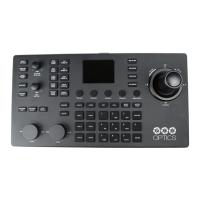

 To Next Page