PUDU ROBOTICSPUDU ROBOTICS
20
ESP32
WIFI
4G
2.4GHz-2.5GHz;BT:2402-2480MHz
2.4G, 2.400GHz-2.497GHz(2.4 GHz ISM Band);5G, 4.900GHz-
5.845GHz(5.0 GHz ISM Band); BT: 2402-2480MHz
B1/B2/B4/B5/B6/B7/B8/B12/B13/B18/B19/B20/B25/B26/B28/
B66/B34/B38/B39/B40/B41
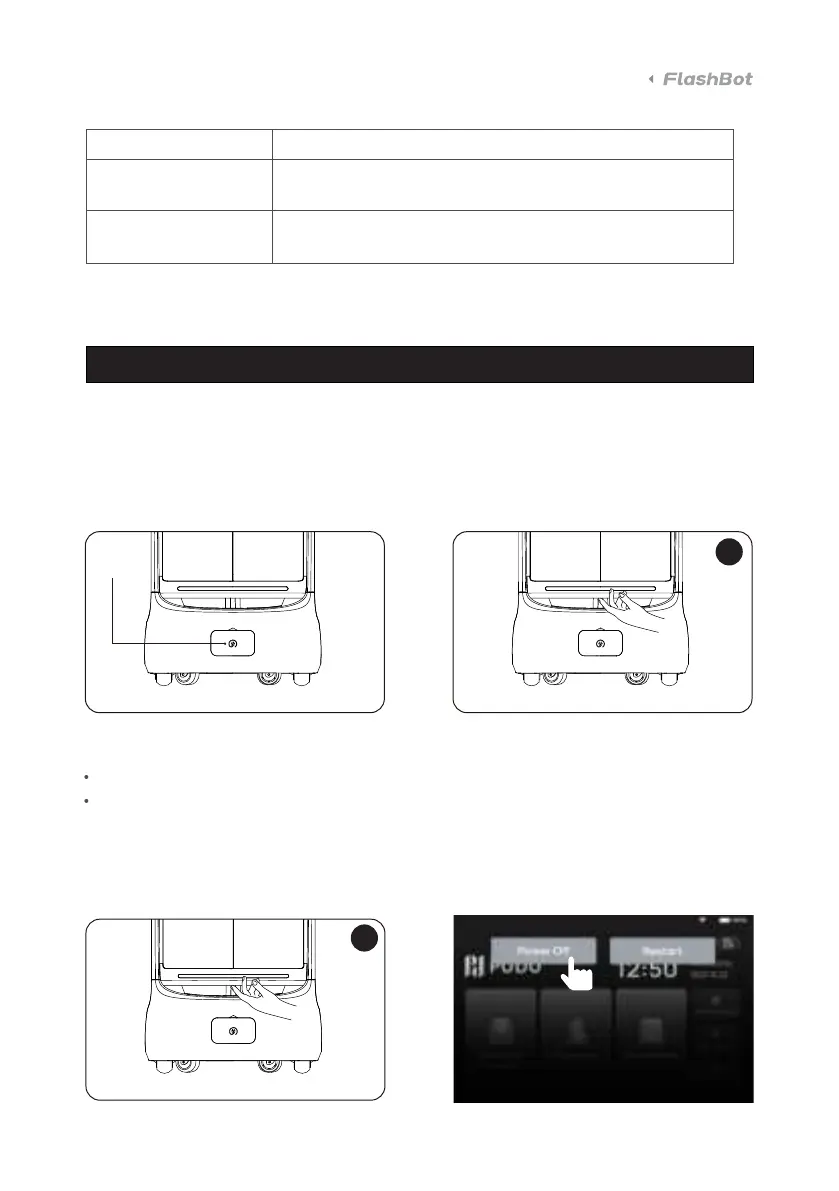
3.1 Powering on and o
Power-on:
Push the robot to the positioning location → Turn on the key switch → Press and hold the on/o
switch for 0.5 seconds, and wait until the bottom appears in blue.
Functions
Multi-location power-on is allowed.
The charging pile can be set as the power-on location.
Power-o:
Press and hold the on/o switch for 3 seconds, at which point the lamp and screen are o
Forced power-o: Press and hold the power switch for 10 seconds.
Positioning location for power-on:
3s
0.5s
KEY



 To Next Page