EasyManua.ls Logo

Pulsar ACCOLADE 2 LRF XP50 PRO - User Manual

Pulsar ACCOLADE 2 LRF XP50 PRO
15 pages
Print Icon
To Next Page IconTo Next Page
Loading...
ACCOLADE 2 LRF
XP50 PRO
USER
MANUAL
Thermal Imaging
Binoculars

Other manuals for Pulsar ACCOLADE 2 LRF XP50 PRO

Question and Answer IconNeed help?

Do you have a question about the Pulsar ACCOLADE 2 LRF XP50 PRO and is the answer not in the manual?

Summary

Specifications

Features

Components and Controls

Using the Battery Pack

Battery Charging

Steps to charge the rechargeable Li-Ion Battery Pack IPS7 before first use.

Battery Installation

Procedure for installing the battery into the device housing correctly.

Button Operation

Powering On and Image Setting

Microbolometer Calibration

Discrete Digital Zoom

Main Menu Functions

Quick Menu Functions

Wi-Fi Activation

Mode

Calibration Mode

PiP Mode

Wi-Fi Settings

General Settings

Remote Control

Rangefinder

Defective Pixel Repair

Restore Default Pixel Map

Cancel defective pixel deletions and return pixels to original state.

Video Recording and Photography

Built-In Laser Rangefinder

PiP Function

Stream Vision

Firmware Update

USB Connection

Wireless Remote Control

Technical Inspection

Technical Maintenance and Storage

Troubleshooting

Summary

Specifications

Features

Components and Controls

Using the Battery Pack

Battery Charging

Steps to charge the rechargeable Li-Ion Battery Pack IPS7 before first use.

Battery Installation

Procedure for installing the battery into the device housing correctly.

Button Operation

Powering On and Image Setting

Microbolometer Calibration

Discrete Digital Zoom

Main Menu Functions

Quick Menu Functions

Wi-Fi Activation

Mode

Calibration Mode

PiP Mode

Wi-Fi Settings

General Settings

Remote Control

Rangefinder

Defective Pixel Repair

Restore Default Pixel Map

Cancel defective pixel deletions and return pixels to original state.

Video Recording and Photography

Built-In Laser Rangefinder

PiP Function

Stream Vision

Firmware Update

USB Connection

Wireless Remote Control

Technical Inspection

Technical Maintenance and Storage

Troubleshooting

Overview

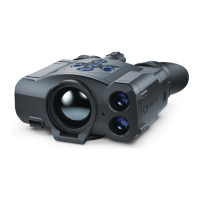
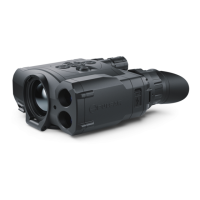
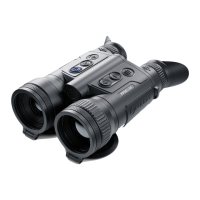
The Pulsar Accolade 2 LRF XP50 Pro is a pair of thermal imaging binoculars designed for comfortable observation with both eyes, suitable for use in various conditions including night-time, daytime, and adverse weather. It is particularly useful for detecting objects that are difficult to see with the naked eye, such as targets, branches, tall grass, and bushes. The device integrates a precise built-in laser rangefinder for accurate distance measurement up to 1000 meters. These binoculars are designed for a wide range of applications, including night hunting, observation, trail orienteering, and rescue operations.

Technical Specifications

The Accolade 2 LRF XP50 Pro features an uncooled microbolometer with a resolution of 640x480 pixels and a pixel pitch of 17 µm. The NETD is less than 25 mK, ensuring high thermal sensitivity. It operates at a frame rate of 50 Hz, providing smooth imaging. The optical magnification ranges from 2.5x to 20x, with a digital zoom of 2x/4x/8x. The objective lens has a focal length of 50 mm and an aperture of f/1.2. The close-up distance is 3 meters. The field of view at 100 meters is 21.8 meters horizontally and 16.4 meters vertically. The eye relief is 15 mm, and the diopter adjustment ranges from -5 to +5. The interpupillary distance adjustment ranges from 56 to 71 mm. The detection range for a deer-type object (1.7x0.5 meters) is 1800 meters. The display is AMOLED with a resolution of 640x480 pixels.

Power is supplied by a Li-Ion Battery Pack IPS7 with a capacity of 6400 mAh and an output voltage of 3.7 V (DC 3.0-4.2 V). The external power supply is 5 V. The operating temperature range is from -25°C to +50°C. The device has an IPX7 degree of protection (IP Code IEC60529). The dimensions are 164 x 130 x 64 mm (6.46 x 5.12 x 2.52 inches), and it weighs 0.6 kg (21.2 oz).

The video recorder supports a resolution of 640x480 pixels in .avi format and .jpg image format. It has 16 GB of built-in memory, capable of storing 650 minutes of video or more than 100,000 photos. The Wi-Fi channel operates at 2.4 GHz, with an 802.11 b/g standard and a line-of-sight reception range of up to 15 meters. The laser rangefinder operates at a wavelength of 905 nm, with a maximum measuring range of 1000 meters and an accuracy of +/- 1 meter.

Usage Features

The Accolade 2 LRF XP50 Pro offers several user-friendly features:

  • Picture-in-Picture mode: Allows simultaneous viewing of a magnified image in a small window while maintaining the main image in a wider field of view.
  • Color palettes: Multiple color palettes (Black Hot, Red Hot, White Hot, Rainbow, Ultramarine, Violet, Red Monochrome, Sepia) are available to optimize observation based on conditions.
  • Observation modes: Three preset observation modes (Forest, Rocks, Identification) are available to suit different environments.
  • Calibration modes: Manual, semi-automatic, and automatic calibration modes are available for the microbolometer.
  • 3 calibration modes: For fine-tuning image quality.
  • Manual contrast and brightness adjustment: Allows users to customize image settings for optimal viewing.
  • Built-in precision laser rangefinder: Measures distances up to 1000 meters with high accuracy.
  • Comfortable for long observation: Ergonomic design for extended use.
  • Variable interpupillary distance: Adjustable to suit individual users.
  • High refresh rate 50 Hz: Provides smooth and fluid imaging.
  • Built-in video recorder: Captures videos and still images.
  • Built-in Wi-Fi module: Enables wireless connectivity for streaming and data transfer.
  • Live internet video sharing: Stream live video to smartphones or tablets.
  • Frost resistant AMOLED display: Ensures reliable performance in cold conditions.
  • Quick-change long-life rechargeable Battery Packs: Provides extended operating time.
  • Fully waterproof IPX7: Ensures durability and protection against water immersion.

The device is controlled via a series of buttons: Power ON/OFF/Calibration, Navigation UP, Button MENU, Recording button REC, Navigation button DOWN. It also features interpupillary distance adjustment rings, diopter adjustment rings, a lens focusing ring, and a battery pack latch. Connectivity options include a MicroUSB port and a MicroUSB cable.

The Accolade 2 LRF XP50 Pro supports external power supply via Power Bank (5 V) and includes a MicroUSB port for charging and data transfer. The device can be connected to a computer for file management and firmware updates.

Maintenance Features

Regular maintenance is crucial for the longevity and optimal performance of the Accolade 2 LRF XP50 Pro.

  • General cleaning: Wipe external plastic and metal surfaces clean of dust and dirt with a soft cloth moistened with a synthetic cleaning agent.
  • Electrical contacts: Clean the electric terminals of the Battery Pack and device’s battery slot using a grease-free organic solvent.
  • Optics: Check the objective and eyepieces lenses, rangefinder’s emitter and receiver lenses. If required, remove dust and sand (preferably by a noncontact method). Clean the external surfaces of the lenses with products especially designed for this purpose.
  • Storage: Store the device in a carrying case when not in use.
  • Battery care: The battery should be partially charged for long-term storage (50% to 80%). Do not charge the battery immediately after bringing the battery from cold environment to a warm one. Wait for 30-40 minutes for the battery to get warm. Charge the Battery Pack at a temperature from 0°C to +35°C. Otherwise, battery’s life will decrease significantly. Do not leave a battery unattended while charging. Never use a modified or damaged charger. Do not leave the battery in a charger connected to the mains after charging is complete. Do not expose the battery pack to high temperature or to a naked flame. Do not submerge the battery in water. Do not connect external devices with a current consumption that exceeds permitted levels. The Battery Pack is short circuit protected. However, avoid any situation that may cause short-circuiting. Do not dismantle or deform the Battery Pack. Do not drop or hit the battery. When using the battery at negative temperatures, battery’s capacity decreases, this is normal and is not a defect. Do not use the battery at the temperatures above those shown in the table - this may decrease battery’s life. Keep the battery out of the reach of children.
  • Firmware updates: Regularly check for and install firmware updates to ensure optimal performance and access to new features.
  • Troubleshooting: The manual provides a detailed troubleshooting guide for common issues such as device not turning on, blurry images, Wi-Fi signal loss, and rangefinder inaccuracies, along with possible causes and solutions. For example, if the device does not turn on, the battery pack might be empty and needs charging. If the image is blurry, microbolometer calibration might be required.

The device is designed for a service life of 5 years, and repairs are typically completed within this period. Detailed product descriptions and complete user manuals are available for download on the official Pulsar website.

Pulsar ACCOLADE 2 LRF XP50 PRO Specifications

General IconGeneral
BrandPulsar
ModelACCOLADE 2 LRF XP50 PRO
CategoryBinoculars
LanguageEnglish

Related product manuals