7
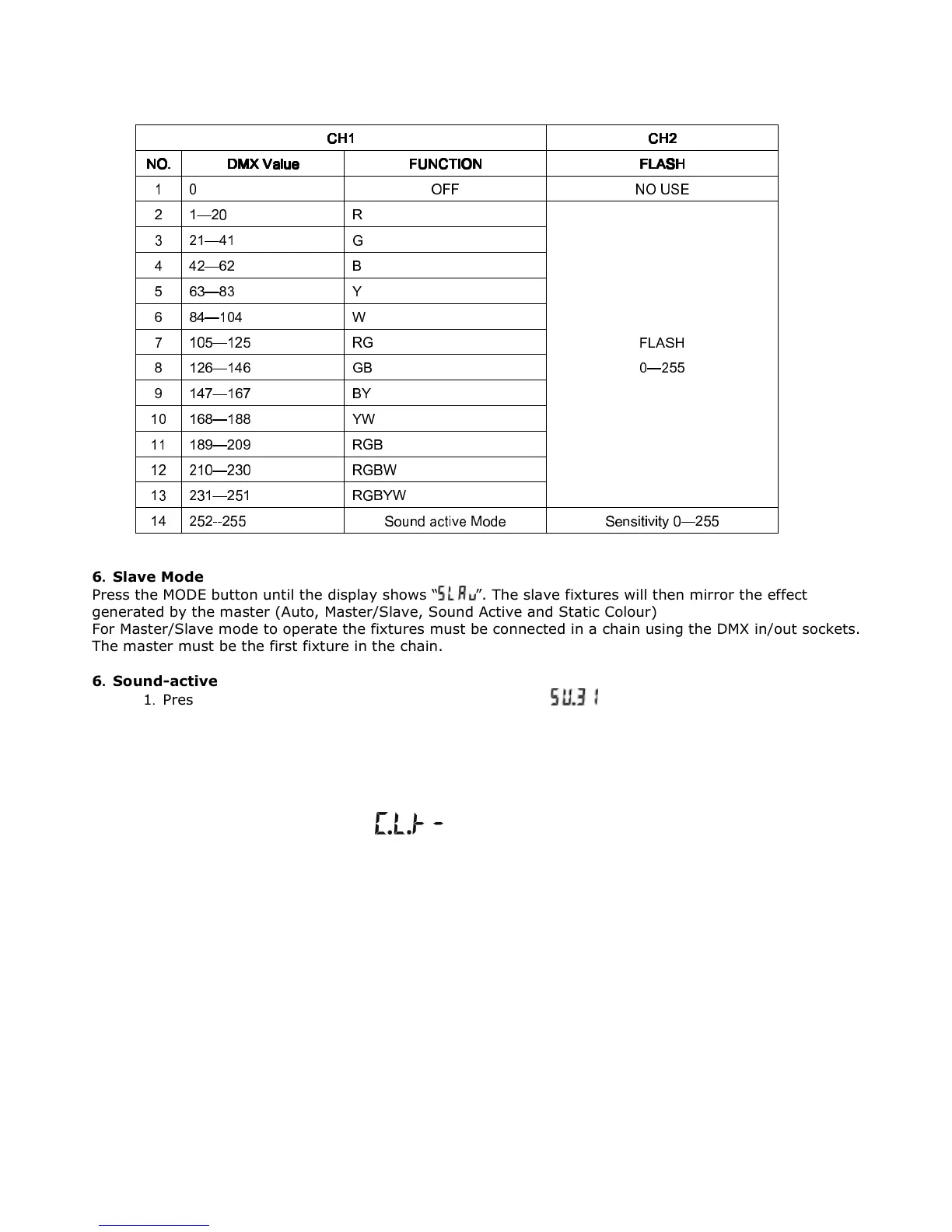
DMX mode 2 (d-P2) = 2-CH
CH1
CH1CH1
CH1
CH2
CH2CH2
CH2
NO.
NO.NO.
NO.
DMX
DMXDMX
DMX
Value
ValueValue
Value
FUNCTION
FUNCTIONFUNCTION
FUNCTION
FLASH
FLASHFLASH
FLASH
1 0 OFF NO USE
2 1—20 R
FLASH
0—255
3 21—41 G
4 42—62 B
5 63—83 Y
6 84—104 W
7 105—125 RG
8 126—146 GB
9 147—167 BY
10 168—188 YW
11 189—209 RGB
12 210—230 RGBW
13 231—251 RGBYW
14 252--255 Sound active Mode Sensitivity 0—255
6. Slave Mode
Press the MODE button until the display shows “ ”. The slave fixtures will then mirror the effect
generated by the master (Auto, Master/Slave, Sound Active and Static Colour)
For Master/Slave mode to operate the fixtures must be connected in a chain using the DMX in/out sockets.
The master must be the first fixture in the chain.
6. Sound-active
1. Press the MODE button, until the sound active mode “ ” is displayed on the menu.
2. Press the UP or DOWN button to setup the sensitivity of the sound active menu SU.00~SU.31.
Notice: After 20 seconds inactive, the LED display will switch off. If any button is pressed, the LED display
will be resume to the original state. All buttons will then work as normal.
6. Static Colour Select
Press the “MODE” button to select , there are 12 built-in static color effects. You can select
different effect by pressing “UP” and “DOWN” buttons.



 To Next Page