Section 2
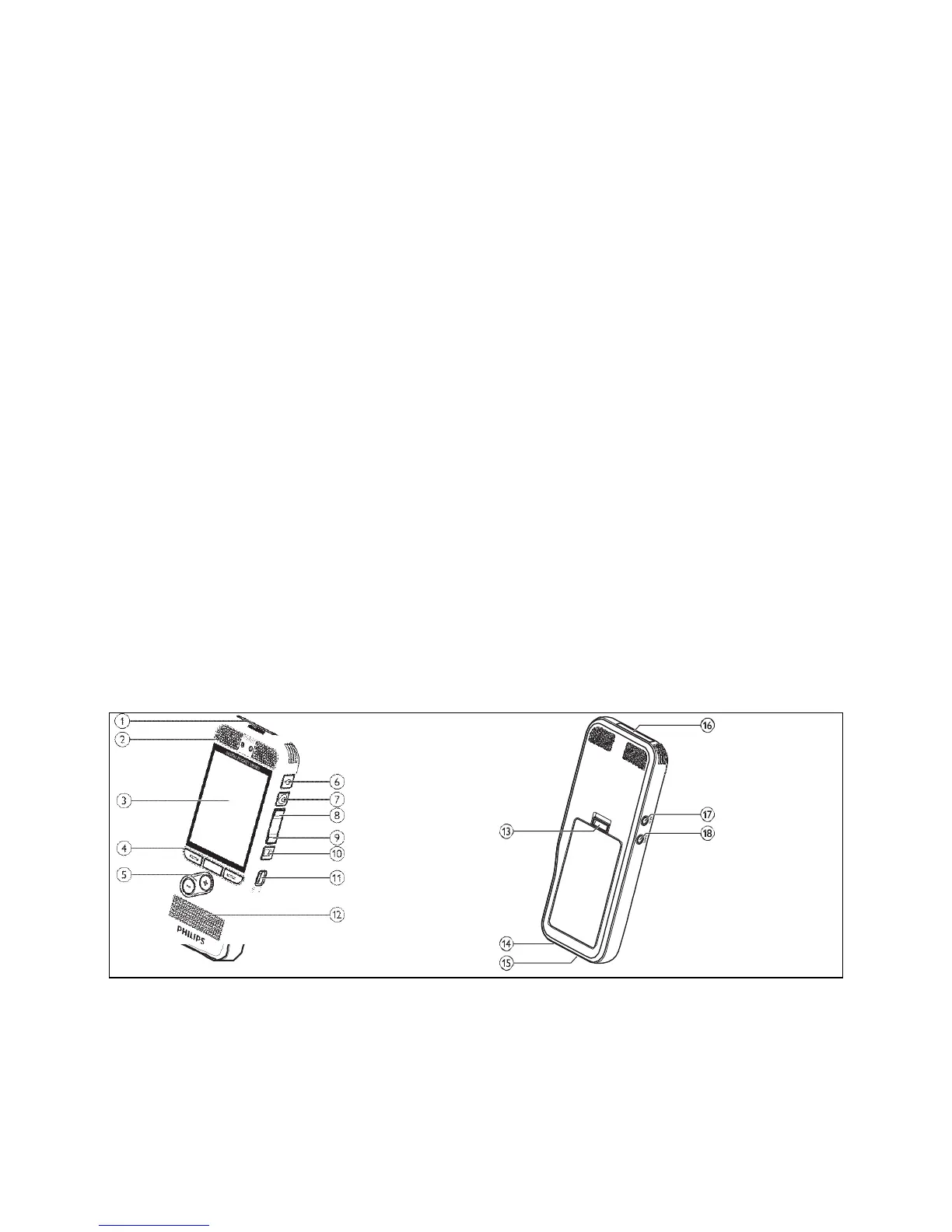
PUMA 5 Buttons, Controls, and Parts
LED FUNCTION LIGHT- RED indicates recording in Contact mode or Dictation overwrite mode. Light will
be off while recording in Tactical mode. Green indicates Insert function, only available in Dictation
mode.
2. MICROPHONES
3. LED DISPLAY SCREEN
4. MULTIFUNCTION BUTTONS- REC, STOP, PAUSE, MENU, BACK, ENTER, OK. Functions and labels of
the individual buttons will change depending on which mode the recorder is set to.
5. + /- : File navigation in stop mode, volume control during playback, menu navigation.
6. RECORD HOLD / EOL BUTTON- Functions as a RECORD HOLD button in all modes. Also functions as
the EOL (end of letter) button in Dictation mode.
7. RECORD/PAUSE BUTTON- Functions as the REC/PAUSE button in Dictation mode. Button is disabled
in Contact or Tactical mode.
8. REWIND BUTTON- Rewinds or backspaces in Dictation mode and moves backward while listening in
any mode.
9. FORWARD BUTTON- Forwards the recording in Dictation mode and moves forward while listening in
any mode.
10. STOP/PLAY BUTTON- Starts and stops playback of completed recordings.
11. ON/OFF SWITCH- Turns the recorder power on or off.
12. Speaker.
13. Battery Cover Latch.
14. Docking/Charging cradle connector.
15. USB Download/Charging cable connector.
16. Memory Card Slot.
17. External 3.5mm microphone jack. Also used to connect the optional telephone record mic.
18. Earphone jack 3.5mm. Also used to connect the optional Remote Switch.


 To Next Page