- 5 -
UNPACKING
Inspect this device before beginning installation. Occasionally,
products are damaged during shipping. If the outlet or any
components are damaged, contact PumpSpy Technical Customer
Support: (833) 786-7779 | support@pumpspy.com
1. Download the PumpSpy app from the App Store (iOS devices) or
Google Play (Android devices).
2. Unplug your sump pump and any other cords from the AC wall
outlet.
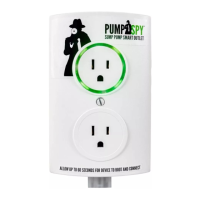
3. Plug the Smart Outlet 2.0 into the AC wall outlet. Secure
the Smart Outlet 2.0 to the AC wall outlet with the included
mounting screw if desired.
4. Open the PumpSpy app and follow the on-screen instructions to
connect the Smart Outlet 2.0 to a WiFi network.
5. Plug your sump pump and oat activation switch (if applicable)
to the top receptacle on the Smart Outlet 2.0. Connect any
other desired devices to the bottom receptacle on the Smart
Outlet 2.0.
6. Install the High Water Float Switch at least 1” higher than the
“on” level of the main sump pump. More details on Page 8. Use
a screwdriver to secure the hose clamp to the discharge pipe.
Connect the High Water Float Switch to the bottom of the
Smart Outlet 2.0 at the green connection.
INSTALLATION
ATTENTION
Before installing the PumpSpy Smart Outlet 2.0, verify that your
sump pump is in good working condition. Replace the sump pump
if necessary.



 To Next Page