98
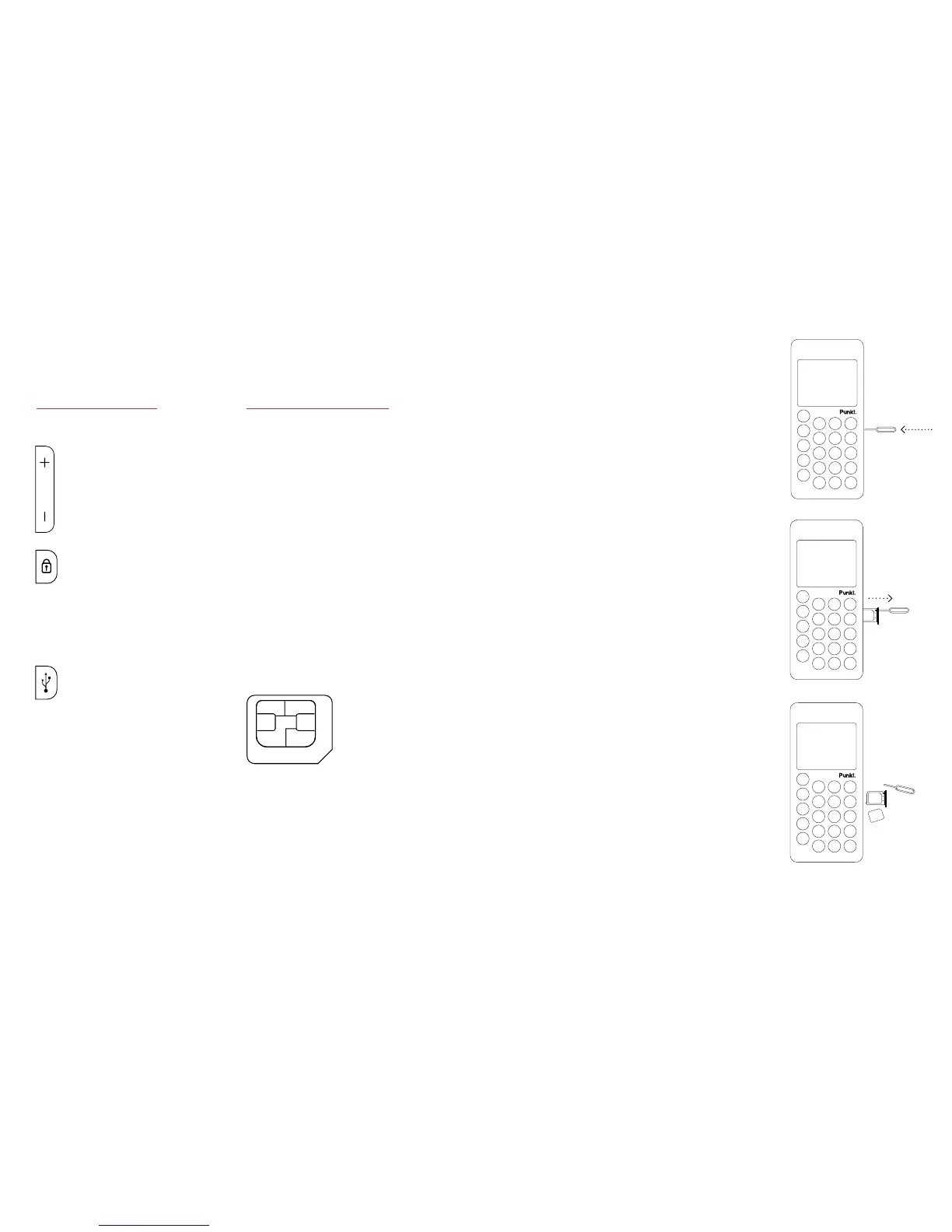
· The MP 01 is designed
to be used with a Micro-
SIM (3FF) only (see
image below).
· Incompatible SIM
cards can damage the
card or device, and may
corrupt data stored in
the card. Permanent use
of SIM adapter is not
recommended.
Micro-SIM
card (3FF)
Volume
· Volume up/down on
the ringer, speaker and
headset (if connected)
Lock
· Lock/Unlock screen
· LONG PRESS: Power
On/O
USB Connector
· Open the door to connect
USB cable to charge
Antenna Area
· Avoid touching or covering
while the antenna is in use.
Contactmayaectthe
communication quality
and drain battery.
Side
and back.
Inserting
a SIM card.
1.SwitchotheMP01
and disconnect the charger
before opening the external
SIM tray on the right side.
Always store and use the
MP 01 with the SIM
tray closed.
2. Insert the SIM tray
opener pin into the
small hole on the SIM
tray, located on the right
side of MP 01, and push
gently until the SIM tray
pops out.
3. Remove the SIM tray
and place the SIM card
inside it with the contact
area face down.
4. Reposition the tray
in the slot (the small hole
on the top side) and push
it gently back into the
phone before switching
on the MP 01.



 To Next Page