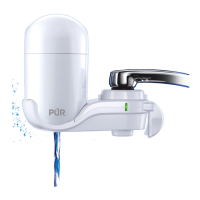
PUR Chrome Horizontal Faucet Filtration System PFM400H
• Question: How do I install my faucet system?
Answer:
Please refer to https://youtu.be/5UKBfQw7Ci0 and the steps below:
1. Remove your original aerator and its washer. Use a rubber jar opener if the aerator is difficult
to remove.
2. Identify your faucet threading – either external or internal.
3. Attach the device to your faucet.
• Question: How do I reset the filter light?
Answer:-
1. Remove filter and place back into unit.
2. Push the reset button in for 3 seconds until all 3 lights flash, then release.
3. Make sure reset button is not stuck in. If reset button is stuck, pull up on button so it springs
back into place
Trouble Shooting Steps
• Check to make sure old aerator washer was removed and only the new adapter washer is being used. •
If the enclosed adapters do not fit, contact PUR Consumer Relations at 1-800-PUR-LINE (1-800-787-
5463).
Adapters don’t fit / won’t stay attached / keep falling off.
Water leaks out around the filter cover. Slow water flow in the filtered position. Water leaks around the
faucet adapter and faucet.
• Remove the filter cartridge and reinstall the filter cartridge again. • Replace the filter cartridge.
Difficulty in removing the old filter cartridge to replace the filter.
• Check to see that the washer was placed on top of the faucet adapter when installed. • Make sure the
adapter is hand-tightened securely to the faucet. • Make sure the unit is securely attached to the faucet
adapter. • Remove the filter system unit from the faucet by squeezing the quick release buttons. •
Remove the cover. • Slowly turn or twist the filter cartridge. This will help loosen the filter.
Technical Specifications:
FILTER CAPACITY: 100 gallons (378 liters)/up to 3 months
RATED SERVICE FLOW: 0.52 gallons/minute (2.0 liters/minute) at 60 psig
MAXIMUM TEMPERATURE: 100°F (38°C)
MINIMUM TEMPERATURE: 34°F (1°C)
MAXIMUM WORKING PRESSURE: 100 psig (690 kPa)

 Need help?
 General

 To Next Page