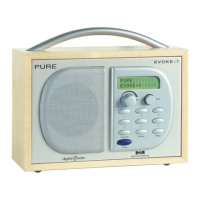
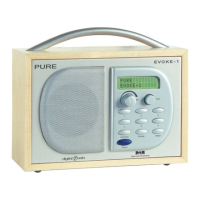
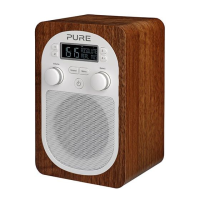
The EVOKE-1XT Prestige is a DAB (Digital Audio Broadcasting) digital radio designed for discerning listeners, offering a unique blend of technology, audio quality, and aesthetic appeal. It features a real wood cabinet with a high-lacquer walnut veneer, providing a sophisticated look. The radio is equipped with hi-fi quality amplifiers and speakers, and it comes with an acoustically-matched separate XT-1 speaker for true stereo separation, promising an unparalleled listening experience.
Function Description:
The primary function of the EVOKE-1XT Prestige is to receive and play DAB digital radio broadcasts. It allows users to scan for stations, store presets, and display various information about the broadcast. The radio also includes an alarm function and a countdown timer, making it versatile for different uses.
Important Technical Specifications:
- Radio Type: DAB digital radio
- Cabinet Material: Real wood with high-lacquer walnut veneer
- Audio Output: Hi-fi quality amplifiers and speakers, with an additional acoustically-matched XT-1 speaker for stereo.
- Connectivity:
- USB port for software upgrades.
- Stereo Out (analogue output) for connecting to an external amplifier or recorder.
- Headphone jack (mutes speaker when in use).
- Aux Speaker port for the supplied XT-1 speaker.
- 9V DC input for the supplied mains adapter.
- F-type connector for the supplied telescopic or other aerial.
- Display: Features a screen that shows station names, scrolling text, time and date, program type, multiplex name, channel, mode (stereo/mono, data rate), and signal quality.
- Power: Operates via a 9V DC mains adapter.
- DRC (Dynamic Range Control): Supports DRC levels (0, ½, 1) to adjust the dynamic range of broadcasts, making quieter sounds easier to hear in noisy environments.
Usage Features:
- Station Tuning:
- Autotune: Press and release to scan UK only Band III; press and hold for two seconds to scan the full range of digital frequencies in Band III.
- Tune Knob: Turn to scroll through stations and press to select.
- Presets (1-6): Press and hold for two seconds to store a station; press and release to select a preset station.
- Information Display: The "Info" button allows users to cycle through different display modes on the bottom line of the screen, including scrolling text, program type, multiplex name, time and date, channel, mode (stereo/mono, data rate), and signal quality.
- Alarm Function:
- A daily alarm can be set to switch the radio on (from standby) and tune to a chosen station or sound a tone.
- Settings include "Set alarm" (on/off), "Set time" (hours and minutes), and "Set mode" (Radio or Tone alarm).
- The alarm volume is determined by the radio's volume control at the time the alarm activates.
- Alarms can be cancelled by pressing any button (radio alarm) or the Tune knob/Standby button (tone alarm).
- Alarms automatically stop after 60 minutes if not cancelled, and the radio returns to standby.
- Countdown Timer:
- Set a timer from 1 minute to 23 hours 59 minutes.
- The timer sounds an alarm after the set period.
- Press the "Timer" button to view remaining time.
- Press and hold the "Timer" button for three seconds to cancel or reset the timer.
- The alarm can be cancelled by pushing the Tune or Standby button.
- Setup Options (accessed via Menu button):
- Station Order: Allows users to change the order of stations in the list:
- Alphanumeric: Displays all stations alphabetically.
- Fav station: Displays six most listened-to stations at the top, marked with a special icon, followed by others alphabetically.
- Active station: Displays active stations at the top and inactive ones (marked with '?') at the bottom.
- Multiplex: Lists stations grouped by their multiplex.
- Trim stn. list: Removes inactive stations from the list.
- → Presets: Transfers favourite stations to the six preset buttons (available only when "Fav station" order is selected).
- Display Brightness: Adjusts screen brightness between Low and High.
- Standby Mode: Choose whether the backlight is on or off when the radio is in standby.
- DRC Value: Adjusts Dynamic Range Control (DRC) settings (DRC 0, DRC ½, DRC 1) to manage audio dynamics, particularly for quieter sounds.
- Tuning Aid: Provides a visual signal level display to help users find the best position for the radio and aerial. Users can scroll through channels, observe the signal level (empty block for minimum required, filled blocks for current), and adjust the aerial for optimal reception.
- Secondary Services: The radio can display secondary services (extra information or alternative content) accompanying some stations, indicated by '>>' next to the station name.
- Resetting the Radio: Press and hold the Menu button for three seconds, then push the Tune knob to confirm, to remove all presets, stored stations, favourite stations, and reset all options to defaults.
Maintenance Features:
- Care Instructions:
- Keep away from heat sources and direct sunlight.
- Do not use near water.
- Avoid objects or liquids getting into the radio.
- Do not remove screws or open the casing.
- Do not expose cabinets to detergents, solvents, abrasive materials, or direct heat sources (e.g., hot drinks).
- Clean gently with a soft cloth.
- Occasional use of light furniture polish (applied with a soft cloth) helps protect the surface.
- Software Upgrades: The USB port allows for software upgrades using a PC. Instructions are provided with the software, and updates may offer enhanced functions or improved performance. Users are advised to check the manufacturer's website for details on available upgrades.
- Troubleshooting: The manual provides hints and tips for common issues such as 'burbling' sounds (check aerial, use tuning aid), 'No stations available' display (check aerial, use Autotune/tuning aid), alarm not working (check settings, volume, headphones), incorrect clock time (try another multiplex), and no audio (check if in standby).

 Need help?

 To Next Page
 General