EasyManua.ls Logo

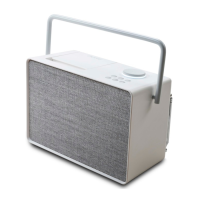
PURE Evoke Play - User Manual

PURE Evoke Play
80 pages
Print Icon
To Next Page IconTo Next Page
Loading...
User Guide
Evoke Spot
Evoke Play
Evoke Home
Internet Radio . DAB+ . FM . Spotify Connect®. Bluetooth®. CD.
Evoke Series
Question and Answer IconNeed help?

Do you have a question about the PURE Evoke Play and is the answer not in the manual?

Summary

Controls Overview

Preset Area Controls

Details controls for Evoke Spot & Play, including volume dial and presets.

Display Area Controls

Details controls related to the display, including source selection and navigation.

CD Area Controls (Evoke Home)

Details controls specific to the CD function on Evoke Home models.

Foldaway Display Functionality

Explains the functionality and operation of the foldaway display.

Light Ring Indicators

Remote Control Operation

Resetting Your Evoke

Understanding the Evoke Display

Display Screen Types

Describes the five basic types of screens shown on the Evoke display.

Menu Navigation Guide

Explains how to navigate through the Evoke's menu system using the navigation arrows.

Initial Setup Procedure

Setup Wizard and Network Connection

Accessing Audio Sources

Internet Radio and Podcasts

Explains how to find and play internet radio stations and podcasts.

Station List Browsing Methods

Details methods for searching and browsing stations by country, genre, or popularity.

DAB Radio Operations

DAB Station Tuning and Scanning

Explains how to tune into DAB stations, scan for new ones, and manual tuning.

DAB Now Playing Information

Describes the information displayed while a DAB station is playing.

FM Radio Operations

FM Station Selection and Scanning

Details how to select FM stations, scan frequencies, and view broadcast information.

FM Scan Settings

Covers scan settings for FM radio to filter by signal strength.

Bluetooth and Spotify Integration

Bluetooth Pairing and Playback

Explains how to pair devices and view playback information via Bluetooth.

Spotify Connect Streaming

Guides on using Spotify Connect for streaming music via the Spotify app.

CD and AUX Input Operations

CD Playback Controls

Details how to insert, play, repeat, shuffle, and eject CDs on Evoke Home.

AUX Audio Connection

Explains how to connect external devices using an auxiliary cable.

Alarms, Snooze, and Sleep Timer

System Settings Management

Menu Navigation and Equaliser

Explains how to navigate menus and adjust sound via the equaliser.

Time;Date and Display Settings

Covers time/date settings, auto-update, backlight, and light ring adjustments.

Network, Standby, and Reset

Details network connectivity, inactive standby, language, and factory reset procedures.

ChargePAK Battery Usage (Evoke Play)

Summary

Controls Overview

Preset Area Controls

Details controls for Evoke Spot & Play, including volume dial and presets.

Display Area Controls

Details controls related to the display, including source selection and navigation.

CD Area Controls (Evoke Home)

Details controls specific to the CD function on Evoke Home models.

Foldaway Display Functionality

Explains the functionality and operation of the foldaway display.

Light Ring Indicators

Remote Control Operation

Resetting Your Evoke

Understanding the Evoke Display

Display Screen Types

Describes the five basic types of screens shown on the Evoke display.

Menu Navigation Guide

Explains how to navigate through the Evoke's menu system using the navigation arrows.

Initial Setup Procedure

Setup Wizard and Network Connection

Accessing Audio Sources

Internet Radio and Podcasts

Explains how to find and play internet radio stations and podcasts.

Station List Browsing Methods

Details methods for searching and browsing stations by country, genre, or popularity.

DAB Radio Operations

DAB Station Tuning and Scanning

Explains how to tune into DAB stations, scan for new ones, and manual tuning.

DAB Now Playing Information

Describes the information displayed while a DAB station is playing.

FM Radio Operations

FM Station Selection and Scanning

Details how to select FM stations, scan frequencies, and view broadcast information.

FM Scan Settings

Covers scan settings for FM radio to filter by signal strength.

Bluetooth and Spotify Integration

Bluetooth Pairing and Playback

Explains how to pair devices and view playback information via Bluetooth.

Spotify Connect Streaming

Guides on using Spotify Connect for streaming music via the Spotify app.

CD and AUX Input Operations

CD Playback Controls

Details how to insert, play, repeat, shuffle, and eject CDs on Evoke Home.

AUX Audio Connection

Explains how to connect external devices using an auxiliary cable.

Alarms, Snooze, and Sleep Timer

System Settings Management

Menu Navigation and Equaliser

Explains how to navigate menus and adjust sound via the equaliser.

Time;Date and Display Settings

Covers time/date settings, auto-update, backlight, and light ring adjustments.

Network, Standby, and Reset

Details network connectivity, inactive standby, language, and factory reset procedures.

ChargePAK Battery Usage (Evoke Play)

PURE Evoke Play Specifications

General IconGeneral
Number of speakers-
Audio output channels2.0 channels
RMS rated power40 W
Wi-FiYes
Bluetooth version4.2
Connectivity technologyWireless
Product typeMono portable speaker
Product colorBlack
Product designTube
Volume controlButtons
Quantity per pack1 pc(s)
FM band range87.5 - 108 MHz
Recommended usageUniversal
Weight and Dimensions IconWeight and Dimensions
Weight2100 g

Related product manuals