Li-LV LFP Battery Module | USER MANUAL
Electric Connection
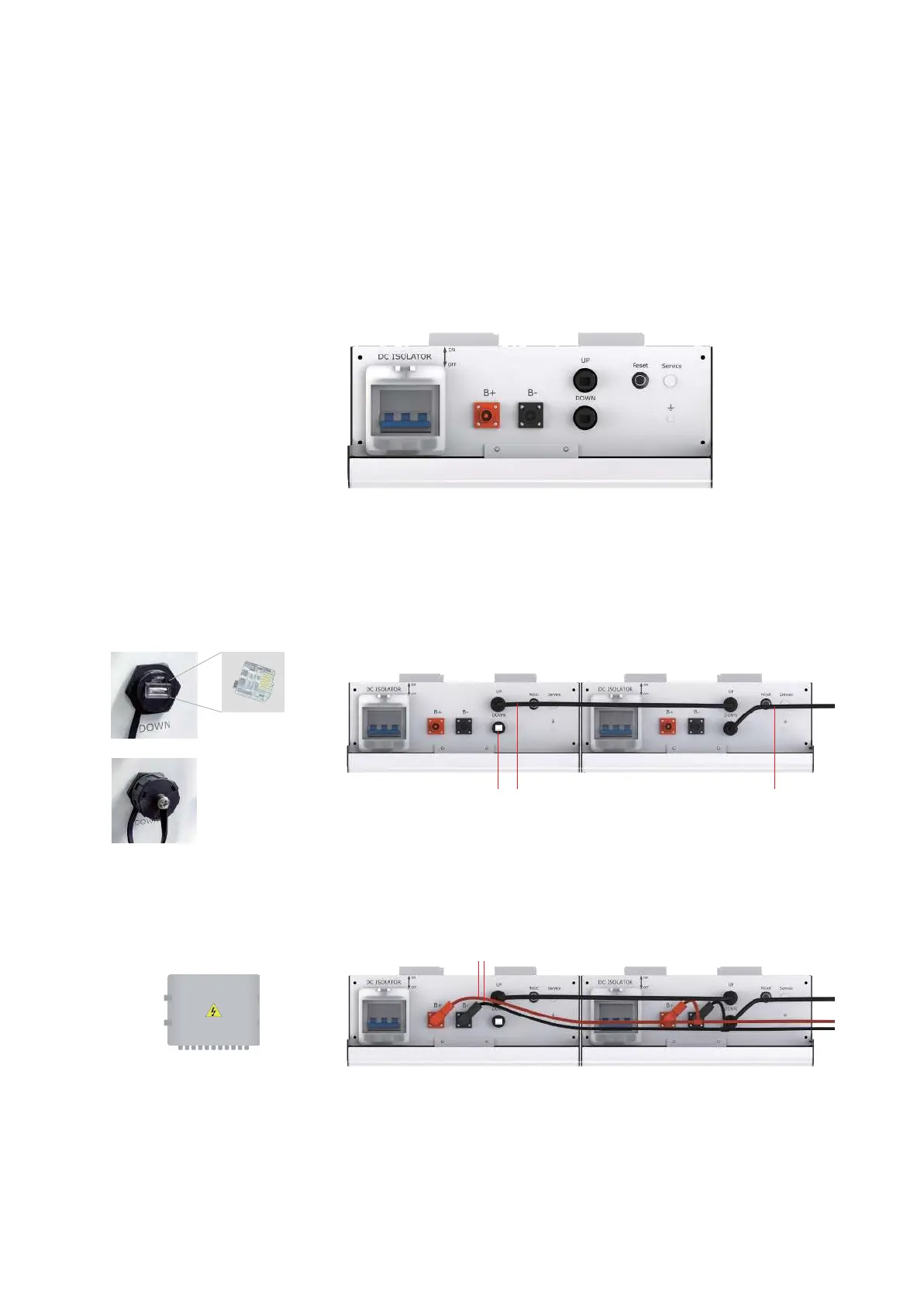
Top
connection
interface
① Battery<-->Inverter Power Cables(+)
② Battery<-->Inverter Power Cables(-)
③ Communication cables(up)
④ Communication cables(down)
⑤ Battery reset button
⑥
DC Isolator
⑦
Grounding Point
⑧
Communication
cable
⑨
COM
resistor
1.
Plug in COM Resistor
2.
Put on a protective cap
Step-3, Cable Connection and COM Resistor
Connect battery power cables and communication cables as shown below.
Plug in the COM resistor to the last communication interface, which is open.
Please note that even with a single battery installation or multi battery installation,
COM resistor is required to strength the CAN Bus signal.
⑨
⑧
⑧
⑩ Puredrive standard parallel kits
withstand maximum 100A current. If you
have a larger load demand, you can choose to
configure the DC combiner box.
⑩
DC combiner box


 To Next Page