4-4
Section 4 Electrical System
DC235 / DC265
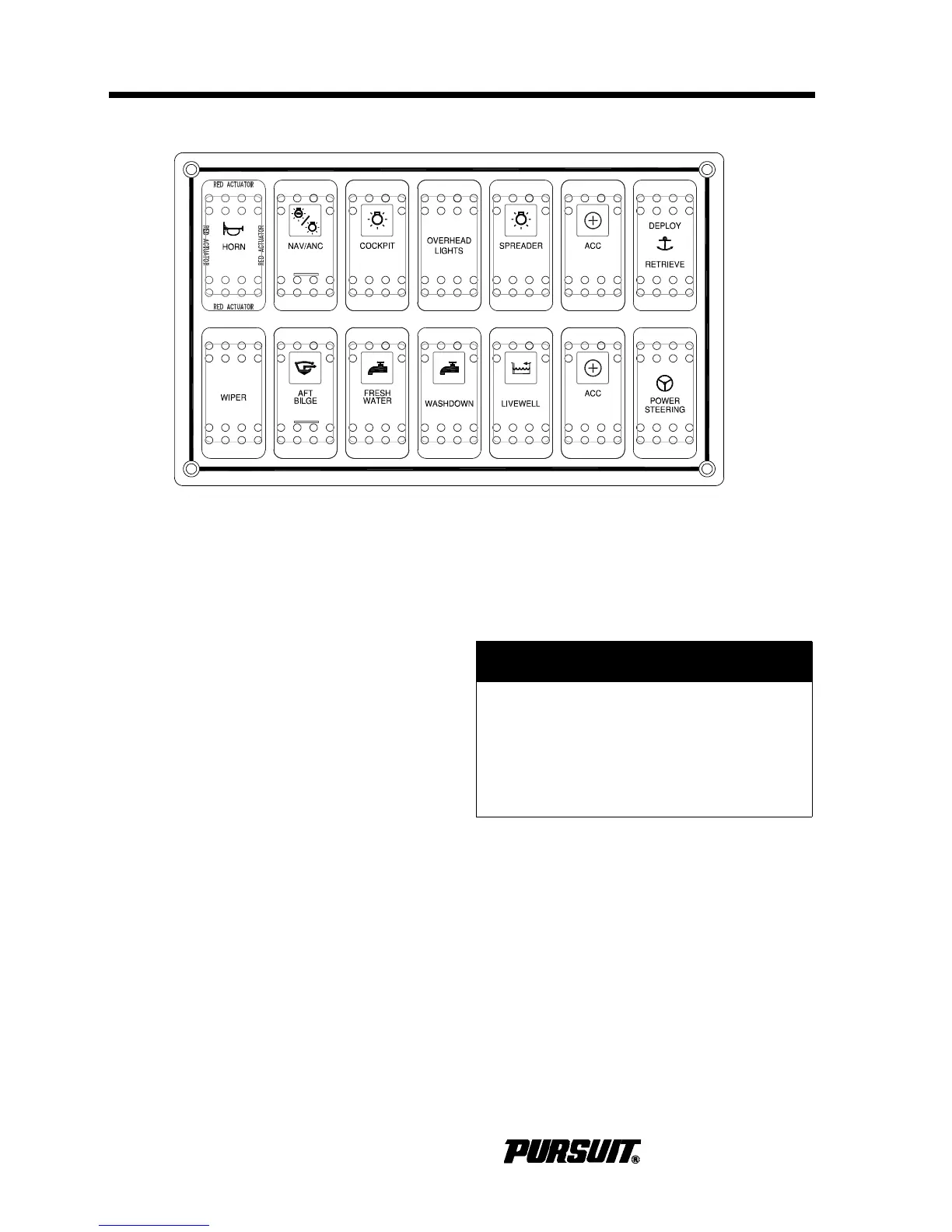
Helm Panel
The following are descriptions of the compo-
nents controlled by the helm switches:
Horn
Press to activate the horn.
Nav/Anc
Press the top of the rocker switch to activate
the navigation lights. Press the bottom of the
rocker switch to activate the anchor light.
Cockpit
Press to activate the lights that illuminate the
cockpit area.
Overhead Lights (Optional DC265)
Press to activate the lights mounted under-
neath the hardtop. Press once and the lights
are red; press again and the lights are bright
white; press a third time and the lights are
dim white. If lights get out of sequence,
press the switch and hold for two seconds.
Spreader (Optional DC265)
Press to activate the flood lights located on
the hardtop.
ACC
This is an open switch and reserved for
future additional accessories. DO NOT
exceed 10 amps.
Deploy Retrieve (Optional DC265)
Pressing the rocker switch deploys and
retrieves the anchor using the optional wind-
lass. Refer to the Windlass in the Exterior
Equipment.
! CAUTION
Halogen lighting contains a filament
bulb that generates intense heat, is
pressurized and could shatter if
scratched or damaged. Protect glass
halogen-cycle bulbs from contact with
liquids when operating.



 To Next Page