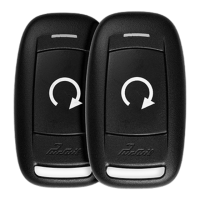
This document is the owner's guide for the PRORS RF Upgrade Kit, which includes models PR1BZ and PR1BZLR, from Voxx Electronics Corporation. It describes the operation, features, and maintenance of a remote security and convenience system.
Function Description:
The PRORS RF Upgrade Kit provides remote control functionalities for vehicle security and convenience. It allows users to remotely lock and unlock vehicle doors, arm and disarm a security system, and remotely start or shut down the vehicle's engine. The system also includes features for preheating or precooling the vehicle's interior, a "Quick-Stop" feature for temporary stops, and an optional Turbo Timer mode for engine cool-down. The system provides visual and audible notifications for various operations and security statuses.
Important Technical Specifications:
- Remote Control Battery: CR2032 (expected life approximately 1 year).
- Transmitter Warranty: 12 months from the date of original purchase.
- Control Modules, Sirens, Sensors, and Relays Warranty: Limited Lifetime Warranty.
- FCC Compliance: This device complies with Part 15 of the FCC rules and RSS-210 of Industry Canada, ensuring it does not cause harmful interference and accepts any received interference.
- Patented Technology: The device incorporates patented technology, details of which can be found at www.voxxintl.com/company/patents.
Usage Features:
Remote Control Operations:
- Door Lock: Press and release the button once.
- Arming Security System (Optional): Press the button once. A second press may be required for an audible arming response if Silent Choice is enabled. Parking lights flash once, and the LED blinks once per second.
- Door Unlock: Press the button twice.
- Disarming Security System (Optional): Press the button twice. Parking lights flash once. A second double press may be required for an audible disarming response if Silent Choice is enabled. If 2-step unlock is set, a third press will activate the audible response.
- Two-Stage Door Unlock (Optional): Press the button twice to unlock the driver's door. Press it twice again within three seconds to unlock remaining doors.
User Selectable Features:
- Notification Chirps (ON/OFF): Turn ignition ON then OFF, then press and release the valet/programming button 3 times. 1 chirp for ON, 2 chirps for OFF.
- LED (ON/OFF): Turn ignition ON, OFF, ON, OFF, then press and hold the valet/programming button for 5 seconds. 1 flash for ON, 2 flashes for OFF.
Security Features:
- Programmed Transmitter Notification: The status LED flashes the number of programmed transmitters when the ignition is turned on, enhancing security by alerting to unauthorized transmitters.
- Valet Mode: Disables all security and remote start functions. To enter/exit, turn ignition ON, push and hold the programming/valet button until the LED turns solid, then release.
- Manual Override: Disarm the system without a transmitter by opening the door (alarm sounds), turning the ignition key to ON, and pressing/releasing the valet button within 10 seconds.
Remote Vehicle Starter Operations:
- Remote Start: Press and hold the button for 3 seconds. The system sounds, parking lights flash once, and the vehicle starts if safety parameters are met. Parking lights remain on (or flash) as a visual indicator. The system attempts to start up to 4 times with 5-second pauses between attempts.
- Remote Start Shutdown: Press and hold the button for 3 seconds again.
- Entering Vehicle While Remote Started: Unlock doors, enter (do not press brake), insert key and turn to ON/RUN, then press the brake pedal. Remote start disengages, and the vehicle operates normally.
- Preheating/Precooling: Set temperature controls before exiting the vehicle. The heater/AC will activate when the vehicle is remote started.
Remote Start Safety Features:
The system will shut down or prevent remote start if:
- Hood is open.
- Brake pedal is pressed before turning ignition key to ON.
- Engine is over-revved (tach checking only).
- Valet Mode is active.
- Remote Start Ready Mode is not set (manual transmission vehicles only).
Manual Transmission Specific Features:
- Remote Start Ready Mode:
- With engine running, place transmission in neutral, set parking brake.
- With foot off brake, press and hold the button to activate remote start (remote beeps 4 times, parking lights turn on).
- Remove keys (vehicle remains running).
- Exit vehicle, close all doors.
- Within 1 minute of step 1, press the button once to lock doors. Vehicle shuts down, sounds 2 short chirps then 1 long chirp to confirm ready mode.
- Entering/Exiting Vehicle with Ready Mode Active:
- Activate remote start (if ready mode is set).
- Open vehicle door.
- Exit, close all doors.
- Press the button. Unit waits 3 seconds, shuts down, verifies doors closed, then emits 2 short/1 long tone and light flash pattern to indicate Ready Mode is active.
- Cancelling Remote Start Ready Mode: Occurs if any door, hood, or trunk is opened; brake is pressed; parking brake is released; or ignition is turned ON.
Convenience Features:
- "Quick-Stop" Feature: Allows the vehicle to remain running while secured for short stops.
- Stop vehicle, place in PARK.
- With foot off brake, press and hold the button 3 times within 2 seconds (LED flashes 3 times).
- Remove keys, exit vehicle. Press the button to lock doors if desired.
- Turbo Timer Mode (Optional): Keeps engine running for a pre-programmed time (1, 3, or 5 minutes) to cool the turbo.
- With engine running via ignition key and foot off brake, engage parking brake.
- Parking lights turn on to verify activation.
- Turn ignition key OFF. Engine continues to run.
- To disengage, press the brake pedal.
Status Indications:
- Status LED Flash Indications:
- OFF: Disarmed
- Slow Flash: Armed
- Fast Flash: Passive Arming Countdown
- ON (Solid): Valet Mode
- 1 Flash: Zone 1 Trigger (Shock Sensor)
- 2 Flashes: Zone 2 Trigger (Trunk/Hood)
- 3 Flashes: Zone 3 Trigger (Door)
- Siren/Horn Chirp Indications:
- 1 Chirp: Arm
- 2 Chirps: Disarm
- 3 Chirps: Door Ajar Upon Arming
- 4 Chirps: Disarm / Triggered
- Parking Light Flash Indications:
- 1 Flash: Arm
- 2 Flashes: Disarm
- 3 Flashes: Disarm / Triggered
- ON (Solid or Slow Flash): Remote Started
- Remote Start Shutdown Diagnostics (Parking Light Flashes):
- 1 Flash: Runtime Expired
- 2 Flashes: Remote Shutdown
- 3 Flashes: Brake ON
- 4 Flashes: Manual Transmission Ready Mode
- 5 Flashes: Hood Open
- 6 Flashes: Low Tach Signal
- 7 Flashes: Tach / Crank Average not learned
- 8 Flashes: High Tach Signal
Maintenance Features:
- Replacing Remote Control Batteries:
- Use a coin to disassemble the remote control halves.
- Remove the old CR2032 battery, noting +/- symbols, and replace with a new one.
- Reassemble the halves.
- Test remote control operation.
- Warranty Information:
- Limited Lifetime Warranty for control modules, sirens, sensors, and relays.
- 12-month warranty for transmitters.
- Warranty requires proof of purchase and delivery to an approved warranty station.
- Exclusions include damage from improper installation, misuse, accidents, or alterations; vehicle electrical system damage; batteries; and broken LCD/OLED screens.
- The company's liability is limited to repair or replacement and does not exceed the purchase price.

 Need help?
 General

 To Next Page