Need help?
Do you have a question about the PURSUIT PRO9051Z and is the answer not in the manual?
Unlock vehicle doors remotely by pressing and holding the transmitter button for 3 seconds.
Locate your vehicle in parking lots by flashing parking lights for 30 seconds.
Unit will not start if hood is open, gear is not in Park, brake is depressed, or safety switch is Off.
Temporarily disable remote starting by holding Push Button and cycling ignition switch.
Toggle the receiver LED on/off by cycling ignition and pressing receiver's push-button switch.
Program transmitters by turning ignition on, pressing valet switch thrice, and pressing transmitter button.
Replace CR2032 battery by separating transmitter halves, noting orientation, and reassembling.
Installer to complete settings for Run Time, Door Lock Timer, and Parking Lights (Pulse/Steady).
Device complies with FCC Part 15, subject to interference conditions and limits for Class B digital devices.
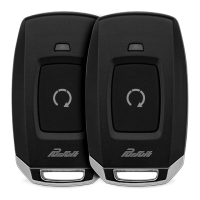
The device is a 1-channel remote car starter, designed to provide convenient remote control over a vehicle's starting and locking functions. It comes with two programmable RF transmitters and a receiver capable of accepting up to four transmitters. An external superheterodyne receiver antenna with a push-button switch and LED is included for enhanced functionality.
The primary function is remote car starting. The system incorporates several on-board relays for critical vehicle systems, including a start relay, accessory relay, ignition 1 relay, ignition 2 relay (selectable for on or off during cranking), and a parking light relay. It also features an output for Ignition 3 / Shock By-Pass / GM VAT (requiring a relay). A tach signal learning circuit is integrated for precise engine control. Safety is paramount, with both positive and negative safety shutdown circuits, and an alarm bypass output.
The system offers accessory outputs that can pulse before, after, and during start, as well as after shut down. Users can select between steady or flashing parking lights for run indication, and choose run times of 5, 10, 15, 20, 45, or 60 minutes. Door lock output pulses are also selectable at 1 second, 3.5 seconds, or 1 second/double 1 second.
Remote Starting: To start the vehicle remotely, the user presses and releases the Start button on the transmitter twice within 2 seconds. The vehicle will start and run for a pre-programmed cycle (up to 60 minutes). The parking lights will flash or remain on as a visual indicator. Before remote starting, ensure the hood is closed, the gear selector is in Park, the brake pedal is not depressed, and the safety control switch is in the Off position. To disengage the remote starter after entering the vehicle, turn the ignition key to the ON position (not the spring-loaded start position) and step on the brake pedal. The engine will continue to run on its own power. The engine will stop prematurely if the Key/Trunk button is pressed twice, the brake pedal is depressed, the hood is opened, or the unit is placed in safety override/disabled mode.
Keyless Entry: While the vehicle is running under remote start control, the transmitter button can be used for keyless entry. Press and hold the transmitter button for 3 seconds as you approach the vehicle, and the doors will unlock. This feature requires the vehicle to have power door locks connected during installation.
Remote Car Finder: The Start button also activates the car finder mode, useful for locating the vehicle in crowded parking lots. To activate, press and hold the transmitter button for 3 seconds while within range of the car. The parking lights will flash, making the vehicle more visible. The lights will stop automatically after 30 seconds. To turn off the car finder mode before the 30-second timer expires, press and release the transmitter button once.
Valet/Override/Safety Control Switch: The Push Button LED switch on the receiver allows temporary disabling of the remote start function, recommended when the vehicle is being serviced. To enter service mode: With the system disarmed/unlocked and the ignition switch off, press and hold the Push Button on the windshield receiver. Then, cycle the ignition switch on, off, on, off, on, off. The LED will flash a pattern of two short flashes followed by one long flash, indicating the unit is in R/S Override mode and will not start from RF or other inputs. To exit service mode: With the system disarmed, press and hold the Push Button. Then, cycle the ignition switch on, off, on, off, on, off. The LED will turn off, indicating full functionality.
LED Toggle: The LED on the receiver can be toggled on or off. To do this, turn the ignition switch on then off. Within 5 seconds, press and hold the receiver's push-button switch for 5 seconds. The LED will flash once for "ON" and twice for "OFF." "ON" means normal flash patterns will function, while "OFF" means they will not. The Programmed Transmitter Notification will always function.
Programmed Transmitter Notification (PTN): After disarming and turning the ignition key on, the unit's LED will report the number of programmed transmitters. This feature alerts the user to unauthorized transmitters. Typically, two flashes and a pause (repeated three times) indicate two programmed transmitters. If additional flashes are observed, it suggests an unauthorized transmitter has been added. This can be corrected by erasing and reprogramming transmitters, which will remove all unauthorized units.
Programming New or Replacement Transmitters: To program new or replacement transmitters (Model 171BPR, using a CR2032 battery):
 General
| Range | Up to 3000 feet |
|---|---|
| Channels | 5 |
| Keyless Entry | Yes |
| Transmitter | 2-Way |
| Security Features | Anti-theft, starter kill |
| Remote Confirmation | LCD Display |

 To Next Page