EasyManua.ls Logo

PXN V3PRO - Page 3

PXN V3PRO
3 pages
Print Icon
To Previous Page IconTo Previous Page
Loading...
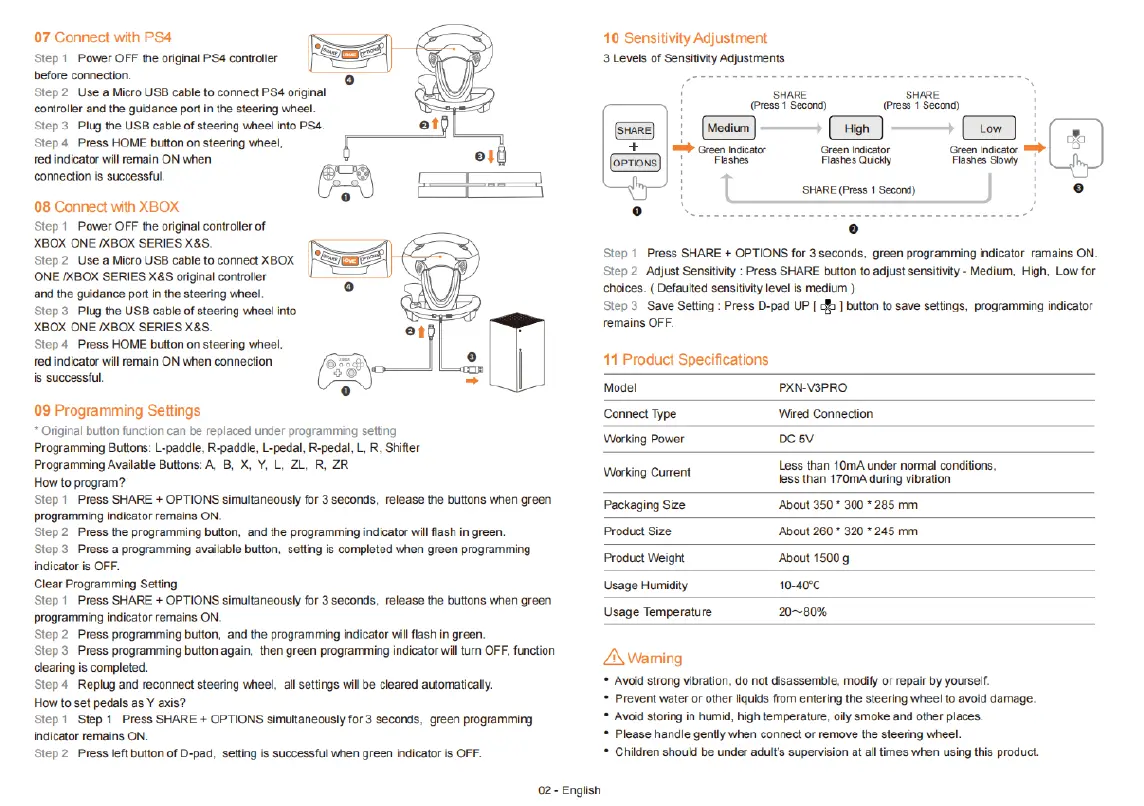
07 Connect
with
PS4
Step
1
Power
OFF
the
original
PS4
contraller
before
connection.
Step2
Use
a Micro
USB
cable
to
connect
PS4
original
controller
and the
guidance
port
i
the
steering
wheel.
Step
3
Plug
the
USE
cable
of
steering
wheel
into
PS4.
Step
4
Press
HOME
button
on
steering
wheel,
red
indicator
wil
remain
ON
when
connection
is
successful
08
Connect
with
XBOX
Step
1
Power
OFF
the
original
controller
of
XBOX
ONE
/XBOX
SERIES
X&S.
ONE
/XBOX
SERIES
X&S
original
controller
and the
guidance
port
n the
steering
wheel.
Step3 Plug
the
USB
cable
of
steering
wheel
into
XBOX
ONE
/XBOX
SERIES
X8S.
Step
4
Press
HOME
button
on
steering
wheel,
ed
indicator
will
remain
ON
when
connection
is
successful.
09
Programming
Settings
*
Original
button
function
can
be
replaced
under
programming
seting
Programming
Buttons:
L-paddle,
R-paddie,
L-pedal,
R-pedal,
L,
R,
Shiter
Programming
Available
Butions:
A
8,
X,
Y,
L.
ZL,
R,
ZR
Howto
program?
Step
1
Press
SHARE
+ OPTIONS
simultaneausly
for
3
seconds,
felease
the
butions
when
green
programming
indicator
remaina
ON.
Step2
Press
the
programming
button,
and
the
programming
indicator
willizsh
in
green.
Step3
Press
a
programming
avalable
button.
setting
is
completed
when
green
programming
indicator
is
OFF.
Clear
Programming
Setting
Step
1
Press
SHARE
+
OPTIONS
simultaneausly
for
3
seconds,
release
the
buttons
when
green
programming
indicator
remains
ON.
Step2
Press
programming
button,
and
the
programming
indicator
vill
flash
in
green.
Step3
Press
programming
button
again.
then
green
programming
indicator
will turn
OFF,
function
dlearing
is
completed.
Step
4
Replug
and
reconnect
steering
wheel.
all
settings
wil
be
cleared
automaticaly.
Howto
set
pedals
as
Y
axis?
Step1
Step
1
Press
SHARE
+
OPTIONS
simuttaneously
for
3
seconds,
green
programming
indicator
remains
ON.
Step?
Press
left
button
of
D-pad,
setting
is
successful
when
green
indicator
is
OFF-
02-
English
10
Sensitivity
Adjustment
3
Levels
of
Sensitivty
Adjustments
nee
'
(press
1
Seeona)
:
(o]
(T
Green
ator
|
D
Famestoy
1
Step
1
Press
SHARE
+ OPTIONS
for
3
seconds.
green
programming
indicator
ramains
ON.
Step 2
Adjust
Sensitivity
:
Press
SHARE
button
o
adjust
sensitivty
-
Medium,
High,
Low
for
choices.
(Defaulted
sensitiviy
level
is
medium
)
Slep3 Save
Setting
:
Press
D-pad
UP
[
b
]
button
to
save
settings,
programming
indicator
remains
OFF.
11
Product
Specifications
Model
PXN-V3PRO
Connect
Type
Wired
Connection
Working
Power
oC
5V
Less
than
10mA
under
normal
conditions,
Werkng
Current less
than
170mA
during
vibration
Packeging
Sze
About
3507
300
285
mm
Product
size
Aoout
2607
520
245
mm
Product
Weight
About
1500
g
Usage
Humidiy
1040
Usage
Temperature
2080%
A\
Wanming
*
Avoid
strong
vibration.
do
not
disassemble.
modify
or
repair
by
yourself.
=
Prevent
water
or
other
liquids
from
entering
the
steering
whee
to
avoid
damage.
=
Avoid
storing
in
humid, high
temperature,
oly
smoke
and
other
places
*
Please handle
genlly
when
connect
of
remove
the
steering
wheel.
*
Children
should
be
under
adult's
supervision
at
alltimes
when
using
this
product

Related product manuals