4
Identifying the Parts
Main Unit
-
2
3
01
4
/
Front View
Rear View
5
9
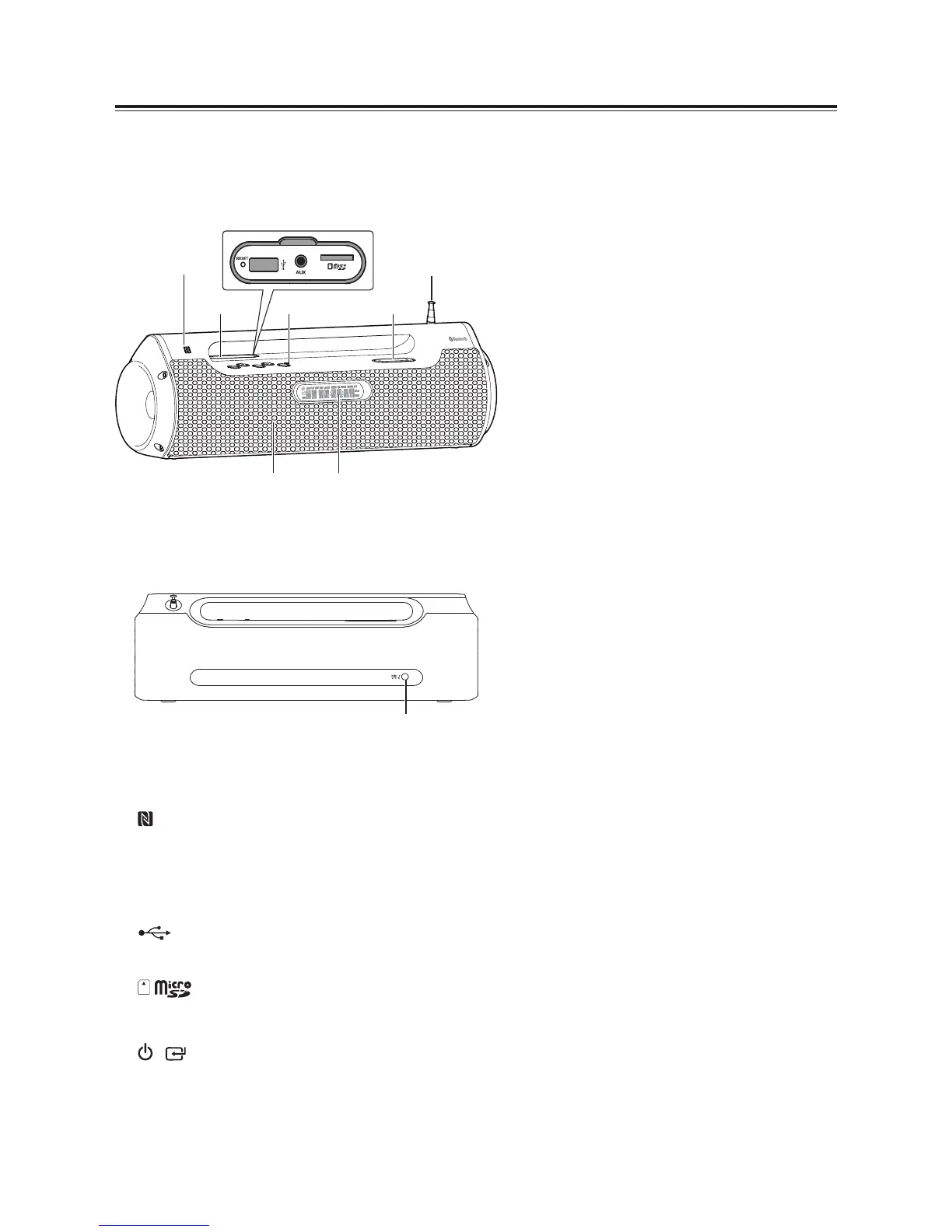
1 NFC (Near Field Communication) sensor.
2 Lift up the cover
« 5(6(7«button
System reset.
USB Socket
« $8;««Socket
«
Socket
3 Buttons
«
/ button
Switch the unit between ON and Standby
mode.
Select the play function.
t
0««««(QWHU«WKH«VHOHFWLRQ«PHQX
-
(4: Select a preset sound effect.
- BASS: Turns the bass On or Off.
-
6/((3: Set the sleep timer.
-
« ',00(5: Adjust display brightness.
-
CL K
- -
:
- -
: Set the clock.
- PLAY MOD: Select play mode in USB/
CARD mode.
In FM mode:
- AUTO SCAN
- INFO
« ÷« 0(025<
t
H
/
G
button
In BT/USB/CARD mode: Skip to previous/
next audio ½le.
In USB/CARD mode: Search backward/
forward within a track.
In FM mode: Search for a radio station.
Navigate to select an item on a menu
screen.
t
BF
button
In FM/AUX mode: Mute/Resume sound.
In BT/USB/CARD mode: Start or pause
play.
Activate the pairing function in Bluetooth
mode and disconnect the existing paired
Bluetooth device.
Con½rm a selection.
« 92/80(«÷«button
Increase/decrease the volume level.
5
FM aerial
6 Speaker
« 'LVSOD\«3DQHO
Show the current status.
8
DC IN 9V
Connect to power chargeable.


 To Next Page