6
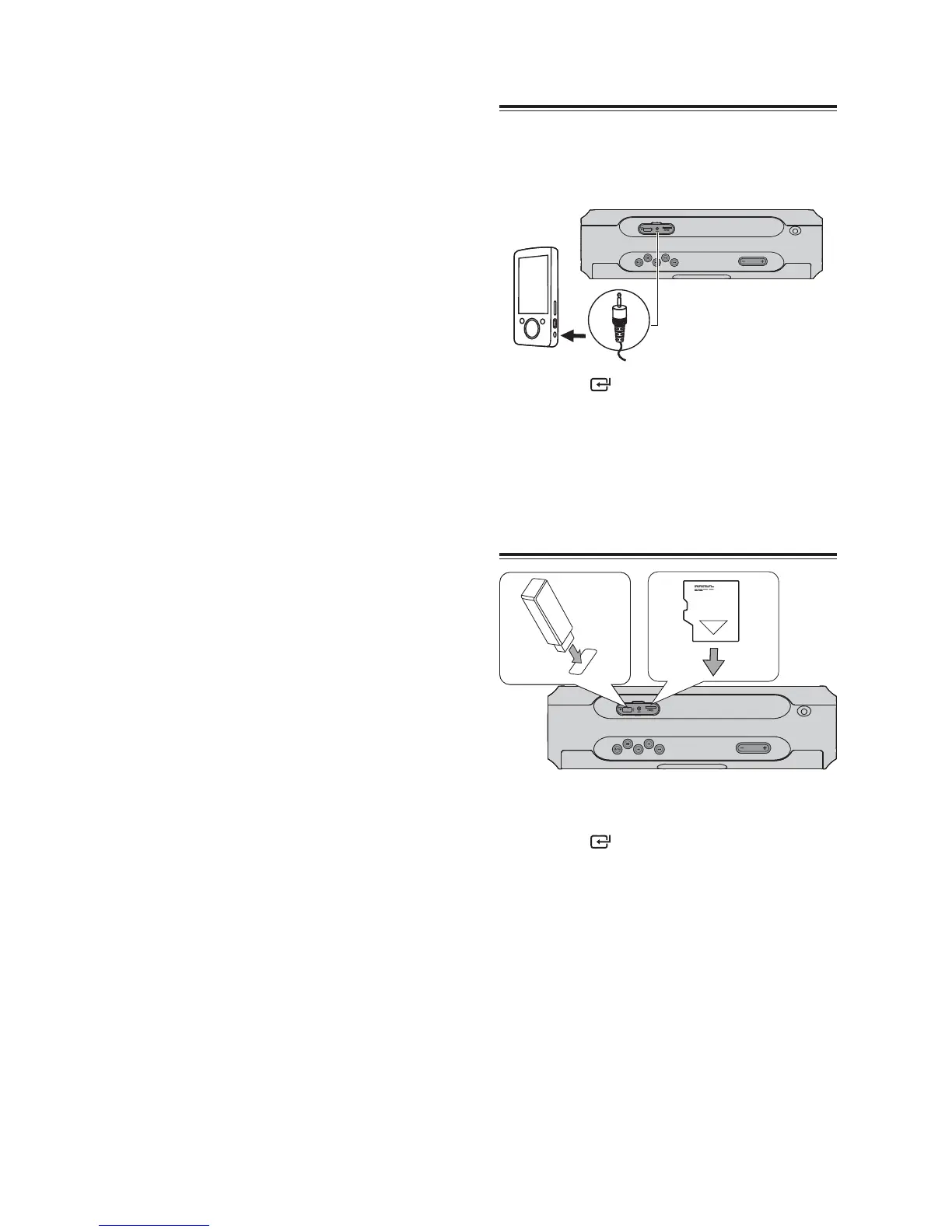
3OD\«IURP«$8;
1 Connect the audio player.
Connect the 3.5mm to 3.5mm audio cable
to the«$8;«socket on the rear of unit and to
the headphone socket on the audio player.
2 Press the button repeatedly to select
the $8;«source.
3 Start to play on the audio player.
4 Press the VOL ± button to adjust the
volume to your desired level.
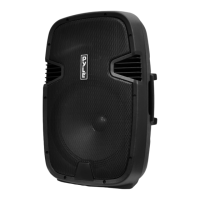
3OD\«IURP«86%0LFUR«6'
1 Lift up the cover on the top panel.
2 Insert the USB or Micro SD device.
3 Press the
button repeatedly to select
the USB or &$5' source.
4 During playback.
To pause or resume play, press the
BF
button.
To skip to the previous/next file, press the
H
/
G
buttons.
To search during play: press and hold
H
/
G
buttons, then release to resume normal
play.
« 5HSHDW«3OD\EDFN
1. Press the M button, then press the
H
/
G
buttons repeatedly to select the PLAY MOD
and press the
BF
button to confirm.
$GMXVWLQJ«EULJKWQHVV«RI«GLVSOD\«SDQHO
1. Press the M button, then press the
H
/
G
buttons repeatedly to select ',00(5«and
press the
BF
button to confirm.
2. Press the
H
/
G
buttons repeatedly to
select different levels of brightness and
press the
BF
button to confirm for the
display panel.
3. Press the M button to exit the menu or the
unit will exit the menu automanually after
20 seconds.
$GMXVWLQJ«WKH«9ROXPH
Press the 92/÷ button to increase/
decrease the volume level.
6HOHFWLQJ«D«3UHVHW«6RXQG«(IIHFW
1. Press the M button, then press the
H
/
G
buttons repeatedly to select (4«and press
the
BF
button to confirm.
2. Press the
H
/
G
buttons repeatedly to
select: >)/$7@«>+,3«+23@«>-$==@«>52&.@«
[CLASSIC] and press the
BF
button to
confirm.
3. Press the M button to exit the menu or the
unit will exit the menu automanually after
20 seconds.
7XUQLQJ«WKH«%DVV«212))
1. Press the M button, then press the
H
/
G
buttons repeatedly to select BASS and
press the
BF
button to confirm.
2. Press the
H
/
G
buttons repeatedly to
turn the bass on or off, and press the
BF
button to confirm
3 Press the M button to exit the menu or the
unit will exit the menu automanually after
20 seconds.


 To Next Page