BASIC CONNECTION
•
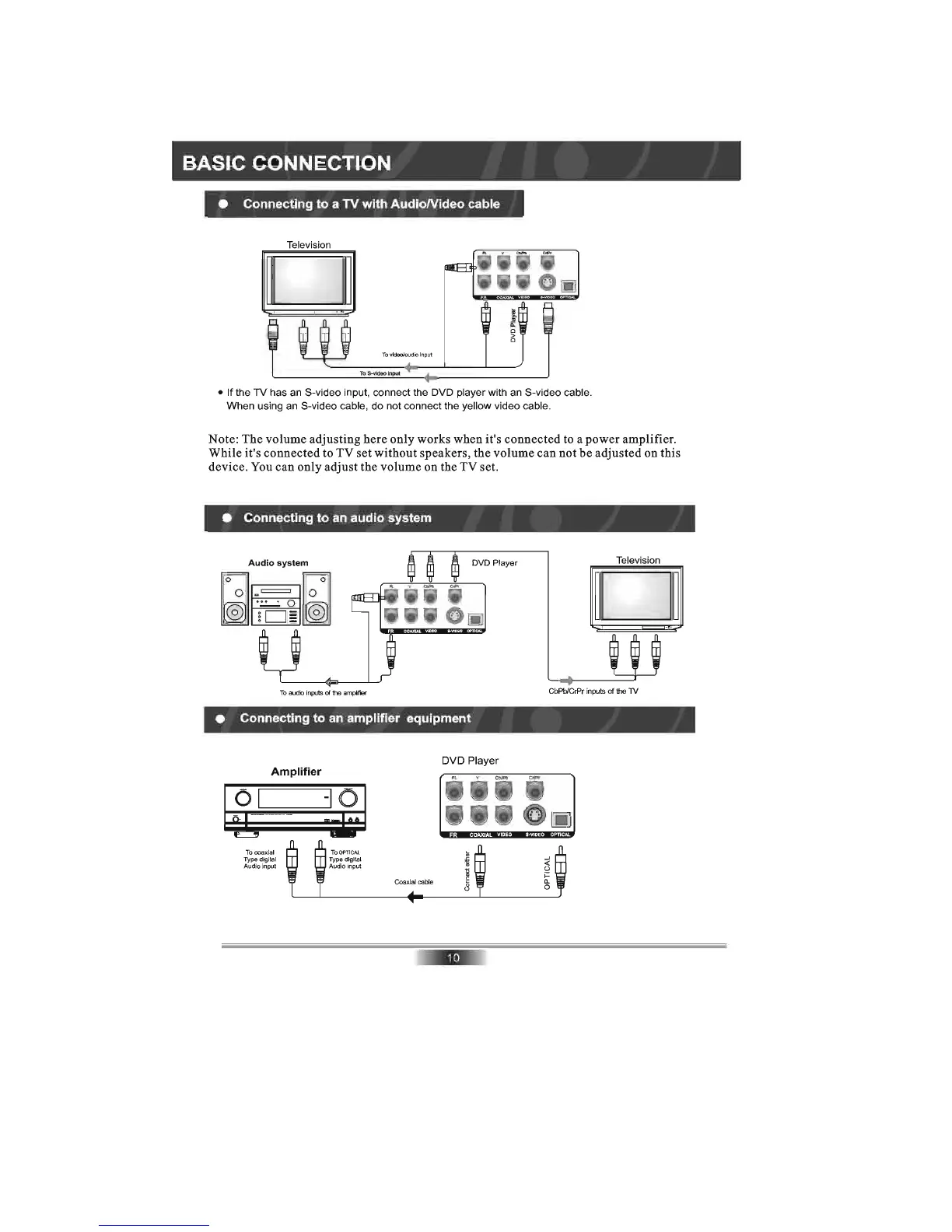
Connecting
to
a
TV
with
AudioNideo
cable
Television
D
To
vtdeolaudlo Input
To
S-video Input
•
If
the
TV
has an S-video input, connect the DVD player with an S-video cable.
When using an S-video cable, do not connect the yellow video cable.
Note: The volume adjusting here only works when it's connected to a power amplifier.
While it's connected to TV set without speakers, the volume can not be adjusted on this
device. You can only adjust the volume on the TV set.
•
Connecting
to
an
audio
system
Audio
system
DVD Player
To
audio
inputs
of
If1e
amplifier
•
Connecting
to
an
amplifier
equipment
Amplifier
01
To
coaxial
Type digital
Audio input
DVD Player
Television
D
CbPbICrPr inputs of
the
TV



 To Next Page