www.PyleUSA.com6 www.PyleUSA.com 7
Using the Wireless Microphone
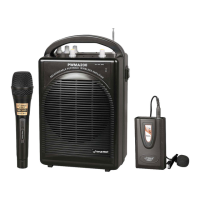
The PA speaker comes with wireless microphones to get you started straight
out of the box.
1. Turn ON the unit.
2. Unscrew the bottom of the microphone to access the battery enclosure. Insert 2X
AA batteries into the microphone. Take note the battery polarity when inserting
the batteries.
3. Replace the bottom microphone cover.
4. The wireless microphone will ash once and automatically pair with the PA speaker,
it is ready to use. If it does not ash, check that you have inserted the batteries
correctly or replace old batteries.
5. Adjust the volume of the microphone by turning the MIC VOL knob located on top
control panel.
Notes:
Please do not operate the microphone directly in front of the PA speaker, set the MIC
VOL/ECHO at a lower level before turning ON the wireless microphone. Operating
the microphone incorrectly will cause loud squealing noise. Turn o the power switch
when the wireless microphone if not in use to save battery life.
Using the Wired Microphone
Connect the wired microphone to this unit using the MIC INPUT located on the
top of control panel.
1. Turn OFF the unit.
2. Connect your wired microphone to the MIC INPUT located on top of the control
panel.
3. Adjust the microphone volume by tuning the MIC VOL/ECHO knobs located on
top control panel.
NOTES:
You can use the wired microphone and wireless microphone at the same time.
Connecting a Guitar
You can connect your Guitar to unit using the 1/4" GUITAR INPUT plug.
1. Turn ON the unit.
2. Connect your guitar cable to GUITAR INPUT port on top control panel.
3. Adjust the volume by turning the GUITAR VOL on top control panel.
USB/SD Card Playback
Play music from USB or SD Card using the USB/SD slot on the PA speaker.
1. Turn ON the unit.
2. Insert USB or SD card into the slot.
3. Unit will automatically play USB or SD card once inserted.
4. You can use the PRE/NEXT/PLAY/PAUSE to control and play music.
Notes:
The speaker system can play the following audio le formats: MP3, MP4, WMA.
The USB/SD Card max size is 32GB. Operation may be slower when searching large
memory les. It will need several seconds to respond when your USB/SD Card full of
contents.
Wireless BT Playback
Connect your Wireless BT phone or other device to the PA speaker.
1. Turn ON the unit.
2. Press the INPUT button which is located on top control panel, next to the USB/SD
slot.
3. The Wireless BT is on when you hear two "tone" indicator sound.
4. Use your Wireless BT phone or other device to search for the Wireless BT name
“PYLE SPEAKER”.
5. Select the “PYLE SPEAKER” Wireless BT name and wait for the device to pair
automatically.
6. You do not need password and get connected with unit.
7. You can use the VOLUME/BASS/TREBLE to adjust the sound level for Wireless BT,
also you can adjust the Wireless BT music sound through your own phone or other
device.



 To Next Page