www.PyleUSA.com5 www.PyleUSA.com 6
REMOTE CONTROL TROUBLESHOOTING
If you experience any of the following diculties while using the unit, use this
troubleshooting guide to help you remedy the problem, should any problem
persist, consult your nearest dealer.
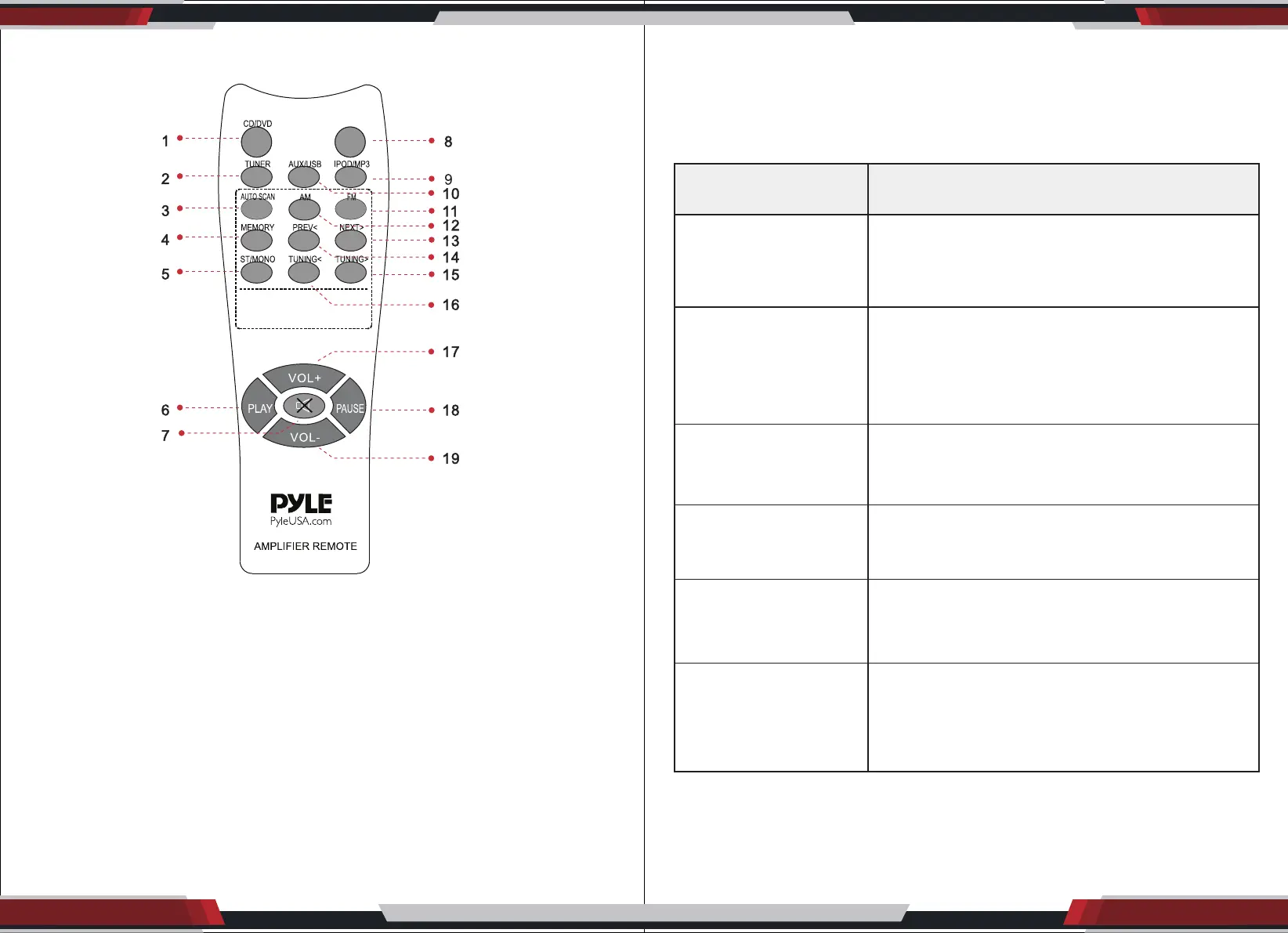
1. CD/DVD Audio Input Select key 11. Tuner FM Select key
2. Tuner Audio Input Select key 12. Tuner AM Select key
3. Tuner Automatic Search key 13. USB/SD Next key
4. Tuner Memory key 14. USB/SD Prev. key
5. Tuner Stereo/Mono key 15. Tuner tuning + select key
6. USB/SD player key 16. Tuner tuning - select key
7. Audio Mute key 17. Music Volume + key
8. None 18. USB/SD pause key
9. IPOD/MP3 Audio Input Select key 19. Music Volume - key
10. AUX/USB Audio Input Select key
PROBLEM POSSIBLE CAUSE
No power
• The ac power cord is disconnected
• Wall socket poor connection or the wall socket is
inactive
No sound
• Disconnected speakers and components.
• Make sure you select the correct component on
the unit
• Volume control at lowest level
• Speaker wire short or open
One master speaker
NO sound
• Bad or Incorrect speaker connections
• Balance not in center
• Speaker wire short or open
Bad Sound
Microphone
has no sound
Severe hum
or noise
• The place is unt for the speakers
• Bad or incorrect speakers connections
• Treble and bass controls are too low
• Microphone volume is too low
• Microphone not turned ON
• Microphone wire short or open
• Check that the speakers and components are
connected securely
• The plugs and jacks are dirty


 To Next Page