10
CD OPERATION
• DISC PLAY
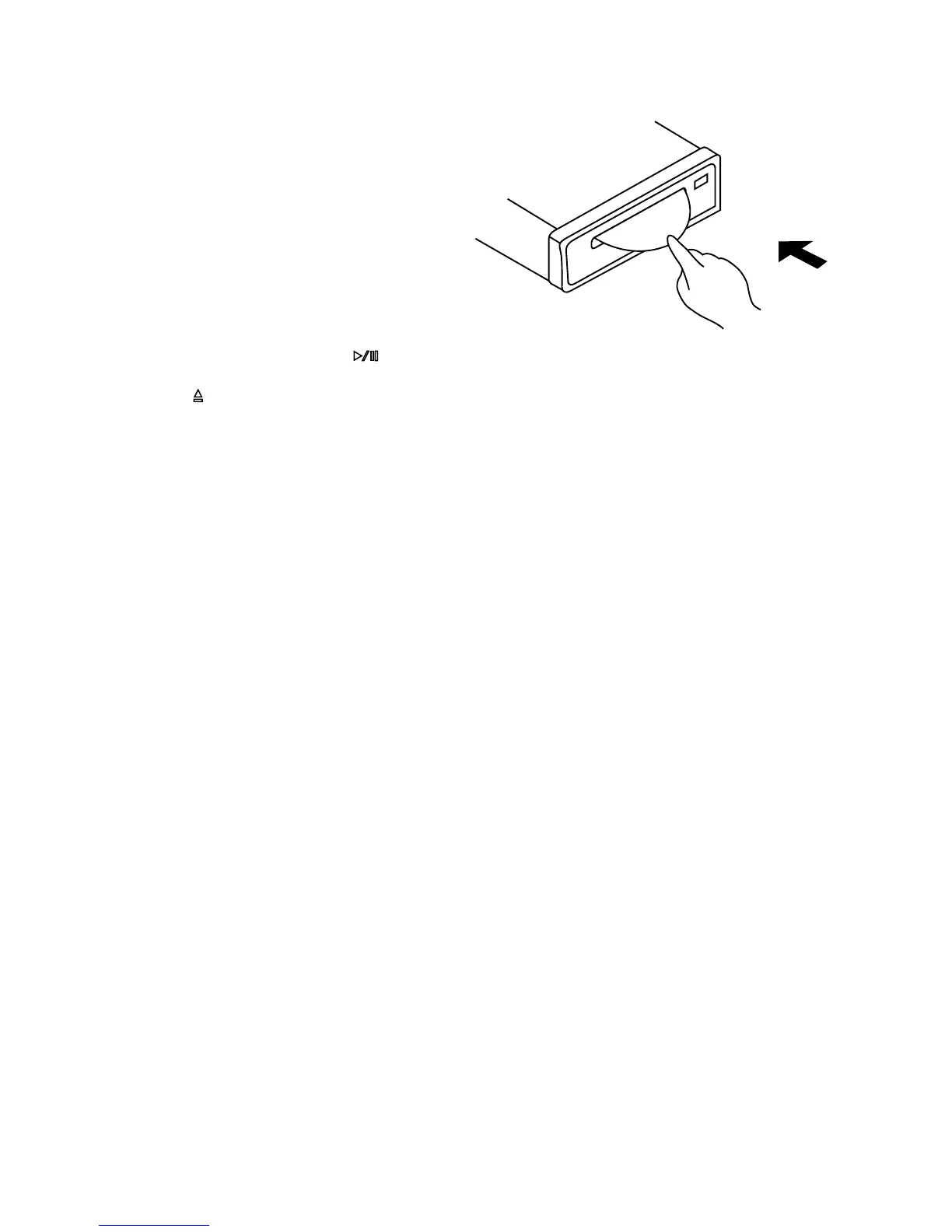
Push a compact disc with the label
side facing up into the disc slot (13)
and you will hear a click sound.
If no sound heard, the CD should be
incorrectly inserted into the disc slot.
(As figure shows)
Then it automatically starts playing the
first track of the disc.
The display will indicate the track
number and playing time.
During the playing, press button (12) to temporarily stop the playing or press it
again to recover playing.
Press (eject) button (14) to eject CD from the slot. The unit switches to radio
operation.
• SELECT TRACKS
In CD operation, press MAN/SKIP buttons – (15) or + (16) to move to the previous
track or the following track. Track number shows on display.
In CD operation, hold MAN/SKIP buttons – (15) or + (16) to fast reverse or fast
forward. CD play starts from when you release the button.
• REPEAT
In CD operation, press RPT/LOC button (9) to continuously repeat the same track.
Press once more to continuously repeat the same disc. Press it at the third time to
release the mode.
• PLAY IN RANDOM ORDER
Press and hold RND/LOU button (11) for more than 1.5 seconds to play all tracks
on the current CD in random order. Press it more than 1.5 seconds again to cancel
the function.
• PREVIEW ALL TRACKS
During CD operation, press INT/MON button (10) to play first 10 seconds of each
track on current CD. Press it again to stop intro and recover normal playing.


 To Next Page