13
the AccuInstall Indicator™ disappears.
This means the bottom of the gate is
securely installed.
Step 9
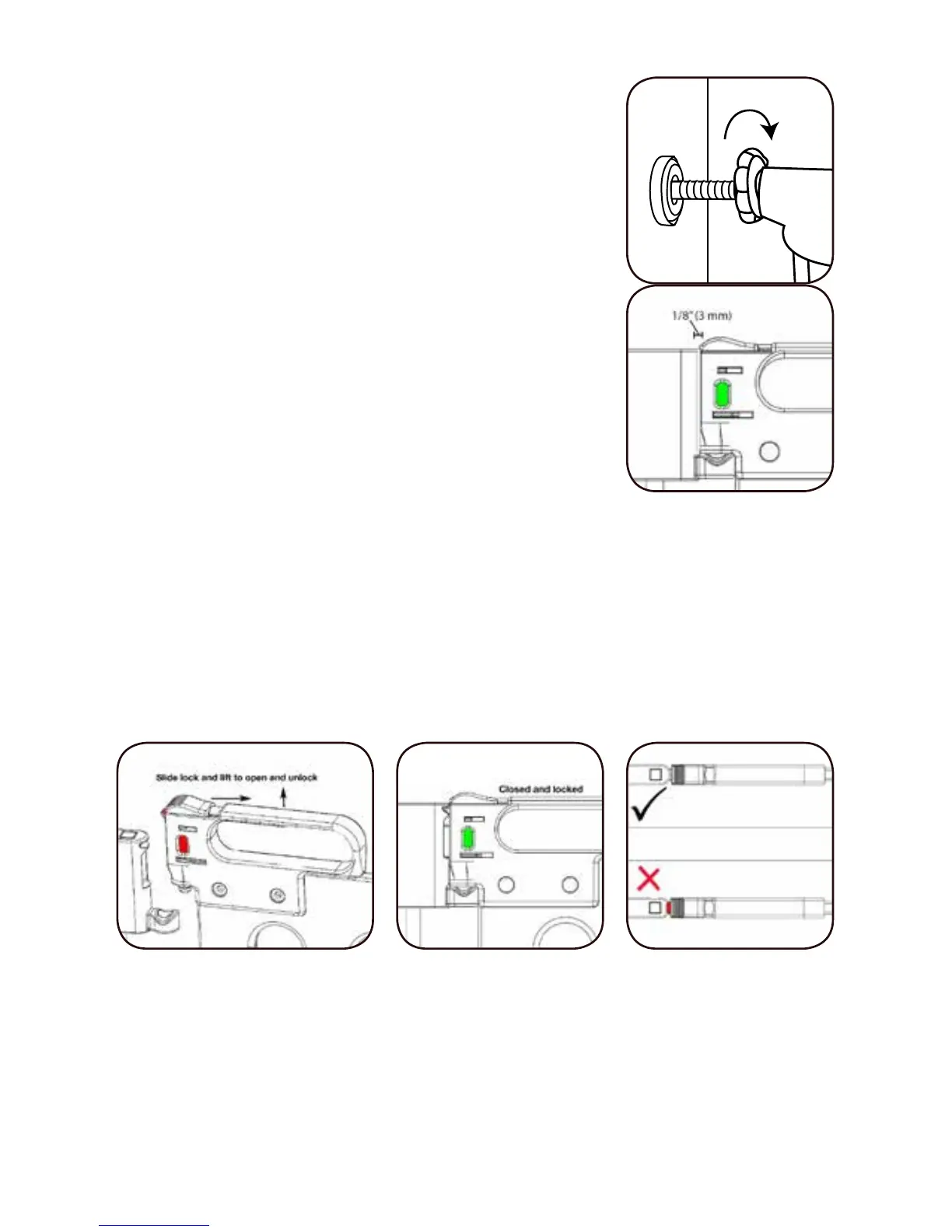
While alternating between the sides,
turn the Hand Wheels until firm tension
is achieved. Check the level to make
sure the gate remains vertical. You can
now cut o the cable tie that has been
holding the gate together. Use the
Hand Wheels to adjust the tension so
the distance between the handle and
the gate is 1/8” (3 mm).
Step 10
To open the Spectrum door, slide back on the Locking
Latch and at the same time lift gate to swing open. The
handle on the door has the At-A-Glance Lock Indicator™
to indicate if the door is locked or not. Green means that
the door is locked. Red indicates the door is not locked
and needs to be secured.
Step 11
Push the Spectrum door closed and check that the At-A-
Glance Lock Indicator™ turns green. If the One-Way Stop
is not being used, check to make sure the door closes


 To Next Page