Load
Load (3/3)
Click left Side +— button
to start beating and
setting nozzle temp
Waiting the temperature
reach thc setting value
220/
Click left Side +— button
to start heating and
setting nozzle temp
Waiting the temperature
roach thc setting
220
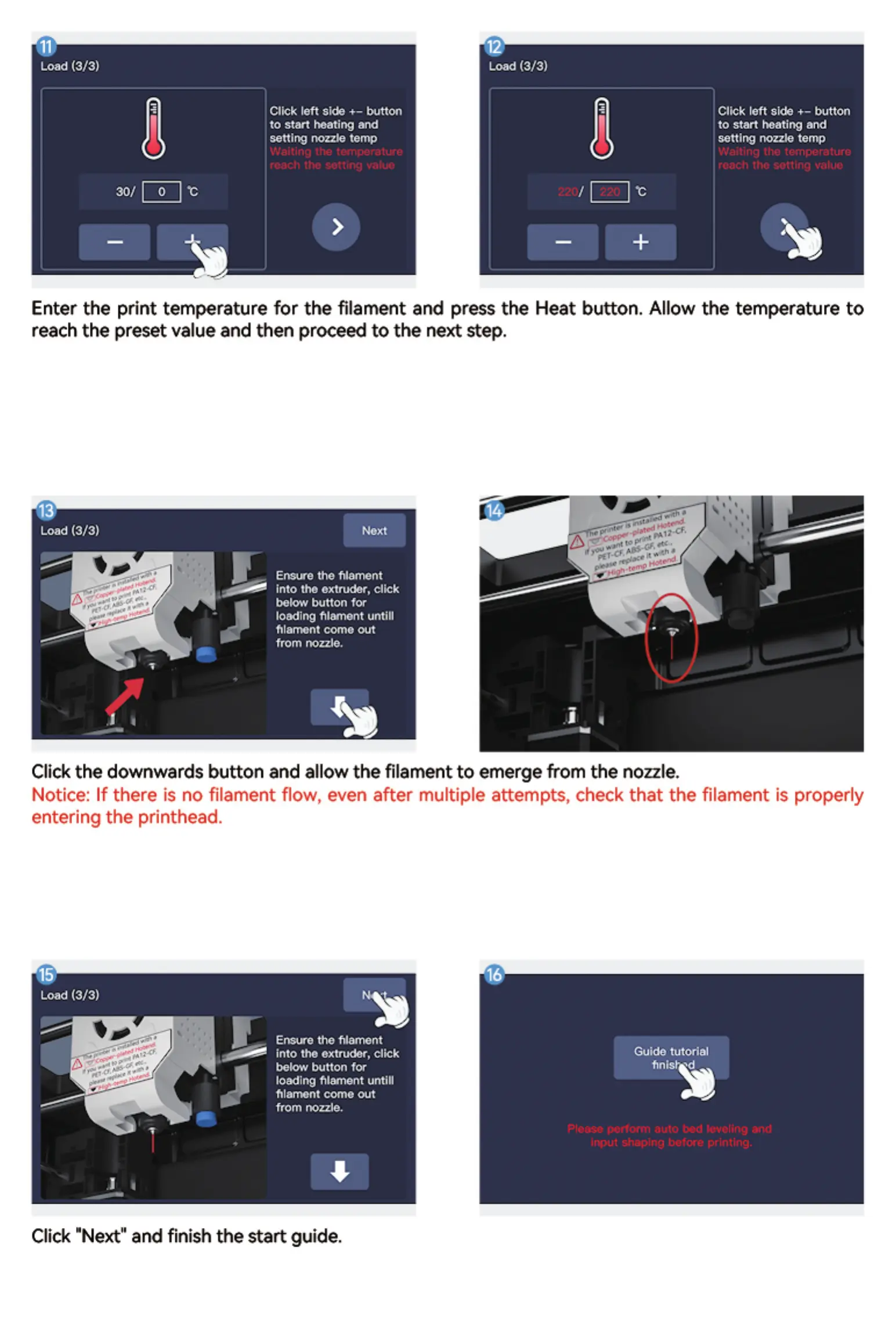
Enter the print temperature for the filament and press the Heat button. Allow the temperature to
reach the preset value and then proceed to the next step,
Load (3/3)
Ensure the filament
into the extruder, click
below button for
loading filament untill
frlannont come out
from
Click the downwards button and allow the filament to emerge from the nozzle.
Notice: If there is no filament flowt even after multiple attemptst check that the filament is properly
entering the printhead
Load (3/3)
Ensure the
into the extruder, click
below button for
loading filatnent untill
filatnont come out
from nozzle,
Click "Next" and finish the start guide.
Guide tutorial
finis •d
Please l%dcrm auro bed cc.•welingand
input shaping befc:e printing.


 To Next Page