
 Need help?
Do you have a question about the Qlima OSK102 and is the answer not in the manual?
Statement of compliance with necessary requirements and relevant provisions of Directive 1999/5/EC.
Details on model, standard, antenna, frequency, power, dimensions, temperature, humidity, and power input.
System compatibility, safety strategy, encryption recommendations, and smartphone camera requirements.
Connecting the smart phone to AC units via a WIFI router for home control.
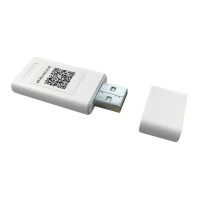
Steps to install the smart kit by removing the cap and inserting it into the air conditioner's reserved port.
Download and install the 'NetHome Plus' app and set the air conditioner to AP mode.
Registering a user account and connecting the smart kit to the Wi-Fi network.
Guide for configuring the network using an Android device, including adding the device and scanning QR codes.
Guide for configuring the network using an iOS device, including adding the device and scanning QR codes.
Login, device selection, and controlling air conditioner functions via the mobile app.
Program the air conditioner to turn on or off at specific times, including weekly schedules.
User can program the air conditioner to run under 8°C, noting it may not be available for all models.
Set the optimal temperature for sleep mode, with graphical representation of temperature changes.

 To Next Page
 General