EasyManua.ls Logo

Qomo QCamera - Page 6

Qomo QCamera
16 pages
Print Icon
To Next Page IconTo Next Page
To Previous Page IconTo Previous Page
Loading...
6
V2.3 02/02/2022
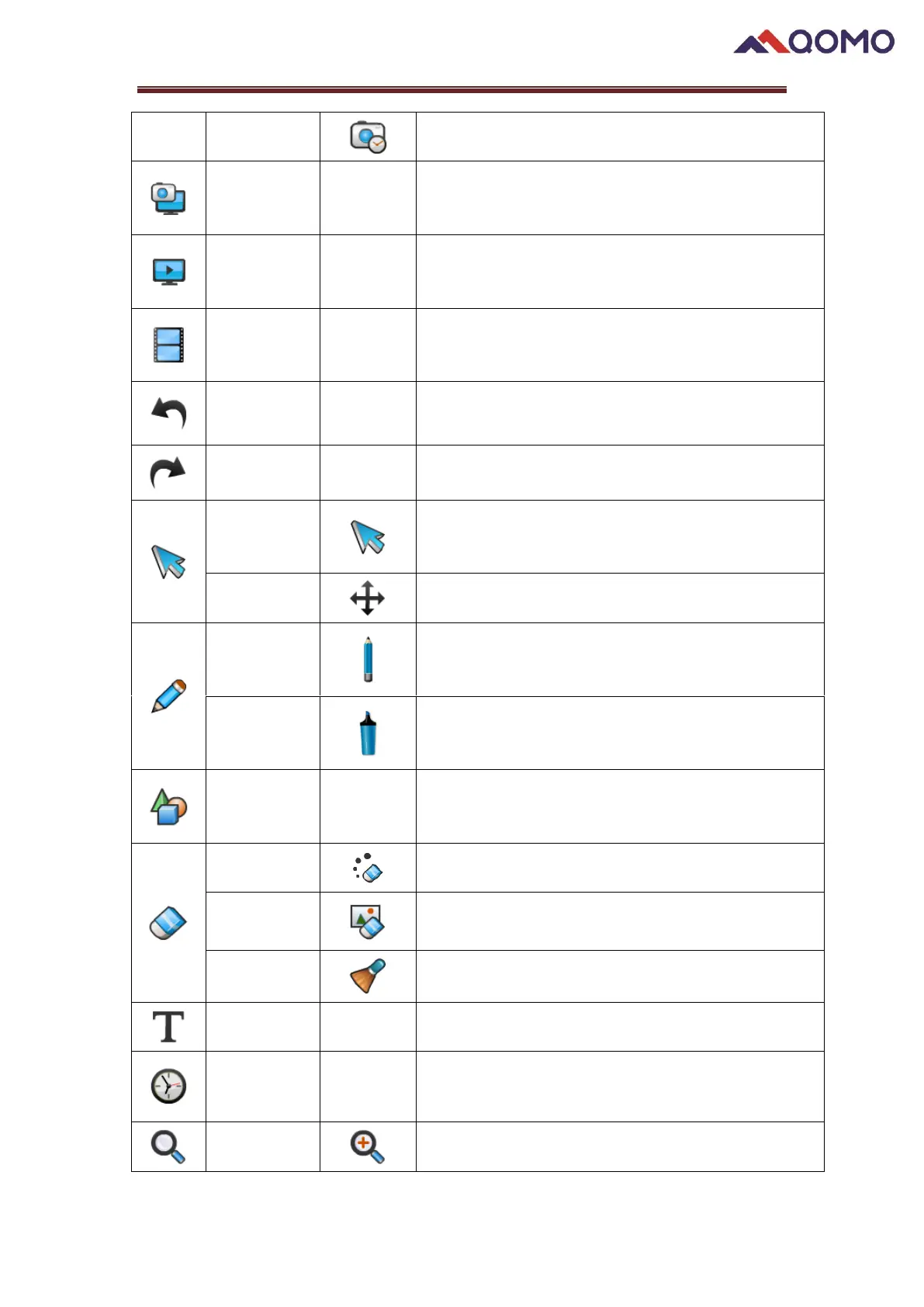
TimeShot
Capture images in fixed increments of time
Webcam
Capture
Capture live image
Screen
Recorder
Record the whole screen
Video
Recorder
Record live video
Undo
Undo the previous process on the drawing board
Redo
Redo the last process on the drawing board
Select
Select objects on the drawing board, adjust the
location and size
Play Mode
Move the selected object
Pen
Set the pen color and thickness
Use the Pen tool to draw
Highlighter
Set the color and thickness
Use the Highlighter tool
Figure
Select a figure and set the thickness
Draw figure on the drawing board
Pixel erase
Eraser for pen and highlighter annotations
Object erase
Clear selected object
Clear
Clear all contents on display area
Text
Input text on the board
Time Stamp
Display time on the screen
Zoom In
Zoom in on live image