10 11
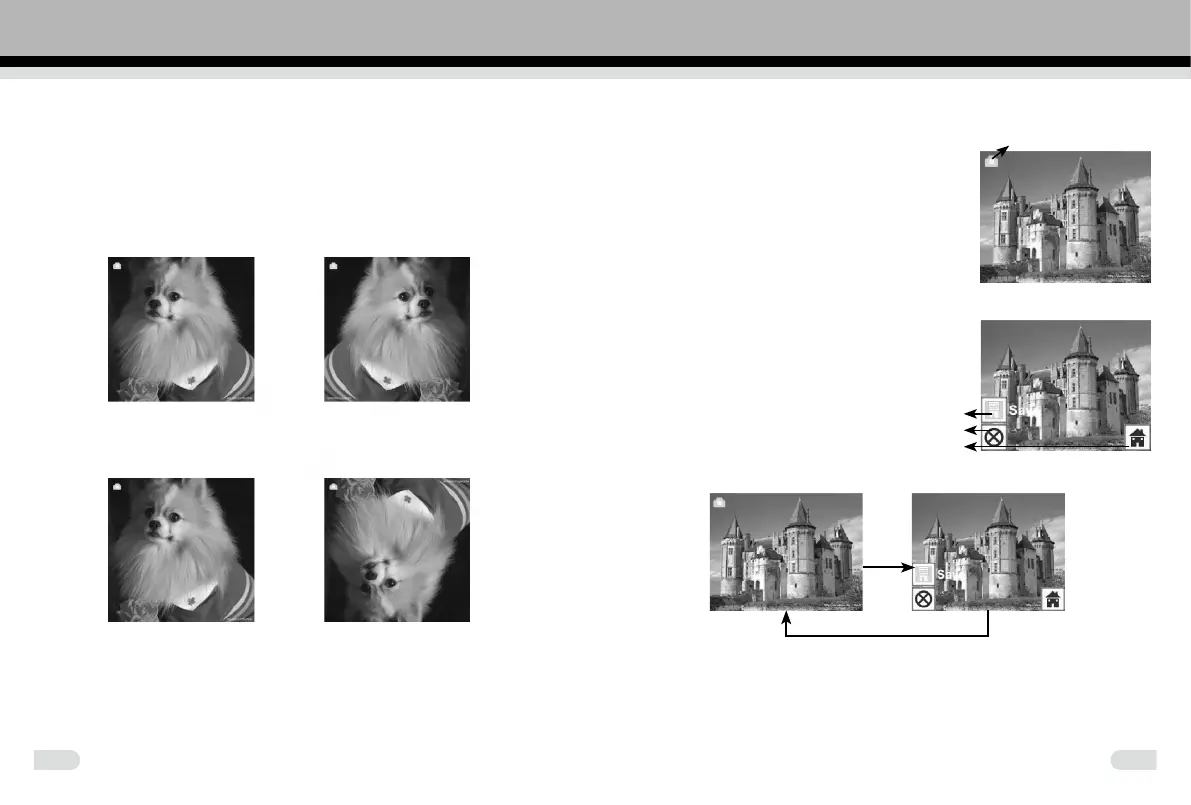
1.2 Capture: Mirror/Flip (Hard Key)
Images can be mirrored or flipped before capture, press the LEFT/
RIGHT button for the Mirror/Flip function, The live preview will be
adjusted accordingly(This function corrects the capture when the lm is
either placed upside down or ipped).
Note: The Mirror and Flip buttons can only be used while in the live
preview mode
Mirror
Press LEFT/MIRROR button to change image from left to right
Flip
Press RIGHT/FLIP button to ip an upside down image
1.3 Capture mode
In the capture mode, there will be an
indicator on the left top corner to indicate that
it is in live preview mode.
Pressing the ENTER button, enters the EV
value mode. Press the LEFT/RIGHT button
to adjust. Press the ENTER button again to
conrm and return to live preview mode.
1.4 Capture: Edit Menu
①
Save: save captured image
②
Cancel: cancel any editing with this image
③
Home: back to main menu
1.5 Live view→Capture/Edit menu
Scan
Enter
Pressing the SCAN button in live preview, the edit menu will appear.
Press the ENTER button and the current image will be saved to the
internal memory or memory card when there is a memory card inserted.
The display will return to live view again.
Live view indicator
①
②
③



 To Next Page