EasyManua.ls Logo

QualGear QG-TM-002-BLK - User Manual

QualGear QG-TM-002-BLK
6 pages
Print Icon
To Next Page IconTo Next Page
Loading...
Do not exceed the maximum rated weight
specified. Otherwise, serious injury or
property damage may occur.
Version October 2017
Scan the QR Code™ below
for more info about this product:
200x200 | 300x200 | 300x300 | 400x200 | 400x300 | 400x400
600x200 | 600x300 | 600x400 | 800x200 | 800x300 | 800x400
;
Question and Answer IconNeed help?

Do you have a question about the QualGear QG-TM-002-BLK and is the answer not in the manual?

Summary

Hanging the TV onto the Wall Plate

Maintenance

General Safety Warnings

Parts Checklist

Hardware Package

Mounting to a Wooden Stud Wall

Mounting to a Concrete or a Brick Wall

Installing to a Flat Back Panel of a TV

Installing to a Curved or Recessed Back Panel of a TV

Overview

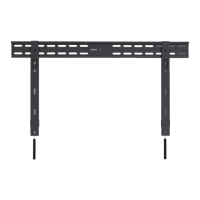
The QualGear QG-TM-002-BLK is an ultra-low profile fixed TV wall mount designed to securely hold flat-screen TVs and monitors. This installation manual provides comprehensive instructions for mounting the device, along with important technical specifications, usage features, and maintenance guidelines.

Function Description:

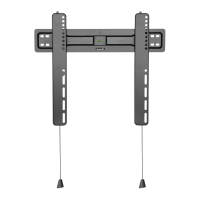
The primary function of the QualGear QG-TM-002-BLK wall mount is to provide a secure and stable mounting solution for flat-screen televisions and monitors on various wall types. Its "ultra-low profile" design ensures that the TV sits very close to the wall, offering a sleek and minimalist aesthetic. The mount consists of a wall plate that attaches to the wall and adapter brackets that attach to the back of the TV. These two components then interlock to secure the TV in place. The design incorporates a mechanism for easy hanging and release, utilizing ropes to engage and disengage the adapter brackets from the wall plate rail.
Important Technical Specifications:

  • Model Number: QG-TM-002-BLK
  • Mount Type: Ultra Low Profile Fixed TV Wall Mount
  • Compatibility: Designed for most 37" to 70" flat-screen TVs and monitors.
  • Maximum Rated Weight: 40kg (88lbs). Exceeding this weight can lead to serious injury or property damage.
  • VESA Compatibility: Supports a wide range of VESA patterns, including:
    • 200x200
    • 300x200
    • 300x300
    • 400x200
    • 400x300
    • 400x400
    • 600x200
    • 600x300
    • 600x400
    • 800x200
    • 800x300
    • 800x400
  • Wall Construction Compatibility:
    • Wooden Stud
    • Wooden Beam
    • Solid Concrete
    • Other (requires contact with a qualified professional)
  • Hardware Included: The package includes various screws, washers, anchors, and spacers (M4x14mm, M5x14mm, M6x14mm, M8x20mm, M6x30mm, M8x50mm, 5.5mm/8.5mm Washer, 5mm Small Spacer, 15mm Large Spacer, ST6.3x65mm Lag Bolt, 10x60mm Concrete Anchor, D6 Washer) to accommodate different TV types and wall materials.
  • Warranty: 1 Year Limited Warranty.
  • Version: October 2017.

Usage Features:

  • Easy Installation Process: The manual outlines a clear, step-by-step installation process for both wooden stud walls and concrete/brick walls.
    • Stud Finder: Recommends using an edge-to-edge stud finder to accurately locate stud edges and centerlines for wooden stud mounting.
    • Marking Template: A marking template (C) is provided to precisely mark drilling locations on the wall.
    • Bubble Level: A bubble level (M-J) is included to ensure the wall plate is mounted perfectly horizontal.
    • Pilot Holes: Specific drill bit sizes and depths are provided for pilot holes (3/16" / 4.5 mm diameter, 2.5" / 65 mm depth for wooden studs; 3/8" / 10 mm diameter, 2.7" / 70 mm depth for concrete/brick).
    • Concrete Anchors: For concrete/brick walls, concrete anchors (W-B) are tapped flush with the wall before securing the wall plate.
  • TV Adapter Bracket Installation: Instructions are provided for attaching adapter brackets (B) to the back of the TV, differentiating between flat back panels and curved or recessed back panels. Various screw, washer, and spacer combinations (M-A/M-B, M-C/M-D, M-D, M-E/M-F, M-F, M-G, M-H, M-I) are detailed to ensure compatibility with different TV designs.
  • Hanging Mechanism:
    • Assisted Hanging: Emphasizes the need for an assistant due to the weight of the TV.
    • Rope System: The TV is hung onto the wall plate, and then ropes are pulled down to engage and secure the adapter brackets into the wall plate rail.
    • Secure Release: Ropes are released to secure the adapter brackets, ensuring the TV is firmly attached.
  • Safety Warnings:
    • Weight Limit: Strict warning not to exceed the maximum rated weight of 40kg (88lbs).
    • Tightening Screws: Instructs to tighten screws firmly but not to overtighten, as this can damage components and reduce holding power.
    • Stud Anchoring: For wooden studs, mounting screws must be anchored into the center of the studs.
    • Supporting Surface Verification: Installers must verify that the supporting surface can safely support the combined weight of the equipment and all attached hardware.
    • Indoor Use Only: All QualGear products are intended for indoor use only; outdoor use voids the warranty.
    • Residential Use Only: Designed and tested for residential use; commercial use voids the warranty.
    • Drilling Precautions: Caution is advised when drilling to avoid electrical cables, water, or gas pipes.
    • Environmental Considerations: DO NOT install near air conditioner vents or areas with excessive dust or smoke.
  • QR Code for Product Info: A QR code is provided for users to scan and access more information about the product.

Maintenance Features:

  • Regular Security Checks: Users are advised to check the wall mount at regular intervals to ensure it remains secure and safe to use.
  • Technical Support: In case of questions regarding instructions or warnings, users can contact their local distributor or QualGear technical support via email at support@qualgear.com.
  • Replacement Parts: If any parts are missing or damaged during installation, users are instructed to contact their local distributor or support@qualgear.com for replacement parts before starting assembly.

QualGear QG-TM-002-BLK Specifications

General IconGeneral
BrandQualGear
ModelQG-TM-002-BLK
CategoryTV Mount
LanguageEnglish

Related product manuals