PASSWORD
CHANGE PASSWORD
Technical Pass.
Doses Pass.
Counters Pass.
Set
Set
Set
GRINDER WEAR
Grinder replacement
counter
Reset
counters
41
5 GRINDER WEAR
6 PASSWORD CHANGE
Numeric keypad
Technician Password
5.1
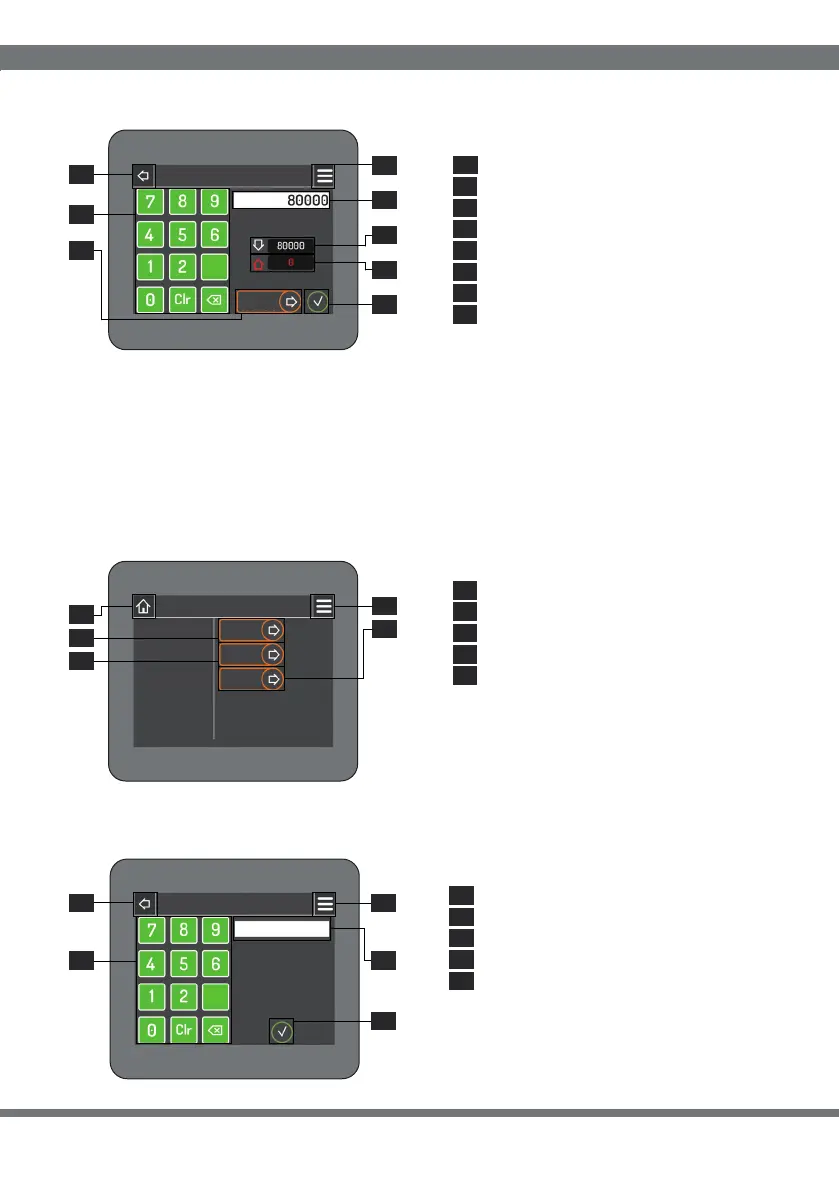
The wear value of the grindstones can be changed by entering the desired value via
the numeric keypad (5.1) and confirming via the confirmation button (5.6). The values
indicated in points 5.3 (number of doses remaining) and 5.4 (number of doses in
excess) will be updated automatically each time you make coee.
At each grinder change reset the counters by pressing the “Reset counters” button
(5.5) and confirm by pressing the confirmation button (5.6).
The password to access the “Technical”,
“Settings/Doses” and “Counters” pages
can be set by clicking on the relative
buttons (6.1, 6.2 and 6.3).
7 PASSWORD
Numeric keypad
Password entry field
Home: return (par.1)
Confirmation button
Menu: access (par.3)
7.1
7.2
7.3
7.4
7.5
5.
5.
5.
1
7
5
5.
5.
5.
5.
5.
2
8
3
4
6
Grinding wheel wear value
Doses Password
Number of excess doses
Home: return (par.1)
Number of remaining doses
Counters Password
“Reset counters” button
Menu: access (par.3)
Confirmation button
Technical: return (par.4)
Menu: access (par.3)
5.2
6.2
6.1
5.3
6.3
5.4
6.4
5.5
6.5
5.6
5.7
5.8
6.
6.
6.
6.
6.
4
5
2
1
3
7.7.
7.
7.
7.
21
5
4
3
Factory-preset password: 123456
SOFTWARE INTERFACE
3
3


 To Next Page
 Loading...
