DISPLAY
Date
English
Time
Stand-by
Brightness
Language
Screensaver
ON OFF
Apr
COUNTERS
Day
Month
Reset Reset Reset
Year
TOT.
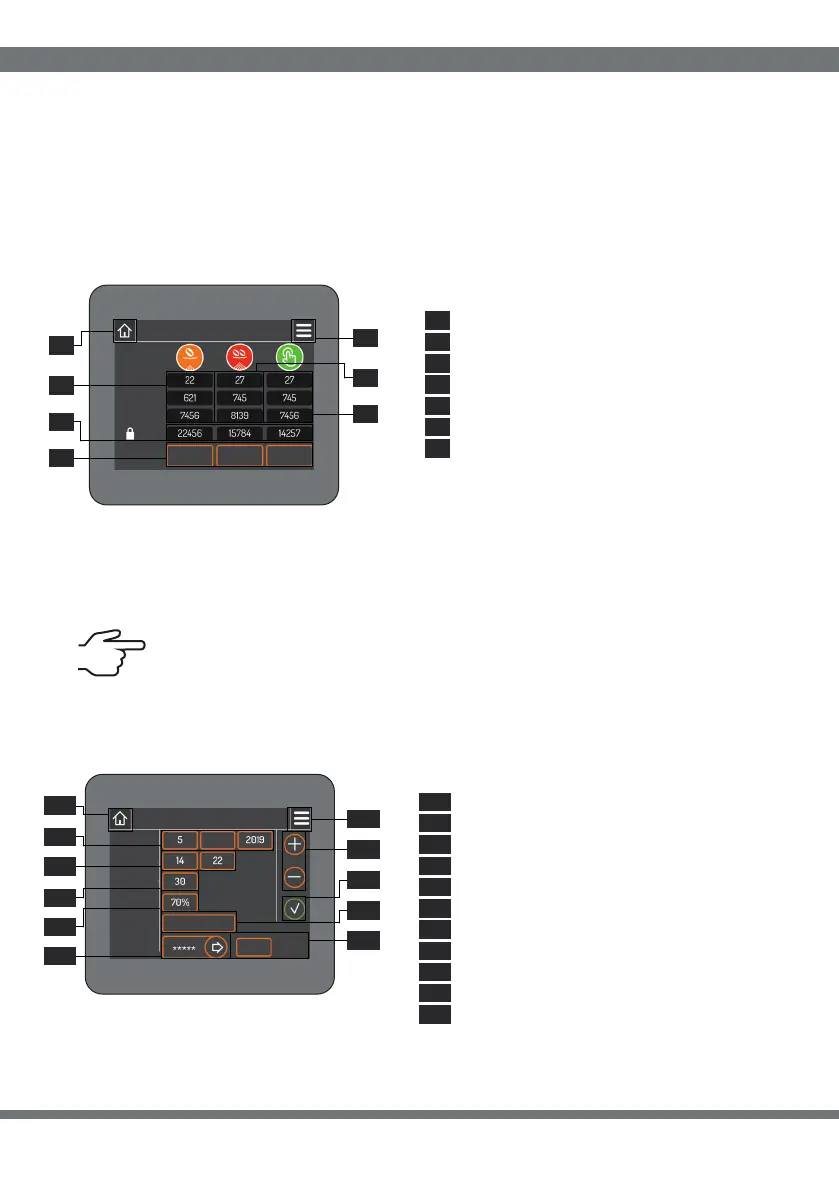
Using the numeric keypad (7.1) on the left-hand side of the screen, you can set the password
for access to the “Technician”, “Settings/Doses” and “Counters” pages. The password you
have just created will appear in the field on the right (7.2), to confirm it click on the confirm
button (7.3).
The single, double and manual doses dispensed are shown on the page (9.1, 9.2 and 9.3).
The daily, monthly and annual dose counters can be reset by selecting the desired box and
pressing the “Reset” button (9.5).
The total value of the doses is not resettable. ( 9.4)
9 COUNTERS
Single dose counter
9.1
Double dose counter
Total number of dose delivered
Manual dose counter
“Reset” button
Home: return (par.1)
Menu: access (par.3)
9.2
9.3
9.4
9.5
9.6
9.7
10 DISPLAY
Date
Now
Stand-by
Display brightness
Screensaver
Language
Activating/deactivating screensaver
Adjustment buttons
Pulsante di conferma
Home: return (par.1)
Menu: access (par.3)
10
10
10
10
10
10
10
10
10
10
10
10
10
10
10
10
10
10
10
10
10
10
10
10
11
11
8
8
9
9
5
5
7
7
1
1
2
2
3
3
4
4
6
6
.
.
.
.
.
.
.
.
.
.
.
.
.
.
.
.
.
.
.
.
.
.
9.
9.
9.
9.
6
4
5
1
9.7
9.2
9.3
SOFTWARE INTERFACE
42


 To Next Page
 Loading...
