23
Attendant Control and Stand-Alone Joystick
For more information on these applications, contact your Quantum Rehab Provider.
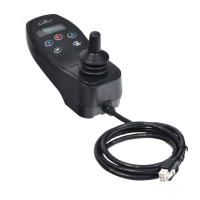
The Attendant Control and the Stand-alone Joystick are similarly laid out:
On/Off Button
Enables/disables power
Battery Condition Meter
Indicates battery charge
Actuator LEDs
Indicates actuators in use
Mode LED
Used for profile selection
Joystick
The joystick controls speed and direction in Drive mode. Push the joystick to the right to select
actuators in Seat mode. Move the joystick forward or backward to activate the desired actuator(s).
On/Off and Mode Jacks
Allow for remote On/Off and Mode switch installations
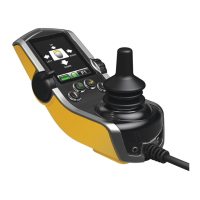
Enhanced Display
The Enhanced Display module is primarily used with specialty control devices such as a head array. It also
can be used to provide a graphical display for the Stand-alone joystick. When used with a hand control,
it provides a larger display than the hand control’s LCD. The Enhanced Display is mainly used in more
advanced applications. Contact your Quantum Rehab Provider for more information.
The Enhanced Display has the following controls:
On/Off Button
Enables/disables power
4-Direction Navigation Key
The up/down arrows of the the four-direction navigation key activate seating functions while the left/
right arrows select previous (left) or next (right) seating functions (multiple seating functions required).
The up/down arrows also navigate up and down through the menu on the menu screen, and the left/
right arrows function as Esc command (left) and Select (right).
9-pin D-sub Connector
Allows for connection of a specialty control device.
Mode Button
Allows changes to client modes without using the client’s switch or input device.
LCD Screen
A color LCD display that may be equipped with built-in infrared (IR) for remote control and with
Bluetooth mouse control.
On/Off and Mode Jacks
Allow for remote On/Off and
Mode switch installations


 To Next Page