www.quark-elec.com Page
2
of
5
2017
existing VHF transmitting antenna is used to receive AIS signals, proper separation equipment (e.g., an
active VHF antenna splitter) should be applied.
CONNECTIONS
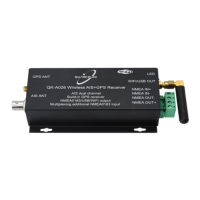
QK-A026 Connections Diagram
QK-A026 has the following connections/indicators:
AIS antenna connector. Standard BNC female 50 Ohm connector. An active VHF antenna splitter is
required if one VHF antenna is shared by QK-A026 and VHF voice radio. (We recommend separate
antennas ideally.)
USB connector. A micro USB connector supplies power to the unit and also outputs the NMEA
messages. It can also be used for adjusting parameters using the GUI Configuration software.
NMEA 0183 output connectors. QK-A026 can be connected to other AIS and SeaTalk compatible
equipment (eg. wind/ depth or heading sensors) QK-A026 sends out NMEA 0183 messages via WiFi, USB
and NMEA outputs simultaneously for chart plotter.
Built-in GPS. An integrated GPS unit supplies positional data in addition to the AIS data. It should
not need setting up. GPS information can be output via WiFi, USB or NMEA.
WiFi. Connectivity in both Ad Hoc and Station Modes on 802.11 b/g/n.
Check the LED lights. QA026/024 features three LEDs which indicate power, AIS and GPS status
respectively. Three LEDs turn on and then off after initialization. When operating, these LEDs flash as
below:
Power: Top LED flashes at 3 second intervals.
AIS : Middle LED Flashes for each valid AIS message received.


 To Next Page
 Loading...